

Blob: Screen Time Control
Spam Musubi Technologies Productivity iPhoneiPadiPod touch
Blob: Screen Time Control is a free Productivity app for iPhone and iPad by Spam Musubi Technologies. Rated 5.0/5 from 3 ratings. Requires iOS 18.0.
- Rating
- 5.0
- 3 ratings
- Price
- Free
- on the App Store
- Size
- 187 MB
- Age 4+
- Updated
- Oct 12
- 2026 · v1.1.0
Screenshots



About Blob: Screen Time Control
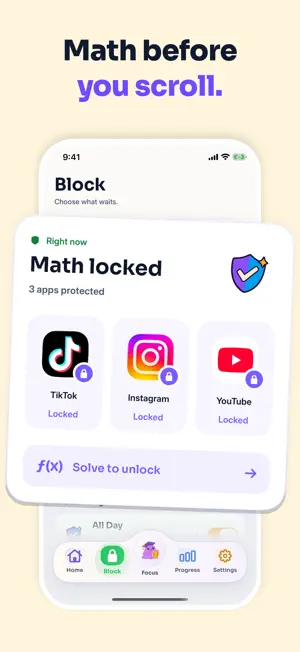
Blob helps you spend less time on distracting apps and more time living your actual life. Most screen time tools either block apps completely or quietly track the damage afterward. Blob does something different: it adds just enough friction before your most tempting apps to break the autopilot. When you try to open a protected app, Blob makes you pause. You can earn a short unlock pass, or you can walk away and keep your time. That tiny interruption can be the difference between “just checking” and losing another hour. Use Blob to: Reduce mindless scrolling Break the habit of impulsively opening apps Get your mornings, evenings, and focus time back Protect specific apps that steal the most time Track walk-aways, streaks, interceptions, and time saved Make late-night scrolling harder with a Late Night schedule Protect distracting websites in Safari, too Unlock apps temporarily when you actually mean to use them And if basic friction is not enough, Blob can get ridiculous. Turn up the challenge level and face harder math gates, from quick arithmetic to algebra, derivatives, and “why did I do this to myself?” mode. The point is simple: if you still want the app badly enough to solve it, fine. If not, you just got your time back. Blob is not about guilt or punishment. It is about snapping out of autopilot before your attention disappears. Get your time back. Scroll less. Live more. All features above require a subscription. Privacy Policy: https://spammusubitech.github.io/prof-blob/privacy/ Terms of Use: https://spammusubitech.github.io/prof-blob/terms/
What’s new
Version 1.1.0 · Updated October 12, 2026
UI improvements
App privacy
The developer, Spam Musubi Technologies, reported these privacy practices to Apple.
Data Used to Track You
The following data may be used to track you across apps and websites owned by other companies:
- Purchases: Purchase History
- Identifiers: User ID, Device ID
- Usage Data: Product Interaction
Data Linked to You
The following data, which may be collected and linked to your identity, may be used for the following purposes:
- Purchases: Purchase History
- Identifiers: User ID, Device ID
- Usage Data: Product Interaction
Used for: Third-Party Advertising, Developer’s Advertising or Marketing, Analytics, App Functionality
Data Not Linked to You
The following data, which may be collected but is not linked to your identity, may be used for the following purposes:
- Contact Info: Email Address
- Diagnostics: Crash Data, Performance Data
- Other Data: Other Data Types
Used for: Analytics, App Functionality
Alternatives to Blob: Screen Time Control
Looking for apps like Blob: Screen Time Control? Here are 6 similar apps on the App Store. The highest rated is Fried: Screen Time Control (5.0/5), and all 6 are free to download.
-
 Screen Time Control: Pausi
-
 Fried: Screen Time Control
5.0
-
 Fella: App Blocker & Limits
-
 Shelly: Screen Time Control
5.0
-
 Screen Time Control App
5.0
-
 Blocus: Earn Screen Time
4.5
| App | Rating | Price | Last updated | Compare |
|---|---|---|---|---|
| Blob: Screen Time Control | 5.0 / 5 (3 ratings) | Free | October 12, 2026 | |
| Screen Time Control: Pausi | – | Free | Oct 12, 2026 | Compare |
| Fried: Screen Time Control | 5.0 / 5 (4) | Free | Jul 18, 2026 | Compare |
| Fella: App Blocker & Limits | – | Free | Oct 12, 2026 | Compare |
| Shelly: Screen Time Control | 5.0 / 5 (3) | Free | Oct 8, 2026 | Compare |
| Screen Time Control App | 5.0 / 5 (2) | Free | Feb 5, 2026 | Compare |
| Blocus: Earn Screen Time | 4.5 / 5 (226) | Free | Sep 10, 2026 | Compare |