

Slidyx: AI presentations
Mansur Tauken Education iPhoneiPadiPod touch
Slidyx: AI presentations is a free Education app for iPhone and iPad by Mansur Tauken. Requires iOS 15.1. Updated September 5, 2026.
- Price
- Free
- on the App Store
- Size
- 51 MB
- Age 4+
- Updated
- Sep 5
- 2026 · v1.0.5
Screenshots
Save to Pinterest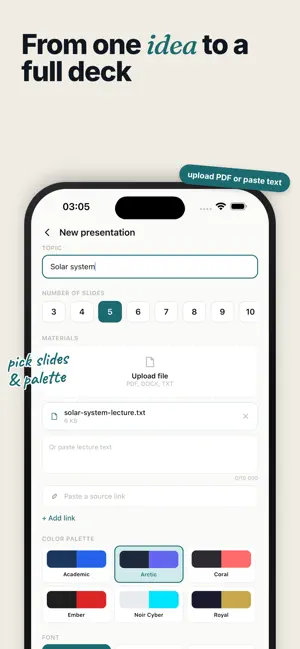
About Slidyx: AI presentations
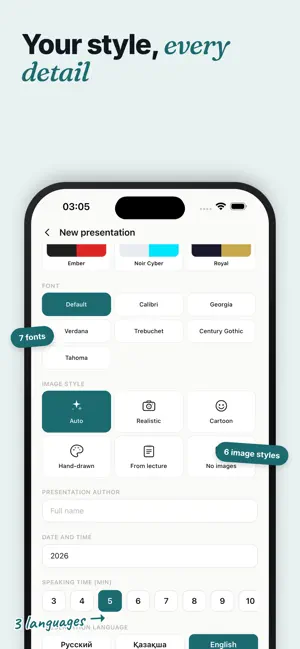
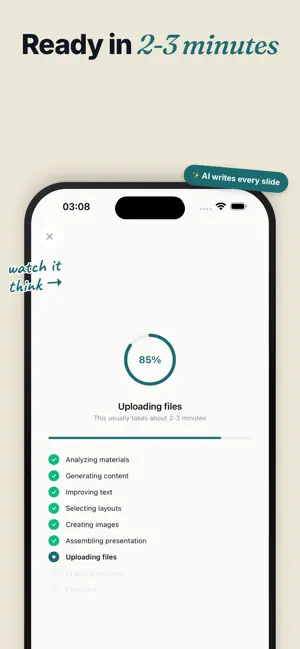
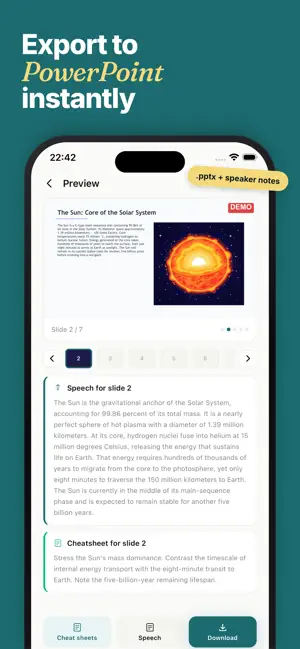
Create polished PPTX and PDF presentations from a topic, PDF, document, or lecture notes in minutes. Slidyx turns rough material into a ready-to-present deck with clear structure, slide text, speaker notes, a speech draft, and export to PPTX or PDF. It is built for students, teachers, and professionals who need strong slides fast without spending hours on formatting. WHY USE SLIDYX • Generate 3-15 slides from a topic, PDF, DOCX, TXT, or pasted notes • Choose a template, language, slide count, and presentation style • Create AI images or keep the deck clean and text-focused • Preview every slide before downloading • Edit slide text directly in the app • Export a standard PPTX file for editing or a PDF for easy sharing • Get speaker notes and a speech draft for each presentation MADE FOR STUDY AND WORK Use Slidyx for class presentations, reports, lectures, diploma or thesis defense slides, term paper talks, teacher materials, project updates, study summaries, homework support, and speech preparation. It is especially helpful when you urgently need to make a presentation for a deadline and want a complete deck instead of a blank slide file. HOW IT WORKS 1. Enter a topic or upload your materials 2. Choose slide count, language, template, and image style 3. Wait while Slidyx builds your presentation 4. Preview, edit, and download as PPTX or PDF READY TO PRESENT A good presentation is more than slide design. Slidyx also prepares speaker notes and a speech draft, so you know what to say on each slide and can present with more confidence. LANGUAGES Slidyx supports Russian, English, Kazakh, Hindi, Spanish, French, Brazilian Portuguese, Turkish, Italian, Polish, and German. You can choose both the app interface language and the language of your presentation. PRIVACY Your materials are used to create your presentation. Slidyx does not use uploaded content to train AI models. Data is stored on secure European servers and encrypted in transit. PRICING You can generate and preview your first presentation before buying credits. To download PPTX or PDF files and create more presentations, use credits available as in-app purchases. Terms of Service: https://slidyx.app/terms Privacy Policy: https://slidyx.app/privacy Support: https://slidyx.app/support
What’s new
Version 1.0.5 · Updated September 5, 2026
• Improved app stability. • Updated supported languages: English, Russian, Kazakh, Uzbek, Hindi, Spanish, French, Brazilian Portuguese, Turkish, Italian, Polish, and German.
App privacy
The developer, Mansur Tauken, reported these privacy practices to Apple.
Data Linked to You
The following data, which may be collected and linked to your identity, may be used for the following purposes:
- Contact Info: Name, Email Address
Used for: Analytics, App Functionality, Other Purposes
Data Not Linked to You
The following data, which may be collected but is not linked to your identity, may be used for the following purposes:
- Usage Data: Product Interaction
- Diagnostics: Crash Data
- Purchases: Purchase History
- User Content: Other User Content
Used for: Developer’s Advertising or Marketing, Analytics, App Functionality
Alternatives to Slidyx: AI presentations
Looking for apps like Slidyx: AI presentations? Here are 6 similar apps on the App Store.
-
 CitationMap
-
 Team Dissertation Mobile
-
 OLPPS Mobile App v2
-
 PlagiarismSearch
-
 Thesis Pro Assistant
-
 RabbitHole: Dive In
| App | Rating | Price | Last updated | Compare |
|---|---|---|---|---|
| Slidyx: AI presentations | – | Free | September 5, 2026 | |
| CitationMap | – | Free | Oct 9, 2026 | Compare |
| Team Dissertation Mobile | – | Free | Jul 7, 2026 | Compare |
| OLPPS Mobile App v2 | – | Free | Sep 18, 2026 | Compare |
| PlagiarismSearch | – | Free | Oct 28, 2026 | Compare |
| Thesis Pro Assistant | – | Free | Sep 12, 2026 | Compare |
| RabbitHole: Dive In | – | Free | Jun 26, 2026 | Compare |