

Drive IQ Canada: Driving Test
Yaniv Navot Education iPhoneiPadiPod touch
Drive IQ Canada: Driving Test is a free Education app for iPhone and iPad by Yaniv Navot. Requires iOS 15.0. Updated October 22, 2026.
- Price
- Free
- on the App Store
- Size
- 119 MB
- Age 4+
- Updated
- Oct 22
- 2026 · v1.1.3
Screenshots


About Drive IQ Canada: Driving Test
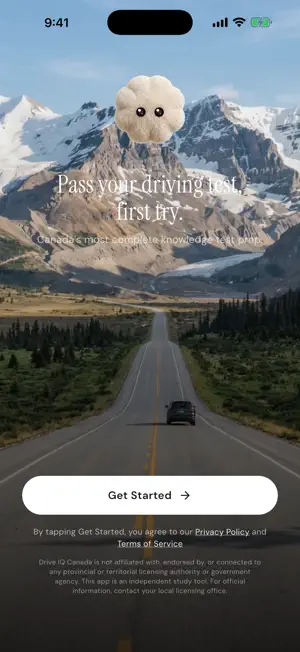
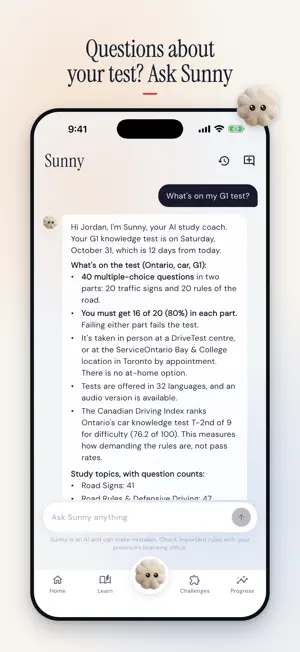
Practise for the driving knowledge test in your province or territory: the G1 in Ontario, Class 7 in BC, Alberta and Saskatchewan, Class 5 in Manitoba, the SAAQ theory exam in Quebec and every other learner's licence test in Canada. Sunny, an AI study coach, explains each question you miss. STUDY WITH SUNNY • Stuck on a question? Tap "Sunny explains" to see why the right answer is right, then keep asking in the Sunny tab. • Each reply names the handbook page or section it draws on, so you know exactly what to reread. • Sunny builds short quizzes out of the questions you got wrong and keeps them inside your licence class. • Ask about the test itself: how many questions, the pass mark, the fee. Sunny goes by what your licensing authority publishes and says so when a detail isn't published. • Sunny replies in English or French. When a handbook exists only in English, a French reply tells you the page is in the English edition. • Like any AI, Sunny can get things wrong. Your handbook is the authority, and you can flag any reply. BUILT AROUND YOUR PROVINCE • 7,400+ practice questions for all 13 provinces and territories, each one in English and in French. • Car, motorcycle and commercial paths, from a first learner's licence to Class 1 and air brakes. • Road signs and illustrated driving scenes, with the picture on every question that uses one. • Sunny sets you up in a minute: your province, licence class and test date, then a study plan drawn from your own question pool. • Every topic opens on an overview of what it covers and its key points. PRACTISE LIKE TEST DAY • The Exam Simulator follows your province's question count and pass mark, and grades each section on its own where your province does. If a province doesn't publish a detail, the app leaves it out rather than guess. • Practice Test and Quick Quiz (10 to 25 questions) put your misses first. • Missed questions return on a spaced-repetition schedule until they stick. PRO STUDY TOOLS • Personalized order: weak topics first, new ones next, and your misses at the front of each topic. • Review mode: read each question with its answer, explanation and handbook source, with nothing to answer. • Custom test: choose topics, which questions (unseen, missed or not yet correct), difficulty and a length of 10 to 50. CHALLENGES Sign Sprint, Sign Match, Flash Cards, Fact Check and By the Numbers, a metric spin-the-wheel game built from your own province's questions. Each game has five levels, and two picks are free every day. TRACK YOUR READINESS • The IQ Readiness Score runs from 0 to 100% and shows how much of your material you have down. It is study guidance, not a forecast of your result. • Filter the Learn tab to weak topics: the ones you've answered with a score under 70%. • See something wrong in a question? Report it from the answer screen. We read every report. FREE, PRO AND SUNNY Free each day: one Practice Test or Quick Quiz, two challenge picks, the Exam Simulator, 3 hints from Sunny, plus Sunny's answers about your test and its topics. Pro is sold Weekly, Monthly or for 3 Months, with a car and motorcycle plan and a separate commercial plan. Sunny's full coaching (explanations, follow-up questions and quizzes on your misses) is included only with a Monthly or 3-Month plan, not with Weekly. Your Apple Account is charged at purchase. Plans renew on their own; to stop a renewal, cancel no later than 24 hours before your current period is over. Manage plans in your App Store account settings. WHO MAKES IT Oddly Sunny LLC, a private company, builds Drive IQ Canada. It is not a government app. No province, territory or licensing office, including DriveTest, MTO, SAAQ, ICBC, SGI and MPI, runs it, endorses it or works with us. We write the questions from the driver's handbooks those governments make public. Terms: https://driveiqcanada.com/app/terms/ Privacy: https://driveiqcanada.com/app/privacy/
What’s new
Version 1.1.3 · Updated October 22, 2026
Sunny now maps your whole course. • New "My path" in the Sunny tab: every topic in order, with your progress and where to go next. • Free hints now come from Sunny, 3 a day, the same count as the website. • Links Sunny shares to our apps and sites are now tappable. • Free learners who ask about progress see a clearly labelled "Example only" chart. • Wording fixes in English and French.
App privacy
The developer, Yaniv Navot, reported these privacy practices to Apple.
Data Linked to You
The following data, which may be collected and linked to your identity, may be used for the following purposes:
- Usage Data: Product Interaction
- User Content: Other User Content
- Identifiers: User ID
Used for: Analytics, Product Personalization, App Functionality
Data Not Linked to You
The following data, which may be collected but is not linked to your identity, may be used for the following purposes:
- Purchases: Purchase History
- Identifiers: Device ID
- Diagnostics: Crash Data, Performance Data, Other Diagnostic Data
Used for: Analytics, App Functionality
Alternatives to Drive IQ Canada: Driving Test
Looking for apps like Drive IQ Canada: Driving Test? Here are 6 similar apps on the App Store.
-
 G1 Test Master: Ontario 2026
-
 Ontario G1: Test Practice
-
 SAAQ Knowledge Test Prep 2026
-
 Canada Driving Test
-
 excelDriving G1
-
 G1G
| App | Rating | Price | Last updated | Compare |
|---|---|---|---|---|
| Drive IQ Canada: Driving Test | – | Free | October 22, 2026 | |
| G1 Test Master: Ontario 2026 | – | Free | Mar 19, 2026 | Compare |
| Ontario G1: Test Practice | – | Free | Mar 26, 2026 | Compare |
| SAAQ Knowledge Test Prep 2026 | – | Free | Feb 28, 2026 | Compare |
| Canada Driving Test | – | Free | Oct 16, 2026 | Compare |
| excelDriving G1 | – | Free | Jun 10, 2026 | Compare |
| G1G | – | Free | Sep 29, 2026 | Compare |