

SnapText: OCR & AI Tutor
Sho Fujimoto Productivity iPhoneiPadiPod touch
SnapText: OCR & AI Tutor is a free Productivity app for iPhone and iPad by Sho Fujimoto. Requires iOS 15.1. Updated April 28, 2026.
- Price
- Free
- on the App Store
- Size
- 61 MB
- Age 4+
- Updated
- Apr 28
- 2026 · v1.0.13
Screenshots


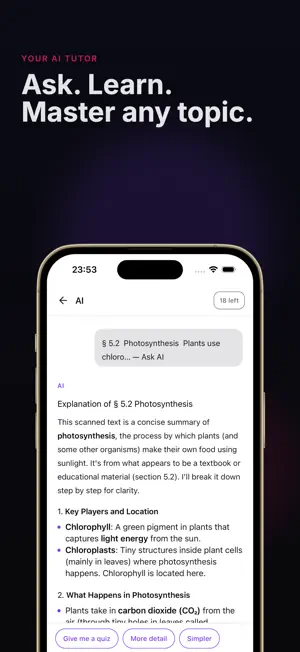

About SnapText: OCR & AI Tutor
Turn printed text into digital text in seconds. SnapText scans textbooks, notes, and documents with your camera, then lets you ask an AI tutor anything about what you just captured. — Point and capture — Aim at any page. A yellow frame shows what SnapText will read. Pinch to zoom, move it with two fingers. Live OCR recognizes text right inside the camera view, so you can check accuracy before saving. — Clean results every time — Remove noise and OCR artifacts with one tap. Use offline cleanup for privacy, or server-side cleanup for longer passages. Copy the cleaned text straight into any app. — Ask your AI tutor — Open a saved scan and tap "Ask AI". Get explanations, step-by-step solutions, summaries, or translations. The AI uses the full scanned text as context, so answers stay focused on what you actually captured. — Offline OCR keeps you private — Recognition runs entirely on your device using Apple Vision. Your camera feed never leaves your phone. Only AI chat needs a network connection. — Everything saved, always with you — Every saved scan stores both the original image and recognized text. Zoom into images with pinch gestures, copy text to any app, and revisit every study session in one library. — 24 recognition languages — English, Japanese, Korean, Chinese (Simplified and Traditional), Arabic, German, French, Spanish, Portuguese, Italian, Russian, Dutch, Polish, Swedish, Finnish, Turkish, Indonesian, Malay, Vietnamese, Thai, and Hindi. — Made for students and professionals — • Study math, chemistry, biology, and history with step-by-step AI explanations • Digitize class notes, research papers, and meeting notes • Translate foreign textbooks as you read • Pull quotes and citations straight into essays • Extract receipts, labels, and handouts into searchable text Core OCR features require no sign-up. Start scanning in under 10 seconds. Terms of Service: https://shofj.com/en/apps/snap-text/terms-of-service
App privacy
The developer, Sho Fujimoto, reported these privacy practices to Apple.
Data Used to Track You
The following data may be used to track you across apps and websites owned by other companies:
- Identifiers: Device ID
- Usage Data: Advertising Data
Data Not Linked to You
The following data, which may be collected but is not linked to your identity, may be used for the following purposes:
- Location: Coarse Location
- Identifiers: Device ID
- Usage Data: Product Interaction, Advertising Data
- Diagnostics: Performance Data, Other Diagnostic Data, Crash Data
- Purchases: Purchase History
- User Content: Photos or Videos
Used for: Third-Party Advertising, Analytics, App Functionality
Alternatives to SnapText: OCR & AI Tutor
Looking for apps like SnapText: OCR & AI Tutor? Here are 6 similar apps on the App Store.
-
 CVAuthentik
-
 QCue: Capture Your Mind
-
 Scanote
-
 Clair Mind: AI Organized Notes
-
 ProScan Document Scanner OCR
-
 PromptSense - Smart AI Library
| App | Rating | Price | Last updated | Compare |
|---|---|---|---|---|
| SnapText: OCR & AI Tutor | – | Free | April 28, 2026 | |
| CVAuthentik | – | Free | Jul 29, 2026 | Compare |
| QCue: Capture Your Mind | – | Free | Jun 28, 2026 | Compare |
| Scanote | – | Free | Sep 5, 2026 | Compare |
| Clair Mind: AI Organized Notes | – | Free | Oct 1, 2026 | Compare |
| ProScan Document Scanner OCR | – | Free | Apr 21, 2026 | Compare |
| PromptSense - Smart AI Library | – | Free | Sep 10, 2026 | Compare |