

Moki - Markdown Editor
Layerz Corp. Developer Tools iPhoneiPadiPod touchMac
Moki - Markdown Editor is a free Developer Tools app for iPhone and iPad by Layerz Corp. Requires iOS 26.0. Updated October 21, 2026.
- Price
- Free
- on the App Store
- Size
- 18 MB
- Age 4+
- Updated
- Oct 21
- 2026 · v1.9.0
Screenshots


About Moki - Markdown Editor
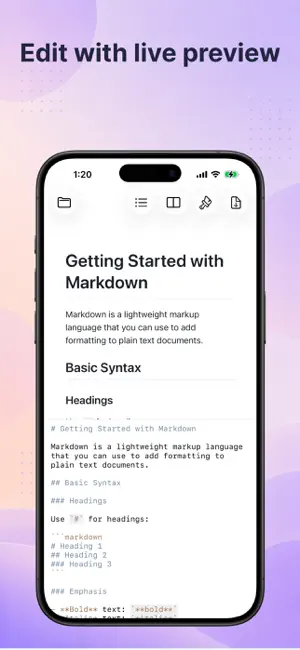
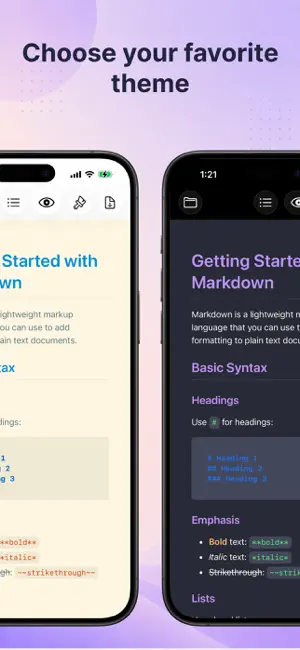
### Description Moki is a warm, simple home for your Markdown on iPhone and iPad — a lovely place to read it and write it. **Reading is a pleasure** - 10 built-in themes to choose from — with colorful code blocks, math, and diagrams - A comfy, centered reading width keeps long lines easy on the eyes - A Table of Contents to hop between headings - Light or dark, whichever you like **Writing feels easy** - Your preview sits right beside the editor as you type — scroll either side and the other keeps pace - A handy formatting toolbar above the keyboard - Gentle syntax colors, and lists that keep themselves going - Everything saves on its own **Made for Vibe Coding** - Open a folder and all your Markdown shows up in the sidebar - When a file changes, it re-renders in a blink — so you can watch your notes, plans, and AI-written docs update live, all in one place - Local images just show up — even blog posts that use site-absolute paths like /images/photo.png - Find files by name, and create, rename, or delete files and folders with ease **See the PDF before you share it** - PDF Preview shows your note exactly as it will print — paginated A4 or Letter, tall images fitted to a page, lines never split, and your own page breaks honored - Flip through the pages right in the reader, then export with one click (Moki Pro) **Make it yours with Moki Pro** One-time purchase: - Export polished, paginated PDFs - Design your own theme — colors, fonts, line spacing, and reading width — with a live preview - Import Markdown CSS themes, fonts and images included, and export your themes as CSS to share or fine-tune **And there's more — beyond Markdown** - Source code in living color in a dark editor — Swift, Python, JavaScript, JSON, and more - A built-in PDF viewer with page layouts and navigation - An image viewer with zoom and animated GIFs, plus video playback - Take a peek at any other file type with QuickLook - iCloud files download whenever you need them, with a clear indicator - Three display modes: read, write, or both
What’s new
Version 1.9.0 · Updated October 21, 2026
- Switching between viewer, editor, and side-by-side keeps your scroll position - Copy button on code blocks — copy the whole block in one click - Check and uncheck task-list boxes right in the viewer
App privacy
The developer, Layerz Corp., reported these privacy practices to Apple.
Data Not Linked to You
The following data, which may be collected but is not linked to your identity, may be used for the following purposes:
- Usage Data: Product Interaction
Used for: Analytics
Alternatives to Moki - Markdown Editor
Looking for apps like Moki - Markdown Editor? Here are 6 similar apps on the App Store. The highest rated is Curly: JSON Viewer & Formatter (5.0/5), and 4 of the 6 are free to download.
-
 QuotaBar - AI Quota Tracker
-
 GapSpark - App Idea Finder
-
 Senrigan Remote Desktop
-
 Code Recipes Pro
4.9
Code Recipes Pro
4.9
-
 View Source Premier
4.1
View Source Premier
4.1
-
 Curly: JSON Viewer & Formatter
5.0
Curly: JSON Viewer & Formatter
5.0
| App | Rating | Price | Last updated | Compare |
|---|---|---|---|---|
| Moki - Markdown Editor | – | Free | October 21, 2026 | |
| QuotaBar - AI Quota Tracker | – | Free | Oct 14, 2026 | Compare |
| GapSpark - App Idea Finder | – | Free | Jul 4, 2026 | Compare |
| Senrigan Remote Desktop | – | Free | Sep 22, 2026 | Compare |
| Code Recipes Pro | 4.9 / 5 (49) | 4.99 USD | Oct 6, 2026 | Compare |
| View Source Premier | 4.1 / 5 (27) | 6.99 USD | Sep 19, 2026 | Compare |
| Curly: JSON Viewer & Formatter | 5.0 / 5 (1) | Free | Jan 21, 2026 | Compare |