

Video & Audio Editor WaveSnip
Alptekin Gok Photo & Video iPhoneiPadiPod touch
Video & Audio Editor WaveSnip is a free Photo & Video app for iPhone and iPad by Alptekin Gok. Rated 5.0/5 from 1 ratings. Requires iOS 16.0.
- Rating
- 5.0
- 1 ratings
- Price
- Free
- on the App Store
- Size
- 4 MB
- Age 4+
- Updated
- Apr 17
- 2026 · v1.1.0
Screenshots
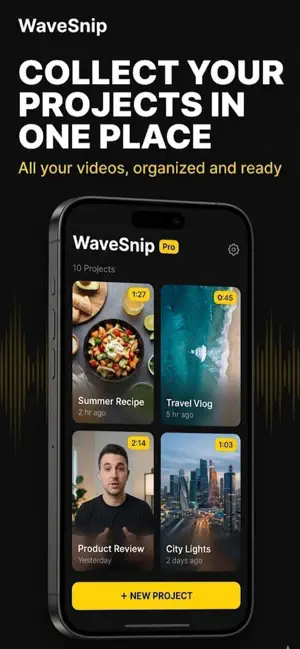


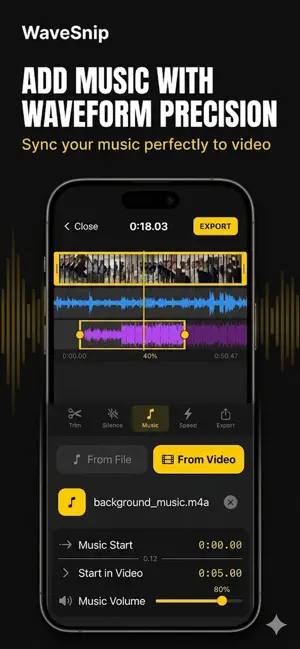
About Video & Audio Editor WaveSnip
Your raw footage has too many silent gaps, awkward music levels, and audio you wish you could pull from another clip. WaveSnip fixes all of that on your phone. Built for creators who care about sound. Drop a video in, add music from your library or extract it from another clip, duck the volume under your voice with keyframes, snap cuts to the beat, and remove dead air with one tap. Everything runs on your device. No cloud, no watermarks, no ads. ADD MUSIC TO ANY VIDEO Import your own track or pull the audio from any video in your library. Place it on the timeline, trim it, loop it, fade it in and out. Your music, your video, your timing. Works with every format iOS supports. EXTRACT AUDIO FROM VIDEO Turn any video into an MP3 in seconds. Grab the music from a clip you love and reuse it somewhere else. No extra app, no upload to a converter site. Export and share. KEYFRAME VOLUME CONTROL This is what pros pay for on desktop editors. Drop keyframes on the music track, pull the volume down where you speak, push it up during transitions. Automatic fades, manual ducking, whatever your scene needs. AUTOMATIC SILENCE REMOVAL Kill dead air with one tap. Adjust sensitivity and minimum silence length so the cuts feel natural. Perfect for podcasts, interviews, tutorials, talking head content. A fifteen minute recording becomes a tight ten minute edit without touching the timeline. WAVEFORM TIMELINE, FRAME ACCURATE Pinch to zoom on a real audio waveform. See every beat, every breath, every pause. The dual track view shows voice and music side by side so you can line up the beat drop with your punchline. BEAT DETECTION WaveSnip analyzes your track and finds the beats automatically. Snap your cuts to the rhythm for content that actually moves with the music. SPEED CONTROL FROM 0.5X TO 2X Slow down the key moment. Speed up the slow part. Quality stays intact. No pixelated slow motion, no choppy fast forward. PRIVATE BY DESIGN Every operation runs on your device. Your interviews, client work, family videos, none of it touches a server. This is not a checkbox feature, it is the whole architecture. NO ADS, NO WATERMARKS, EVER We will never put a logo on your exports. We will never show you an ad mid edit. That is the agreement. WHO USES WAVESNIP - Podcasters and podcast editors - YouTubers and vloggers - Short form creators on social platforms - Course creators and tutorial makers - Musicians and DJs making visualizers - Anyone who cares about how their video sounds WHAT IS NEW IN 1.1.0 - Automatic beat detection so cuts snap to the music - 5 new visual themes - Smoother fade in and fade out transitions - Instant project autosave - Cleaner onboarding for new users UNDER THE HOOD - Native iOS performance, no lag on videos up to 15 minutes - Passthrough export with zero quality loss on trim only cuts - iPhone and iPad, iOS 16 and later - Interface in English, Turkish, German, French, Spanish - Autosave so you never lose work WAVESNIP PRO Upgrade anytime for unlimited exports, every premium feature, and priority support. Weekly, monthly, yearly, or lifetime plans. Subscriptions auto renew unless cancelled at least 24 hours before the current period ends. Manage anytime in your Apple ID subscription settings. Built by an indie team. Every rating and review shapes the next version. Privacy Policy: https://alpdigital.io/wavesnip/privacy/ Terms of Use: https://www.apple.com/legal/internet-services/itunes/dev/stdeula/ Support: [email protected]
What’s new
Version 1.1.0 · Updated April 17, 2026
What's new in 1.1.0: - Brand new onboarding: a smooth 4 step intro walks you through every feature on first launch - Light and dark themes, fully synced across every screen, switchable from Settings - Beat detection that marks every beat on the waveform in red so your cuts land on the rhythm - Smoother fade in and fade out transitions on silence cuts - Animated launch screen with moving wave bars - Undo support for trim edits - Cleaner language picker, opens as a sheet instead of a long list - Export button now stays visible as you scroll - Silence detection results open in a clean modal - Better default silence settings: -30 dB threshold, 1.0s minimum - Polish pass on light theme colors - Review prompt now appears at the right time, after your second export - Several smaller fixes based on your feedback Keep the feedback coming.
App privacy
The developer, Alptekin Gok, reported these privacy practices to Apple.
Data Not Linked to You
The following data, which may be collected but is not linked to your identity, may be used for the following purposes:
- Purchases: Purchase History
- Identifiers: Device ID
- Usage Data: Product Interaction
- Diagnostics: Crash Data
Used for: Analytics, App Functionality
Alternatives to Video & Audio Editor WaveSnip
Looking for apps like Video & Audio Editor WaveSnip? Here are 6 similar apps on the App Store. The highest rated is Compress: Video & Photo Resize (5.0/5), and all 6 are free to download.
-
 AV Studio: Audio Video Editor
-
 Remove Silence
-
 Clipbench: Insta Video Toolkit
-
 Video Trimmer, Merger & Joiner
-
 Compress: Video & Photo Resize
5.0
Compress: Video & Photo Resize
5.0
-
 Reelab: Audio & Video Editor
3.0
Reelab: Audio & Video Editor
3.0
| App | Rating | Price | Last updated | Compare |
|---|---|---|---|---|
| Video & Audio Editor WaveSnip | 5.0 / 5 (1 rating) | Free | April 17, 2026 | |
| AV Studio: Audio Video Editor | – | Free | Sep 7, 2026 | Compare |
| Remove Silence | – | Free | Jun 15, 2026 | Compare |
| Clipbench: Insta Video Toolkit | – | Free | Sep 29, 2026 | Compare |
| Video Trimmer, Merger & Joiner | – | Free | Aug 21, 2026 | Compare |
| Compress: Video & Photo Resize | 5.0 / 5 (1) | Free | Oct 22, 2026 | Compare |
| Reelab: Audio & Video Editor | 3.0 / 5 (1) | Free | Jun 9, 2026 | Compare |