

Dikta - Voice to Text
Paul Lukas Roder Productivity iPhoneiPadiPod touch
Dikta - Voice to Text is a free Productivity app for iPhone and iPad by Paul Lukas Roder. Requires iOS 18.0. Updated May 12, 2026.
- Price
- Free
- on the App Store
- Size
- 18 MB
- Age 4+
- Updated
- May 12
- 2026 · v1.1
Screenshots

About Dikta - Voice to Text
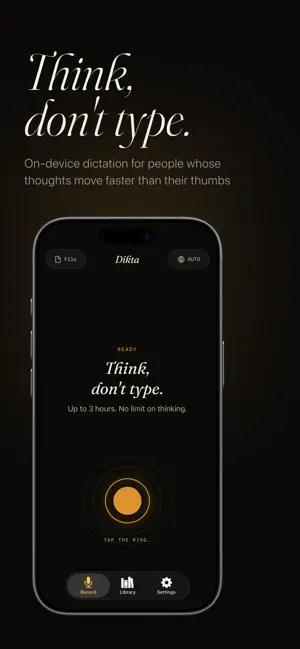
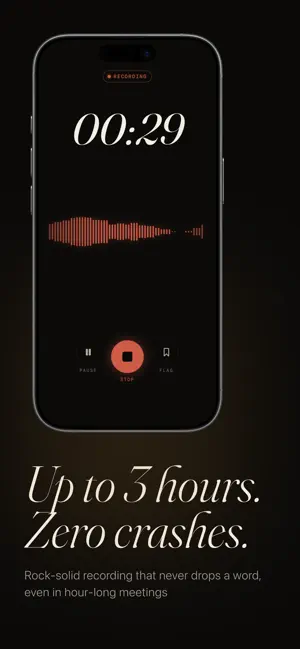
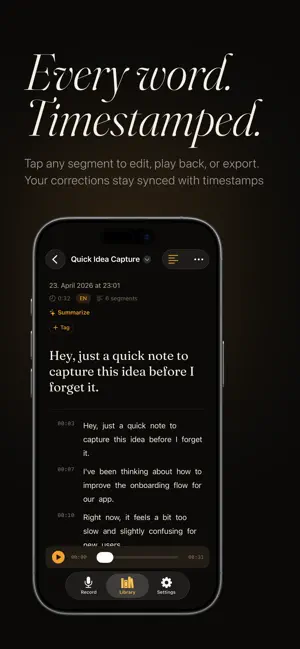
Your voice, your device, your words. Dikta turns speech into text, entirely on your iPhone or Mac. No internet required. No cloud uploads. No account needed. Just tap, speak, and watch your words appear in real time. Built for people whose thoughts move faster than their thumbs. WHY DIKTA Most transcription apps send your voice to a server. Dikta doesn't. Every word is processed on-device using state-of-the-art AI. Your recordings never leave your phone. Not now, not ever. REAL-TIME TRANSCRIPTION See your words appear as you speak, not after. Dikta streams text live during recording, so you always know what's been captured. Works offline, on a plane, in a basement, anywhere. ROCK-SOLID WITH LONG RECORDINGS Record meetings, lectures, and interviews for up to 3 hours without crashes or lost audio. Dikta processes audio in smart chunks, keeping memory usage low and stability high. SPEAKER LABELS "Who said what?" — Dikta detects different speakers and labels them automatically. Perfect for meetings, interviews, and group conversations. AI SUMMARIES Turn a 60-minute meeting into a 30-second summary. Extract key decisions, action items, and takeaways, all processed on your device. POWERFUL EXPORT Share your transcripts as TXT, Markdown, SRT subtitles, DOCX, or PDF. Copy with or without timestamps. Export audio files. Everything you need for your workflow. IMPORT ANY AUDIO Drop in voice memos, podcast episodes, lecture recordings, or interview files. Supports MP3, M4A, WAV, and more. 100+ LANGUAGES Transcribe in English, German, Spanish, French, Japanese, Chinese, and 100+ more languages. Auto-detection included. EDIT YOUR TRANSCRIPTS Tap any segment to correct a word. Edits stay synced with timestamps, so your exports are always clean. PRIVACY BY ARCHITECTURE No account. No tracking. No server ever touches your audio. Your transcripts are stored in Apple's secure app sandbox. Period.
What’s new
Version 1.1 · Updated May 12, 2026
Try the Studio transcription model, now included on the free plan. Studio is Dikta's highest-accuracy transcription model. It's now part of the free plan for 15 minutes each calendar month, no subscription needed. Premium removes the monthly limit. Also in this update: - Free recordings run up to 5 minutes; Premium recordings run up to 3 hours. - Each transcript shows whether it was made with the Studio or Fast model. - A clearer subscription screen that lays out what the free plan still includes. - The first recording after you open the app starts faster. - Free-plan recordings reliably stay on your device. - Fixes for switching transcription models and for cancelling a model download.
App privacy
The developer, Paul Lukas Roder, reported these privacy practices to Apple.
Data Not Linked to You
The following data, which may be collected but is not linked to your identity, may be used for the following purposes:
- Purchases: Purchase History
- Identifiers: Device ID
- Diagnostics: Crash Data, Performance Data, Other Diagnostic Data
Used for: App Functionality
Alternatives to Dikta - Voice to Text
Looking for apps like Dikta - Voice to Text? Here are 6 similar apps on the App Store. The highest rated is CueScribe: Voice to Text Notes (5.0/5), and 5 of the 6 are free to download.
-
 PageMoss
-
 BastionChat
-
 Speech to Text: Transcribe STT
-
 CueScribe: Voice to Text Notes
5.0
CueScribe: Voice to Text Notes
5.0
-
 QWallet - QR and Barcode
-
 Voice to Text Translator
| App | Rating | Price | Last updated | Compare |
|---|---|---|---|---|
| Dikta - Voice to Text | – | Free | May 12, 2026 | |
| PageMoss | – | Free | Jan 29, 2026 | Compare |
| BastionChat | – | 4.99 USD | Oct 14, 2026 | Compare |
| Speech to Text: Transcribe STT | – | Free | May 11, 2026 | Compare |
| CueScribe: Voice to Text Notes | 5.0 / 5 (3) | Free | Jul 22, 2026 | Compare |
| QWallet - QR and Barcode | – | Free | Mar 7, 2025 | Compare |
| Voice to Text Translator | – | Free | Oct 16, 2026 | Compare |