

Air Cast: Screen Mirror to TV
AI Generated Inc. Utilities iPhoneiPadiPod touch
Air Cast: Screen Mirror to TV is a free Utilities app for iPhone and iPad by AI Generated Inc. Requires iOS 17.0. Updated July 9, 2026.
- Price
- Free
- on the App Store
- Size
- 61 MB
- Age 4+
- Updated
- Jul 9
- 2026 · v1.0.1
Screenshots


About Air Cast: Screen Mirror to TV
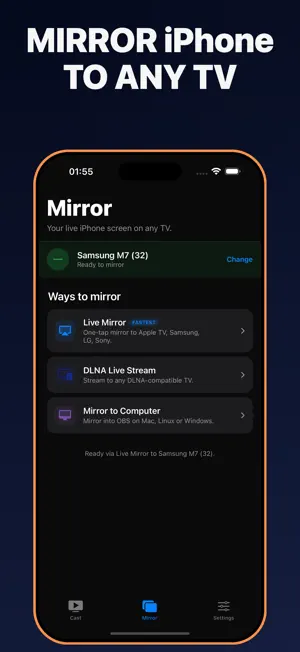
Mirror your phone to any TV in seconds — no cables, no extra hardware needed. Air Cast streams your screen, photos, videos, and live camera to a wide range of Smart TVs over your local WiFi network. WORKS WITH Air Cast works with virtually any Smart TV on your home WiFi network. Compatible with TVs that support common wireless streaming protocols including AirPlay and DLNA, as well as any TV with a built-in web browser. FEATURES Screen Mirroring Mirror your entire phone display to your TV in real time. What you see on your phone appears on your TV — great for presentations, gameplay, and browsing. Camera Cast Turn your phone camera into a wireless TV camera. Point your phone, see it live on the big screen. Works as a baby monitor, security feed, or video call display. Photo & Video Cast Send photos and videos from your camera roll to your TV with a tap. Watch home videos with the family without connecting a single cable. Web Video Cast Paste a video URL or browse to any page and cast it directly to your TV. Supports most major video sites and streaming formats. Browser Receiver — No App Needed on Your TV Air Cast's standout feature: your TV's built-in browser acts as the receiver. Nothing to install on your TV side. Works on virtually any Smart TV made in the past several years, including models with no dedicated cast platform. Local WiFi Only Everything runs on your home network. Your screen, video, and photos never leave your local WiFi — no cloud upload, no third-party server, no data collection. WHY AIR CAST Most cast apps lock you into a specific dongle or platform. Air Cast works across many platforms because it speaks the open protocols your TV already understands. The Browser Receiver means you can cast to a TV you have never connected to before, in seconds, with zero TV-side setup. PERFECT FOR - Watching web videos or vacation photos on the big screen - Using your phone camera as a baby monitor or wireless security camera - Presenting slides, web pages, or documents from your phone to a room display - Playing phone games or mirroring apps on a larger screen SUBSCRIPTION & PRICING Air Cast Premium unlocks all features. Available plans: • Weekly Premium — 1 week — $5.99 (3-day free trial for new users) • Monthly Premium — 1 month — $17.99 • Annual Premium — 1 year — $69.99 One-time purchase: Lifetime — $79.99 (no auto-renewal) Subscriptions auto-renew at the same price unless cancelled at least 24 hours before the end of the current period. Manage or cancel anytime in your Apple ID account settings; your subscription stays active until the end of the paid period. Payment is charged to your Apple ID at confirmation of purchase. Any unused portion of a free trial is forfeited when a paid subscription is purchased. Prices shown are in USD; pricing in your local currency may vary by country and is shown before purchase. Privacy Policy: https://aircast.universaltv.app/privacy Terms of Use (EULA): https://aircast.universaltv.app/terms Apple Standard EULA: https://www.apple.com/legal/internet-services/itunes/dev/stdeula/ Download Air Cast and mirror your phone to any TV — starting right now.
What’s new
Version 1.0.1 · Updated July 9, 2026
• Big stability update — fixed crashes during TV discovery and connection • LG native screen mirroring is now more reliable • Smoother screen mirroring and casting overall
App privacy
The developer, AI Generated Inc., reported these privacy practices to Apple.
Data Used to Track You
The following data may be used to track you across apps and websites owned by other companies:
- Identifiers: User ID, Device ID
- Usage Data: Product Interaction
- Diagnostics: Crash Data, Performance Data
Data Not Linked to You
The following data, which may be collected but is not linked to your identity, may be used for the following purposes:
- Identifiers: User ID, Device ID
- Usage Data: Product Interaction
- Diagnostics: Crash Data, Performance Data
- User Content: Photos or Videos, Audio Data
Used for: Analytics, App Functionality
Alternatives to Air Cast: Screen Mirror to TV
Looking for apps like Air Cast: Screen Mirror to TV? Here are 6 similar apps on the App Store. The highest rated is Universal TV Remote App || (4.9/5), and all 6 are free to download.
-
 Cast to TV + Screen Mirroring
3.3
Cast to TV + Screen Mirroring
3.3
-
 Universal TV Remote App ||
4.9
Universal TV Remote App ||
4.9
-
 Cleaner X: Clean Up Storage
4.8
Cleaner X: Clean Up Storage
4.8
-
 Remote for Samsung, Control TV
4.0
Remote for Samsung, Control TV
4.0
-
 Cast to TV & Screen Mirror
4.3
Cast to TV & Screen Mirror
4.3
-
 AirPlay to Smart TV
3.0
AirPlay to Smart TV
3.0
| App | Rating | Price | Last updated | Compare |
|---|---|---|---|---|
| Air Cast: Screen Mirror to TV | – | Free | July 9, 2026 | |
| Cast to TV + Screen Mirroring | 3.3 / 5 (3) | Free | Jun 22, 2026 | Compare |
| Universal TV Remote App || | 4.9 / 5 (8) | Free | Aug 31, 2026 | Compare |
| Cleaner X: Clean Up Storage | 4.8 / 5 (4) | Free | Oct 23, 2026 | Compare |
| Remote for Samsung, Control TV | 4.0 / 5 (4) | Free | Aug 17, 2026 | Compare |
| Cast to TV & Screen Mirror | 4.3 / 5 (15) | Free | May 11, 2026 | Compare |
| AirPlay to Smart TV | 3.0 / 5 (2) | Free | Jul 8, 2026 | Compare |