

V-Supo: Volleyball Scoreboard
Koji Tanida Sports iPhoneiPadiPod touch
V-Supo: Volleyball Scoreboard is a free Sports app for iPhone and iPad by Koji Tanida. Rated 3.0/5 from 1 ratings. Requires iOS 15.0.
- Rating
- 3.0
- 1 ratings
- Price
- Free
- on the App Store
- Size
- 36 MB
- Age 4+
- Updated
- Oct 9
- 2026 · v1.5.1
Screenshots

About V-Supo: Volleyball Scoreboard
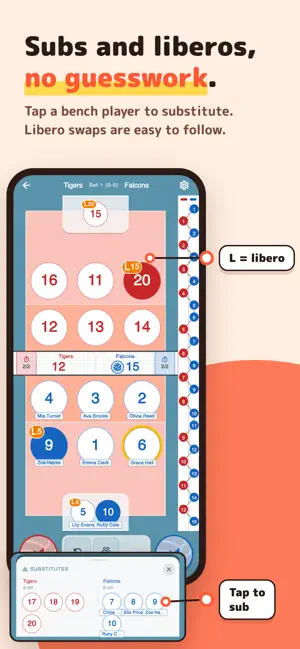
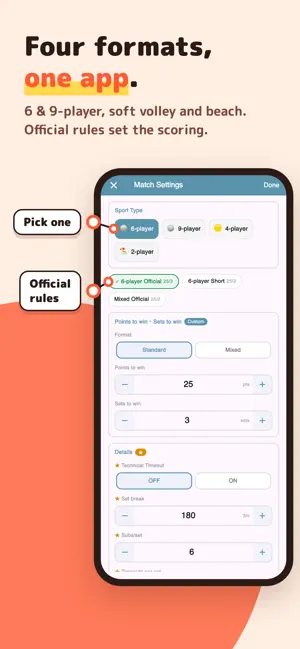
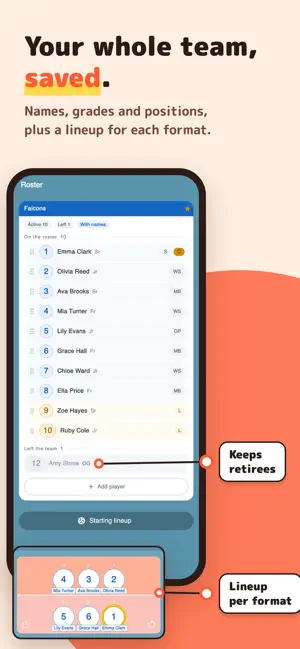
One of the few volleyball apps that covers 9-player, soft volleyball and coed formats - and shows the flow of the match at a glance. Score, rotation and players, all on one screen. Whether you are following your own team's match from the bench or the stands, or you have been asked to act as assistant referee, you can always see who is where. No officiating experience needed - you can use it from day one. ■ Supported formats 6-player (official rules) / 6-player coed / 9-player / soft volleyball (4-player) / beach (2-player) Very few apps cover 9-player, soft volleyball and coed formats in one place. It works as-is for recreational leagues, club teams and local tournaments. ■ The match flow, at a glance · Portrait or landscape Hold your phone upright and your own team sits at the bottom. Turn it sideways to see both teams side by side. · Real-time rotation tracking See the court layout at a glance and catch rotation errors before they happen. · Jersey numbers and player names Show each player's name on court as well. You can switch it during a match. · Score & set management Tap to track both teams. The end of each set and the match is detected automatically. · Auto-counted substitutions & timeouts Remaining counts are tracked for you. Tap a bench player to substitute. · Libero handling Libero swaps are easy to follow. Substitution limits and front-row / serving-position warnings are covered. · Pre-serve lineup warnings (6-player & coed) Warns when the libero is in the front row or serving position, or when the male/female alternation breaks in coed. ■ Your whole team, in one place · Roster Keep names, grades, positions and the captain. Retired players can stay on the roster. · A lineup for each format Save a starting lineup for 6-player, 9-player and the other formats. · Just load your team Load a team from the registration screen and you are ready to play. You can check the lineup before loading it. · Share by team card (QR) Hand your roster to the other team with a QR code. They just scan it with the camera. · Saved teams and favorites Teams you play with are saved automatically. Mark the ones you use often as favorites. ■ Keep a record · Match history & score sheet sharing Matches are recorded automatically. Review them later and share as a PDF. · Sanction records (warning, penalty, expulsion, disqualification) Record the cards shown by the first referee. The set and score at the time are kept with each entry and printed on the PDF score sheet. · Achievements & stats The more you use it, the more you unlock. ■ More features · App display language Switch between 12 languages from Appearance in settings. It follows your device language by default. ■ Free to use All core features are free. A one-time Remove Ads purchase is available if you prefer no ads. You can mark 10 saved teams as favorites. Watch a video ad to add more slots, or raise the limit to 20 with the one-time Additional Favorite Slots purchase. ■ Please note This app helps you follow the match and keep your own record. It is not a replacement for an official score sheet. When submitting records for a tournament, follow the format required by the organizer. Available in 12 languages. Follow your team's matches more easily - and referee with confidence. (Formerly V-Ref.)
What’s new
Version 1.5.1 · Updated October 9, 2026
■ New icon A fresh app icon and launch screen in the new V-Supo design. ■ New skin: Sunset Added a warm-toned skin in cream, coral and orange. Switch to it from Appearance in settings. ■ Team name suggestions As you type a team name on the registration screen, your saved teams appear below the field. Pick one and, after the usual confirmation, its lineup is filled in. If you type a saved team's full name, the app asks whether to load it. ■ Players are now remembered as people Changing a jersey number in the roster keeps that player's lineup spot and name tag. When a new player takes over a number someone used before, the previous player's lineup spot and name no longer come along. Coed genders are remembered per player too. A team entered by hand is saved together with the genders you chose. ■ Loaded teams: move players by dragging When you load a saved team on the registration screen, its lineup is locked. Long-press a circle and drag it, or tap a circle and then tap where it should go, to swap players between the court and the bench. To set a libero, tap a bench player and then an empty libero circle. It works the same way as lineup settings and the between-set lineup screen. To field someone who is not on the roster, turn off the lock under the team name and edit numbers as before. Teams entered by hand work as before. ■ Coed lineups Teams can now choose "6-player · Mixed" and "4-player · Mixed" as separate formats, so the coed lineup is saved apart from the regular one. In lineup settings, the coed tab shows each player's gender on the circles and warns you when two players of the same gender are next to each other. For regular formats, the button at the top right shows genders. ■ Display names You can now give each player a display name (a nickname). Name tags on court, on the bench, for liberos and in lineups use it. The roster list still shows the real name. Team cards (QR) do not share display names by default. To share them, turn on "Include display names" on the card screen. ■ Team cards - Cards now carry lineups for every format the team plays. - Scanning a card for a team you already have offers "Update this team". Favorites and your own display names are kept. - When a roster does not fit on one card, retired players, other formats' lineups, tags and positions are left out in that order, and the screen tells you what was left out. - A team imported from a link can be put straight into the registration screen with "Use in match". ■ My Team First-time users are guided through setting up My Team (team name and formats, then the roster). To set it up later, use the notice on the registration screen or My Team in settings. You can also unset My Team without deleting the team. ■ Sanctions Now opened from the top bar of the match screen (previously inside settings). ■ Fixes - Fixed sanctions recorded during a match sometimes not being kept in the match. - Fixed Undo after deleting a player sometimes reverting changes made on other screens. Thank you for using V-Supo. Send feedback from Support in the settings screen.
App privacy
The developer, Koji Tanida, reported these privacy practices to Apple.
Data Used to Track You
The following data may be used to track you across apps and websites owned by other companies:
- Identifiers: Device ID
- Usage Data: Product Interaction, Advertising Data, Other Usage Data
Data Linked to You
The following data, which may be collected and linked to your identity, may be used for the following purposes:
- Identifiers: Device ID
- Usage Data: Product Interaction, Advertising Data, Other Usage Data
- Purchases: Purchase History
Used for: Third-Party Advertising, Analytics
Data Not Linked to You
The following data, which may be collected but is not linked to your identity, may be used for the following purposes:
- Diagnostics: Crash Data, Performance Data, Other Diagnostic Data
Used for: Analytics, App Functionality
Alternatives to V-Supo: Volleyball Scoreboard
Looking for apps like V-Supo: Volleyball Scoreboard? Here are 6 similar apps on the App Store. The highest rated is V-Score Referee (5.0/5), and all 6 are free to download.
-
 V-Score Referee
5.0
V-Score Referee
5.0
-
 VolleyRef: Volleyball Referee
5.0
VolleyRef: Volleyball Referee
5.0
-
 Down Ref
4.0
Down Ref
4.0
-
 Sofvo - ソフトバレーボール
-
 Rufio Stats
-
 Volleyball Rotation Board
| App | Rating | Price | Last updated | Compare |
|---|---|---|---|---|
| V-Supo: Volleyball Scoreboard | 3.0 / 5 (1 rating) | Free | October 9, 2026 | |
| V-Score Referee | 5.0 / 5 (1) | Free | Feb 10, 2026 | Compare |
| VolleyRef: Volleyball Referee | 5.0 / 5 (1) | Free | Oct 3, 2026 | Compare |
| Down Ref | 4.0 / 5 (1) | Free | Aug 8, 2026 | Compare |
| Sofvo - ソフトバレーボール | – | Free | Oct 1, 2026 | Compare |
| Rufio Stats | – | Free | Oct 15, 2026 | Compare |
| Volleyball Rotation Board | – | Free | Oct 4, 2026 | Compare |