

Deadwax
Jason Means Music iPhoneiPadiPod touch
Deadwax is a free Music app for iPhone and iPad by Jason Means. Rated 4.7/5 from 15 ratings. Requires iOS 17.0. Updated November 8, 2026.
- Rating
- 4.7
- 15 ratings
- Price
- Free
- on the App Store
- Size
- 19 MB
- Age 4+
- Updated
- Nov 8
- 2026 · v2.1.0
Screenshots
Save to Pinterest


About Deadwax
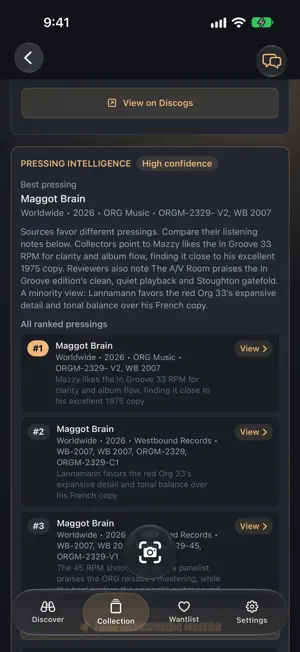
Most record apps tell you what albums you own. Connect to your Discogs collection, and Deadwax shows you which pressings you own, and whether they’re the ones worth keeping. Deadwax brings the pressing research collectors already do: audiophile versions, notable mastering engineers, forum favorites, and shootout results into one app. Deadwax. I have bought the same album three times, not on purpose. The first was a deal that did not sound right. The second came from a record fair - a dealer I trusted, a sleeve that looked right, a runout I could not quite read. It was not the one either. The third time, I had done the research. Read the threads. Cross-referenced the matrix markings. I paid more than I wanted to. The needle dropped, and I finally understood what all the fuss was about. The pressing makes the record. The same master, cut by a different engineer at a different plant, sounds like a different record. Most of us have been flying blind, or searching through forums and watching shootout videos to find the best pressing. A familiar scenario for any record collector. Deadwax changes that by doing the heavy lifting and research for you and bringing those insights to your fingertips with Pressing Intelligence. No marketplace noise - just the data that separates one copy from another to help you find the pressing to own. PRESSING INTELLIGENCE Every release in your collection gets a pressing-level breakdown: notable mastering engineers, audiophile and audiophile adjacent labels, best pressings from popular forums, and shootout video winners from creators we trust. PI badges flag full pressing Intelligence. AP badges surface the audiophile pressings you may not have known you owned. With a tap, you are directed to review forums and launched into a shootout video reference. YOUR COLLECTION A clean visual grid of your Discogs collection. PI and AP badges surface what matters. Tap any release for full pressing detail. No more cross-referencing different pressings across your browser tabs and reading decade-old forum threads. WANTLIST WITH PURPOSE Add a release directly from Deadwax. Syncs with Discogs. No double-entry, no marketplace upsell - just the pressings you are still hunting. Built around the specific pressing, not just the title. DISCOVER, CURATED A discovery surface organized around mastering engineers, audiophile labels, and the people who actually own these records - curated lists, not algorithmic filler. In the record shop, quickly type in the matrix from the deadwax and know instantly you’re holding a great-sounding pressing. If you have ever bought the same album twice chasing a better pressing - Deadwax was built for you. If you have ever squinted at a runout etching, trying to decode whether it says A2 or B2, Deadwax was built for you. If you have ever wondered whether the copy on your shelf is the one to keep, you already know the answer. Deadwax shows it to you.
Ratings & reviews
4.7
15 ratings
What’s new
Version 2.1.0 · Updated November 8, 2026
Deadwax now feels at home on iPad. • Records open beside your list. Tap an album in your Collection, Wantlist, or search results, and it opens on its own page next to the list, so you never lose your place. • Open liner notes. Spread a record across the whole screen, pressing details on one side and Pressing Intelligence on the other, then fold it back to your list. • Scan from iPad. A camera button sits beside the search field on Discover, Collection and Wantlist. Point it at a barcode, a label or a cover. • Turn it sideways. iPad now works in landscape as well as portrait. Hold it sideways to see your sidebar, your list and a record all at once. • Easier to scan your list. Album cards keep the shape they have on iPhone, and the open record gets the room it needs. • Your place is kept. Switching tabs keeps each list's scroll position, search, and open record right where you left them.
App privacy
The developer, Jason Means, reported these privacy practices to Apple.
Data Not Collected
The developer does not collect any data from this app.
Alternatives to Deadwax
Looking for apps like Deadwax? Here are 6 similar apps on the App Store. The highest rated is Spinz: Vinyl Record Scanner (5.0/5), and 5 of the 6 are free to download.
-
 Spinz: Vinyl Record Scanner
5.0
-
 Track One – Vinyl Journal
4.9
-
 Stylus Tracker
4.0
-
 NowSpinning: Vinyl Collection
4.8
-
 Groovv - Vinyl Collection
5.0
-
 Dead Format
5.0
| App | Rating | Price | Last updated | Compare |
|---|---|---|---|---|
| Deadwax | 4.7 / 5 (15 ratings) | Free | November 8, 2026 | |
| Spinz: Vinyl Record Scanner | 5.0 / 5 (10) | Free | Nov 9, 2026 | Compare |
| Track One – Vinyl Journal | 4.9 / 5 (8) | Free | Jul 4, 2026 | Compare |
| Stylus Tracker | 4.0 / 5 (4) | 3.99 USD | Jul 14, 2026 | Compare |
| NowSpinning: Vinyl Collection | 4.8 / 5 (18) | Free | Nov 4, 2026 | Compare |
| Groovv - Vinyl Collection | 5.0 / 5 (8) | Free | Oct 26, 2026 | Compare |
| Dead Format | 5.0 / 5 (137) | Free | Nov 3, 2026 | Compare |
Compare Deadwax with the top alternatives: ratings, updates, ASO score and keyword gaps →