
Crop Planner
Kevin Nail Lifestyle iPhoneiPadiPod touch
Crop Planner is a free Lifestyle app for iPhone and iPad by Kevin Nail. Requires iOS 15.1. Updated August 3, 2026.
- Price
- Free
- on the App Store
- Size
- 45 MB
- Age 4+
- Updated
- Aug 3
- 2026 · v2.0
Screenshots

About Crop Planner
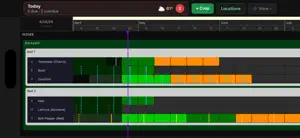
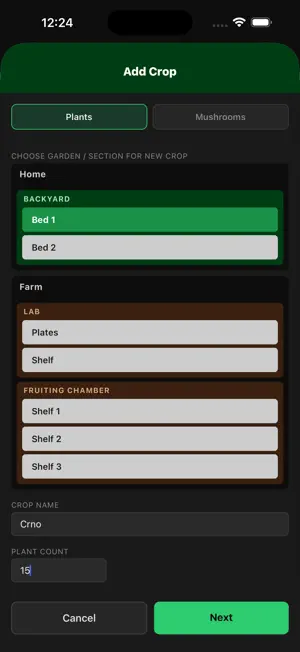
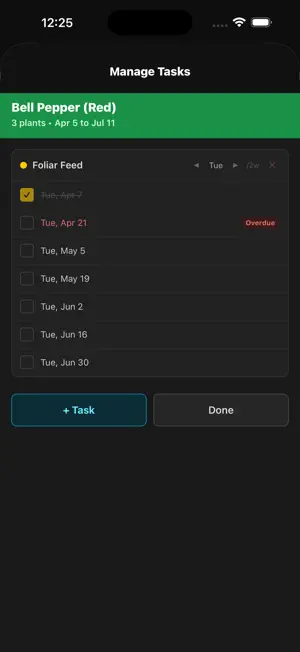
Crop Planner is a timeline-based crop planner for home growers, hobby farmers, and small-scale producers. Plan your entire growing season on a visual timeline grid. Each row is a crop. Each column is a week. Color-coded lifecycle stages — Seedling, Vegetative, Flowering, Fruiting, Harvest, Pinning, Inoculation, Colonization, Drying, and more — let you see your whole operation at a glance. Plan and track with confidence Visualize overlapping crops across a 3-year timeline See upcoming workloads before they arrive Drag crops to shift their timeline when plans change Task management built into the timeline Add tasks directly to crop rows — Watering, Fertilizing, Pest Control, Harvest, and any custom type you define Solid task markers are pending/ need to be done. Dashed markers are done. Tap to toggle. A Today view shows everything due today, overdue, or coming up soon Organized the way growers think Group crops by location: greenhouse, raised beds, outdoor plots Track mushroom grows alongside traditional crops Attach notes and photos to any time period Local-first, with optional cloud backup All data lives on your device — no account needed to get started Works fully offline Local weather shown for your growing location Optional Cloud Backup subscription: create an account to back up your data and sync across devices Cloud Backup is an auto-renewing annual subscription. Payment is charged to your Apple ID at purchase and renews yearly unless canceled at least 24 hours before the period ends. Manage or cancel in your Apple ID settings. Terms of Use: https://kevinnail.com/crop-planner/support.html Privacy Policy: https://kevinnail.com/crop-planner/privacy.html
What’s new
Version 2.0 · Updated August 3, 2026
What's New in 2.0 Cloud Backup & Sync (optional) • Create a free account to back up your garden plans to the cloud. • Sync across your devices — your crops, notes, tasks, and photos stay up to date everywhere you sign in. • Restore your data on a new device just by signing in. Premium subscription • Unlock cloud backup and multi-device sync with an optional annual subscription. • Your planner stays fully offline and free to use — a subscription is only needed for cloud backup. Plus stability and UI polish throughout.
App privacy
The developer, Kevin Nail, reported these privacy practices to Apple.
Data Linked to You
The following data, which may be collected and linked to your identity, may be used for the following purposes:
- Purchases: Purchase History
- Contact Info: Email Address
- User Content: Photos or Videos
- Identifiers: User ID
Used for: App Functionality
Alternatives to Crop Planner
Looking for apps like Crop Planner? Here are 6 similar apps on the App Store.
-
 Aiya's Garden – Plant Tracker
-
 Ketha - Farmer's Diary
-
 Everbloom - Gardening App
-
 Plotly
-
 Gardned: Garden Planner
-
 Garden Planner Journal
| App | Rating | Price | Last updated | Compare |
|---|---|---|---|---|
| Crop Planner | – | Free | August 3, 2026 | |
| Aiya's Garden – Plant Tracker | – | Free | Jun 7, 2026 | Compare |
| Ketha - Farmer's Diary | – | Free | Mar 26, 2026 | Compare |
| Everbloom - Gardening App | – | Free | Aug 25, 2026 | Compare |
| Plotly | – | Free | Aug 2, 2026 | Compare |
| Gardned: Garden Planner | – | Free | Sep 2, 2026 | Compare |
| Garden Planner Journal | – | Free | Jul 23, 2026 | Compare |
Compare Crop Planner with the top alternatives: ratings, updates, ASO score and keyword gaps →