

ConvertCat-MP3Editor&Converter
Tianmen Weilan Network Technology Co., Ltd. Music iPhoneiPadiPod touch
ConvertCat-MP3Editor&Converter is a free Music app for iPhone and iPad by Tianmen Weilan Network Technology Co., Ltd. Rated 5.0/5 from 3 ratings.
- Rating
- 5.0
- 3 ratings
- Price
- Free
- on the App Store
- Size
- 138 MB
- Age 4+
- Updated
- Oct 18
- 2026 · v1.6.8
Screenshots

About ConvertCat-MP3Editor&Converter
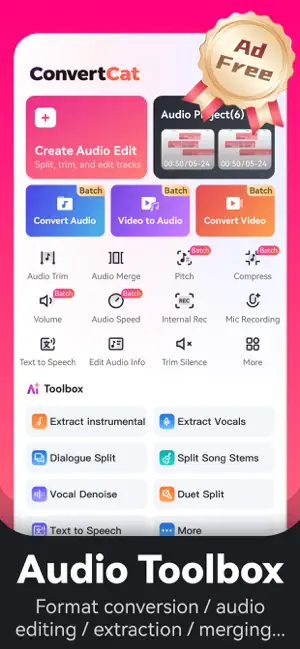
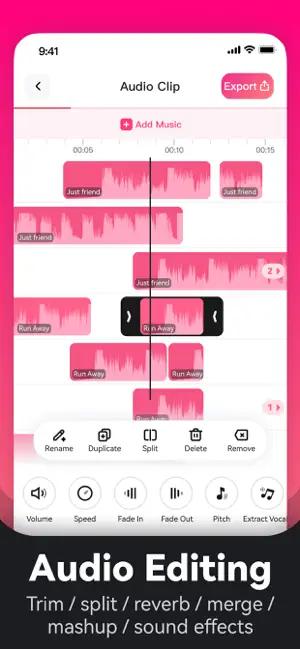
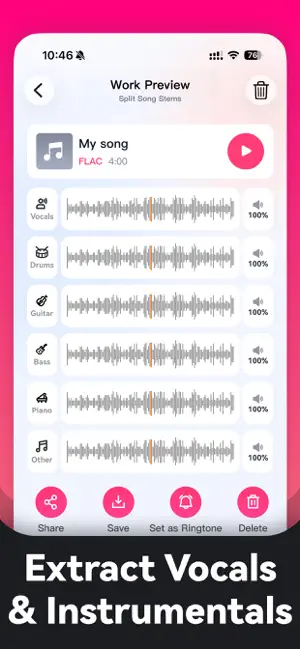
ConvertCat is a professional audio processing app that combines format conversion, audio editing, and AI-powered tools all in one place. Whether you need to convert audio formats, trim tracks, extract audio from video, separate vocals from instrumentals, reduce noise, or create ringtones, ConvertCat helps you get it done quickly and efficiently. Get started in just 3 simple steps: Import an audio or video file, or record directly using the built-in recorder Choose your desired function – e.g., convert to MP3, trim audio, extract audio from video, separate vocals, remove noise, adjust pitch, compress files, and more Preview and export your finished audio, then easily save and share it Key Features: Audio Format Conversion – Supports converting WAV, FLAC, M4A, AAC, OGG, AC3, WMA, AMR, MP2, and more to MP3 Audio Editing & Trimming – Multi-track cutting, merging clips, splicing audio, and removing silence from the beginning and end Audio Extraction – Extract background music, vocals, instrumentals, and more from any audio source Video to Audio Extraction – Quickly extract high-quality audio from video files and save as MP3 or other popular formats Vocal & Instrumental Separation – One-click separation of dry vocals and backing tracks – ideal for karaoke, singing practice, mixing, and music production Instrument Track Extraction – Isolate piano, guitar, drums, and other instrument tracks Noise Reduction – Remove background noise, static, wind, and electrical interference to enhance audio clarity, suitable for both voice recordings and general audio Dialogue Separation – Perfect for interviews, podcasts, and two-person conversation scenarios Podcast Production Suite – Multi-track editing with separate layers for vocals and background music; balance host voices, guest dialogues, and background scores; create intro/outro segments seamlessly – covers the entire workflow from recording to final export Text-to-Speech – Multiple voice options available for dubbing, narration, and listening material creation Ringtones Maker – Create custom ringtones by selecting your favorite audio clips Audio Metadata Editing – Edit cover art, album, artist, year, and other ID3 tag information Pitch Adjustment – Raise or lower pitch to suit singing practice, dubbing, or creative projects Audio Compression – Reduce file size while preserving sound quality, making it easier to store and share your audio files Use Cases: Convert music to MP3 for playback on car USB drives Create custom ringtones by trimming your favorite song clips Convert voice recordings to MP3 for meetings, lectures, and interviews Extract instrumentals or isolate vocals for cover songs Remove noise from lecture recordings, interviews, and podcast sessions Produce podcast episodes with noise reduction, dialogue separation, background music embedding, and multi-clip editing – export in standard MP3 format ready for all major podcast platforms Extract instrument tracks for music arrangement, transcription, and learning Create dubbing, narration, and text-to-speech content Whether you're a music enthusiast, content creator, podcaster, student, or just someone who needs to process audio files regularly, ConvertCat offers a straightforward and powerful solution for all your audio processing needs Subscription Plans: Auto-Renewing Subscriptions: Weekly: $2.99/week Monthly: $4.99/month Yearly: $14.99/year Payment will be charged to your Apple ID upon confirmation of purchase Your iTunes account will be automatically renewed within 24 hours prior to the end of the current period at the selected plan rate To cancel, please go to Settings → Apple ID → Subscriptions at least 24 hours before the renewal date Non-Renewing Purchase (One-Time): One-time purchase: $2.99, valid for 1 day – no automatic renewal after expiration Privacy Policy: https://www.zhuanhuanmao.com/privacy-policy.html Terms of Service: https://www.zhuanhuanmao.com/terms-of-service.html
What’s new
Version 1.6.8 · Updated October 18, 2026
Improved user experience
App privacy
The developer, Tianmen Weilan Network Technology Co., Ltd., reported these privacy practices to Apple.
Data Used to Track You
The following data may be used to track you across apps and websites owned by other companies:
- Identifiers: Device ID
Data Not Linked to You
The following data, which may be collected but is not linked to your identity, may be used for the following purposes:
- Identifiers: Device ID, User ID
- Diagnostics: Crash Data, Performance Data, Other Diagnostic Data
- User Content: Photos or Videos, Audio Data
Used for: Analytics, App Functionality
Alternatives to ConvertCat-MP3Editor&Converter
Looking for apps like ConvertCat-MP3Editor&Converter? Here are 6 similar apps on the App Store. The highest rated is 格式转换猫 (5.0/5), and all 6 are free to download.
-
 格式转换猫
5.0
-
 MP3 Converter - video2mp3
4.7
-
 Muse AI-Songs & Music Maker
4.6
-
 AeroTune:AI Music Generator
4.6
-
 Audio Editor: MP3 Converter
4.6
-
 回森
4.7
| App | Rating | Price | Last updated | Compare |
|---|---|---|---|---|
| ConvertCat-MP3Editor&Converter | 5.0 / 5 (3 ratings) | Free | October 18, 2026 | |
| 格式转换猫 | 5.0 / 5 (4) | Free | Jul 9, 2026 | Compare |
| MP3 Converter - video2mp3 | 4.7 / 5 (44) | Free | Jun 4, 2026 | Compare |
| Muse AI-Songs & Music Maker | 4.6 / 5 (32) | Free | Oct 14, 2026 | Compare |
| AeroTune:AI Music Generator | 4.6 / 5 (80) | Free | Oct 4, 2026 | Compare |
| Audio Editor: MP3 Converter | 4.6 / 5 (275) | Free | Apr 29, 2026 | Compare |
| 回森 | 4.7 / 5 (1,154) | Free | Oct 17, 2026 | Compare |