

Zimmer: Weekly Meal Planner
Benjamin Muldkjær Hørlyck Food & Drink iPhoneiPadiPod touch
Zimmer: Weekly Meal Planner is a free Food & Drink app for iPhone and iPad by Benjamin Muldkjær Hørlyck. Requires iOS 15.0. Updated October 7, 2026.
- Price
- Free
- on the App Store
- Size
- 70 MB
- Age 4+
- Updated
- Oct 7
- 2026 · v1.4.0
Screenshots


About Zimmer: Weekly Meal Planner
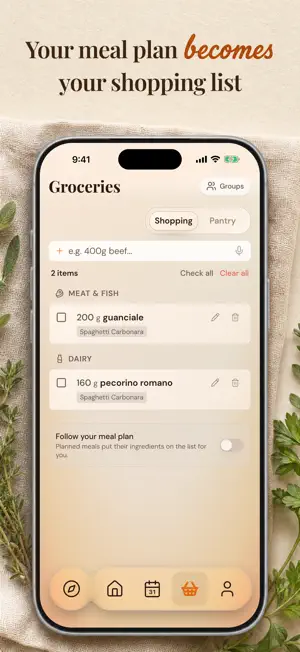
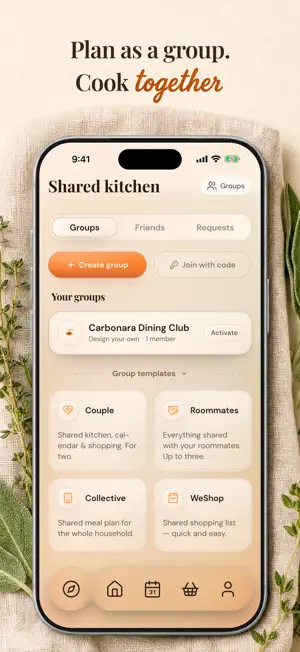
Save the recipes you want to cook and plan the week's meals. When it's time to shop, add the ingredients to a shopping list that takes your pantry into account. KEEP YOUR RECIPES Import a recipe from a link, a cooking video, a screenshot or a photo of a cookbook page. You can also dictate a recipe. On iPhone, share a recipe page from Safari to Zimmer, or try importing a screen recording if the link doesn't work. Organize recipes in color-coded books. Browse Zimmer's kitchen for ideas, or use Find a recipe to search the web for something you'd like to cook. In cooking mode, one step fills the screen at a time. PLAN YOUR WEEK Add meals to the plan yourself, or use Quick plan to find meals from your own recipes, Zimmer's kitchen or the web. When you choose your recipes or Zimmer's kitchen, you can prioritize meals that use ingredients in your pantry. A free account includes one Quick plan and ten Find a recipe searches each month. SHOPPING AND PANTRY Add a recipe's ingredients to your shopping list with one tap. The list sorts items by section and takes your pantry into account. Turn on Auto shopping list if you want your personal list to follow your meal plan automatically. Scan a receipt, review the items, and add them to your pantry. When you mark a dish as cooked, Zimmer shows what can be deducted. You can also dictate items and find meals you can make with the ingredients you have. SHARE A KITCHEN Share recipes, a meal plan and a shopping list with the people you cook with. Contribute to shared recipe books and see your shared kitchen's recipes in Explore. Sharing a kitchen is free. WITH ZIMMER PLUS Everything above is free. Plus adds extras on top, and you can try it free for 14 days: • Shopping on your Lock Screen: check off items, undo a check-off and switch between sections without unlocking your phone. Start from the shopping list or the Start Shopping widget on your Lock Screen. • Widgets with today's meal, your weekly meal plan and your shopping list. • Chat with Zimmie, which knows your recipes, your week and your pantry. • Save meal plans and reuse them for another week. • An optional taste profile that shapes the suggestions on Home. You can see, edit and delete what Zimmie has learned. • Cooking tips for your own recipes. Recipes from Zimmer's kitchen already include tips. • Quick plan and Find a recipe without a monthly limit. ON IPHONE Use Add to Shopping List and Today's Meal in the Shortcuts app. On supported iPhones, you can also assign a shortcut to the Action button. Widgets, the new shortcuts and the shopping card require iOS 17 or later. YOUR DATA You can look around without creating an account. From your account, you can export your information or delete your account. Questions or feedback? Contact [email protected]. https://zimmerfood.com/terms https://zimmerfood.com/privacy
What’s new
Version 1.4.0 · Updated October 7, 2026
Your shopping list can now stay on your Lock Screen as a card with Zimmer Plus. Start from the shopping list or the new Start Shopping widget. Check off items, undo a check-off, and see what the other person in your shared kitchen has picked up. The old Shopping List widget is no longer available on the Lock Screen. To start the new card from there, add Start Shopping from the widget gallery. Widgets and the shopping card are now part of Zimmer Plus. Also new: • Today's Meal is available as a medium widget, and Weekly Meal Plan as a large widget. Both can add meals to your shopping list. • The Home Screen shopping list widget has a new look. • Add to Shopping List and Today's Meal are available in the Shortcuts app and through the Action button on supported iPhones. • Importing from Safari can read more recipe pages. Widgets, the new shortcuts and the shopping card require iOS 17 or later.
App privacy
The developer, Benjamin Muldkjær Hørlyck, reported these privacy practices to Apple.
Data Linked to You
The following data, which may be collected and linked to your identity, may be used for the following purposes:
- User Content: Photos or Videos, Audio Data, Other User Content
- Identifiers: User ID, Device ID
- Usage Data: Product Interaction, Advertising Data, Other Usage Data
- Purchases: Purchase History
- Location: Precise Location
- Contact Info: Email Address, Name
Used for: Analytics, App Functionality
Data Not Linked to You
The following data, which may be collected but is not linked to your identity, may be used for the following purposes:
- User Content: Other User Content
- Diagnostics: Crash Data
Used for: Analytics, App Functionality
Alternatives to Zimmer: Weekly Meal Planner
Looking for apps like Zimmer: Weekly Meal Planner? Here are 6 similar apps on the App Store. The highest rated is FamilyPlate: Dinner Planner (5.0/5), and all 6 are free to download.
-
 BoccaBite: Meal Planner
-
 VAS Kouzina
-
 Kenji: Recipes & Meal Prep
-
 Mealsketch: Family Meal Plan
-
 City Eats | Rider
-
 FamilyPlate: Dinner Planner
5.0
FamilyPlate: Dinner Planner
5.0
| App | Rating | Price | Last updated | Compare |
|---|---|---|---|---|
| Zimmer: Weekly Meal Planner | – | Free | October 7, 2026 | |
| BoccaBite: Meal Planner | – | Free | Oct 4, 2026 | Compare |
| VAS Kouzina | – | Free | Oct 17, 2026 | Compare |
| Kenji: Recipes & Meal Prep | – | Free | Oct 19, 2026 | Compare |
| Mealsketch: Family Meal Plan | – | Free | Oct 21, 2026 | Compare |
| City Eats | Rider | – | Free | Aug 25, 2026 | Compare |
| FamilyPlate: Dinner Planner | 5.0 / 5 (1) | Free | Oct 13, 2026 | Compare |