

Inktify: Add Logo to Photo
NanoHawk Graphics & Design iPhoneiPadiPod touchMac
Inktify: Add Logo to Photo is a free Graphics & Design app for iPhone and iPad by NanoHawk. Rated 5.0/5 from 1 ratings. Requires iOS 15.6.
- Rating
- 5.0
- 1 ratings
- Price
- Free
- on the App Store
- Size
- 49 MB
- Age 17+
- Updated
- Oct 26
- 2026 · v1.10
Screenshots


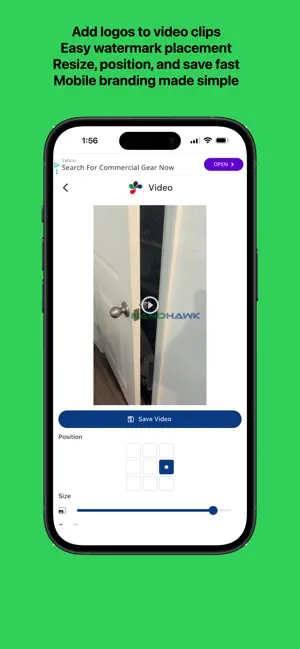
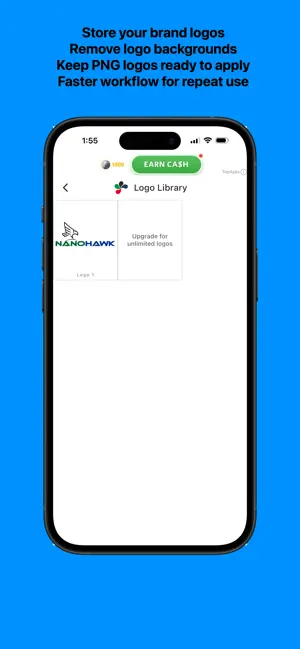
About Inktify: Add Logo to Photo
The fastest way to brand your photos and videos. Inktify is built for creators, small business owners, and artists who want a simple way to add their logo or watermark to their work. No complex menus or over-engineered tools—just choose your media, add your logo, adjust it, and export. HOW IT WORKS Create: Add your logo to your Logo Library for quick reuse. Apply: Choose a photo or video, select your logo, and adjust its size, position, and opacity. Export: Save your finished image or video, or share it directly from your device. PHOTO WATERMARKING Add your logo to photos with simple positioning, size and opacity controls, and Fit to Photo sizing. VIDEO WATERMARKING Add your logo to videos, choose its position, adjust its size and opacity, and export the finished video as an MP4. INKTIFY PRO Upgrade to unlock additional tools: • Build an unlimited logo library • Reorder your saved logos • Export images as JPG and GIF • Save background-free logos The core Inktify workflow remains available without a subscription. Inktify does not display third-party advertising. PRIVACY Inktify does not use third-party advertising or third-party analytics and does not request permission to track you across apps or websites. We collect limited first-party operational data, including device type, operating system version, app version, and coarse location derived from your public IP address. This helps us understand which app versions and device types are in use and maintain our services. Operational data is retained for up to 90 days on servers we control. An account is not required to watermark photos or videos. Optional sign-in is available for account features and cross-platform subscription entitlement management. Sign-in uses a one-time verification code sent to your email address; no password is required. If you contact support, you may provide your name and email address so we can reply. We do not use support emails for advertising or tracking. Support emails are deleted when no longer needed, or within 2 years. Your photos, videos, and logos are processed locally as part of the watermarking workflow and are not uploaded to us for advertising or analytics.
What’s new
Version 1.10 · Updated October 26, 2026
Package updates to ensure stability and security.
App privacy
The developer, NanoHawk, reported these privacy practices to Apple.
Data Not Linked to You
The following data, which may be collected but is not linked to your identity, may be used for the following purposes:
- Location: Coarse Location
- Identifiers: Device ID
- Usage Data: Product Interaction
Used for: Analytics
Alternatives to Inktify: Add Logo to Photo
Looking for apps like Inktify: Add Logo to Photo? Here are 6 similar apps on the App Store. The highest rated is Object Removal-Photo Eraser (5.0/5), and all 6 are free to download.
-
 SimplyMark: Fast Watermark
-
 Object Removal-Photo Eraser
5.0
-
 Watermarkio: Watermark Maker
5.0
-
 Censor Blur Pixelate Photos
-
 AnimeGen: Anime Art Generator
5.0
-
 All Image Tools
| App | Rating | Price | Last updated | Compare |
|---|---|---|---|---|
| Inktify: Add Logo to Photo | 5.0 / 5 (1 rating) | Free | October 26, 2026 | |
| SimplyMark: Fast Watermark | – | Free | Oct 6, 2026 | Compare |
| Object Removal-Photo Eraser | 5.0 / 5 (1) | Free | Nov 2, 2026 | Compare |
| Watermarkio: Watermark Maker | 5.0 / 5 (9) | Free | Sep 26, 2026 | Compare |
| Censor Blur Pixelate Photos | – | Free | Feb 24, 2025 | Compare |
| AnimeGen: Anime Art Generator | 5.0 / 5 (1) | Free | Oct 28, 2026 | Compare |
| All Image Tools | – | Free | Sep 23, 2024 | Compare |