

Expense Tracker: Budget Book
献慧 陈 Finance iPhoneiPadiPod touch
Expense Tracker: Budget Book is a free Finance app for iPhone and iPad by 献慧 陈. Rated 4.7/5 from 6 ratings. Requires iOS 15.0. Updated September 29, 2026.
- Rating
- 4.7
- 6 ratings
- Price
- Free
- on the App Store
- Size
- 8 MB
- Age 4+
- Updated
- Sep 29
- 2026 · v1.6
Screenshots
About Expense Tracker: Budget Book
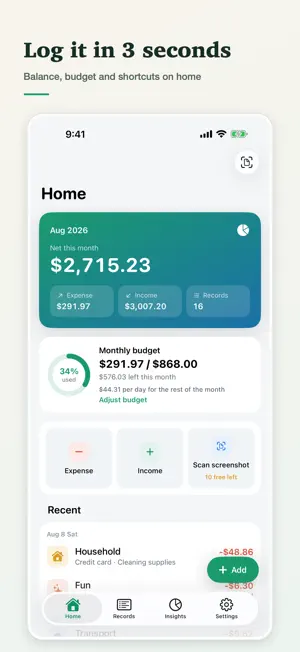
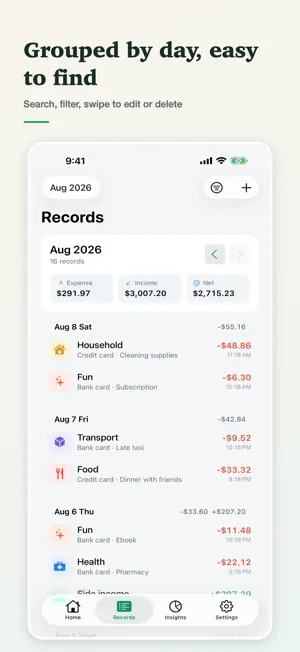
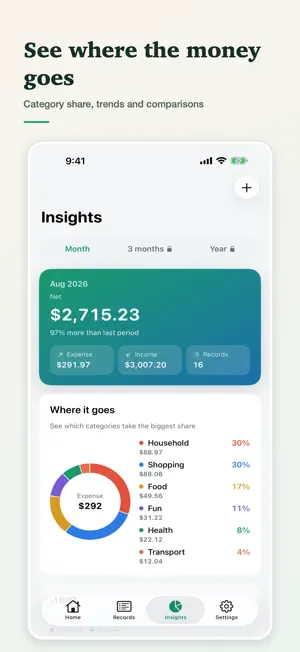
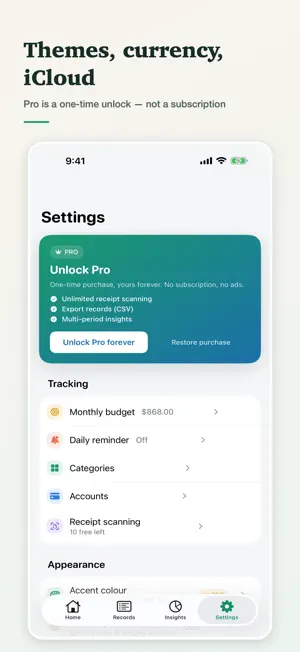
Expense Tracker is a beautifully simple expense tracker and budget app. No sign-up, no account — just open it and log a transaction in 3 seconds. The app pre-fills your most recent category and account, so you capture every income and expense without the hassle. WHY BUDGET PLANNER - Scan to log: import a payment screenshot and the app reads the amount, date, and note on-device — confirm and save. No image is uploaded. - Fast entry: add an expense or income from the home screen in one tap, with common amounts a tap away. - Clear insights: monthly balance, income/expense trends, a category donut chart, and period-over-period comparison. - Monthly budget: set a spending cap and see used vs. remaining in real time. It also projects month-end spending from your current pace and warns you before you go over. - Records that stay tidy: grouped by day, searchable by note or amount, swipe to edit or delete. - Daily reminders: pick a time to build a daily logging habit, delivered via local notifications. - Accounts & categories: manage cash, bank cards, and wallets; fully customizable categories. - Themes & currency: choose an accent color; the currency symbol follows your region or can be set manually. Amounts are never converted. - iCloud backup: back up to your own iCloud and restore after a reinstall or a new device. A Home Screen widget is included. - Languages: Simplified Chinese, Traditional Chinese, Japanese, Korean, English, Malay and Hindi. PRIVACY FIRST - No accounts: no registration, no sign-in, no phone number or email collected. - Local-first: your records live on your device. Backups go to your own private iCloud space — we run no servers that store your ledger, and we cannot read it. - We never read your records for ads or profiling, and never sell your data. No ads. - Automatic backup can be switched off in Settings if you prefer manual only. Download Expense Tracker and start with today's first transaction.
Ratings & reviews
4.7
6 ratings
What’s new
Version 1.6 · Updated September 29, 2026
This app is independently developed and maintained by an indie developer. Feedback and bug reports are always welcome. For collaboration inquiries, please contact me by email. Enjoy the app. Email: [email protected] What's New: • Accounts show net worth, assets, and liabilities, with a balance baseline, icons, and archiving • Transfers between accounts stay out of income, expenses, and budgets • Partial refunds are supported. Reimbursement status does not count as income until the money received is recorded • Add tags to records and filter by tag • The app opens on Home. Tab order is Home, Bills, Statistics, Accounts, Settings
App privacy
The developer, 献慧 陈, reported these privacy practices to Apple.
Data Not Collected
The developer does not collect any data from this app.
Alternatives to Expense Tracker: Budget Book
Looking for apps like Expense Tracker: Budget Book? Here are 6 similar apps on the App Store. The highest rated is Walti: Budget Expense Tracker (5.0/5), and 5 of the 6 are free to download.
-
 Walti: Budget Expense Tracker
5.0
Walti: Budget Expense Tracker
5.0
-
 BillGuard Medical Bill Tracker
-
 Maturity Ledger: Deposit Log
5.0
Maturity Ledger: Deposit Log
5.0
-
 US Debt & World - EconoLive
5.0
US Debt & World - EconoLive
5.0
-
 ClaimReady - Home Inventory
-
 Cash Book: Cash Counter
5.0
Cash Book: Cash Counter
5.0
| App | Rating | Price | Last updated | Compare |
|---|---|---|---|---|
| Expense Tracker: Budget Book | 4.7 / 5 (6 ratings) | Free | September 29, 2026 | |
| Walti: Budget Expense Tracker | 5.0 / 5 (2) | Free | Oct 6, 2026 | Compare |
| BillGuard Medical Bill Tracker | – | Free | Aug 30, 2026 | Compare |
| Maturity Ledger: Deposit Log | 5.0 / 5 (1) | Free | Oct 1, 2026 | Compare |
| US Debt & World - EconoLive | 5.0 / 5 (1) | 4.99 USD | Aug 14, 2026 | Compare |
| ClaimReady - Home Inventory | – | Free | Oct 6, 2026 | Compare |
| Cash Book: Cash Counter | 5.0 / 5 (2) | Free | Apr 2, 2026 | Compare |