

PDF to Excel Converter: XLSX
Amna Iftikhar Productivity iPhoneiPadiPod touchMac
PDF to Excel Converter: XLSX is a free Productivity app for iPhone and iPad by Amna Iftikhar. Rated 5.0/5 from 1 ratings. Requires iOS 15.6.
- Rating
- 5.0
- 1 ratings
- Price
- Free
- on the App Store
- Size
- 37 MB
- Age 4+
- Updated
- Sep 23
- 2026 · v1.0.5
Screenshots

About PDF to Excel Converter: XLSX
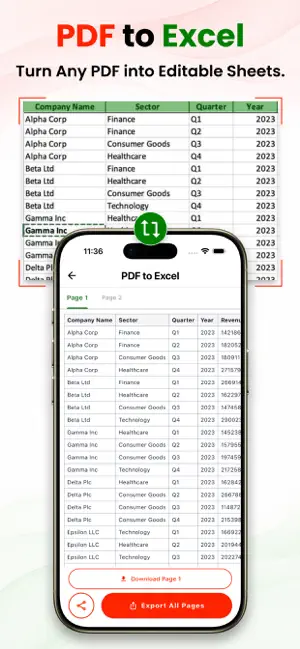
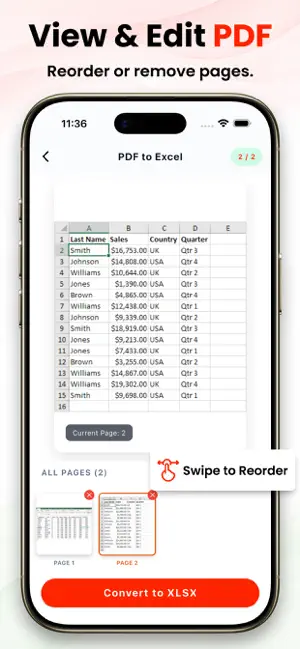
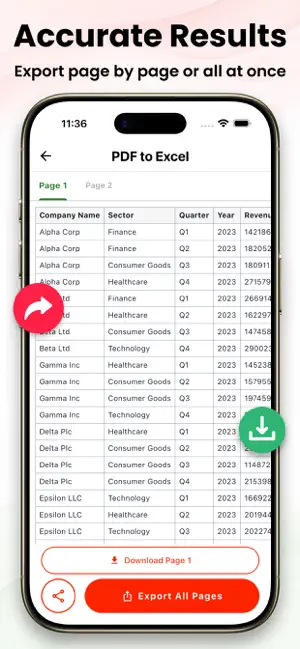
Turn your PDF files into fully editable Excel spreadsheets with accuracy and control. This PDF to Excel Converter is designed for users who need reliable data extraction from documents such as reports, invoices, bank statements, research papers, and more. Instead of manually retyping tables or copying messy data, the app helps you transform structured content into organized spreadsheet files while maintaining the original layout as closely as possible. The app uses advanced table recognition technology to detect rows, columns, and cell boundaries within your PDF files. This ensures that even complex tables are converted into clean and structured formats that are ready for editing, sorting, and analysis. Whether you are working with financial data, business records, or academic material, you can depend on consistent and accurate results. One of the key advantages of this converter is its ability to preserve formatting. Fonts, alignment, and table structure are retained to minimize the need for adjustments after conversion. This allows you to continue working on your data without wasting time fixing broken layouts or misplaced values. The result is a smooth transition from static documents to dynamic spreadsheet files. The interface is designed with simplicity and clarity in mind. You can select your PDF file, start the conversion process, and receive your excel output in just a few steps. No technical knowledge is required, making it suitable for students, professionals, and anyone who frequently handles document-based data. The app also supports a wide range of PDF types. Whether your file contains single-page tables or multi-page datasets, the converter processes them efficiently and delivers consistent results. It is optimized to handle different document structures, ensuring that your data remains usable and well-organized. Privacy is an important priority. Your files are processed securely, and you remain in control of your data throughout the conversion process. This makes the app suitable for handling sensitive documents such as financial records and confidential reports. Key Features: * Accurate table detection and structured data extraction * Maintains original layout and formatting * Converts multi-page PDFs into organized XLSX files * Simple and user-friendly interface * Suitable for business, academic, and personal use * Secure file handling and data privacy Save time, reduce manual effort, and improve your workflow by converting PDFs into structured spreadsheet files whenever you need them. Whether you are managing data, preparing reports, or analyzing information, this PDF to excel Converter provides a dependable solution for transforming static content into editable formats. Disclaimer: This application is an independent tool. It is not an official product and is not affiliated with, endorsed by, or associated with any company, brand, or organization. Privacy Policy: https://nexadestudio.com/privacy-policy Terms of use: https://nexadestudio.com/terms-of-service
What’s new
Version 1.0.5 · Updated September 23, 2026
- Added Light and Dark Mode - Improved UI and app performance - Fixed minor bugs and improved stability
App privacy
The developer, Amna Iftikhar, reported these privacy practices to Apple.
Data Used to Track You
The following data may be used to track you across apps and websites owned by other companies:
- Identifiers: Device ID
- Usage Data: Product Interaction, Advertising Data
Data Not Linked to You
The following data, which may be collected but is not linked to your identity, may be used for the following purposes:
- Identifiers: Device ID
- Usage Data: Product Interaction, Advertising Data
Used for: Third-Party Advertising
Alternatives to PDF to Excel Converter: XLSX
Looking for apps like PDF to Excel Converter: XLSX? Here are 6 similar apps on the App Store. The highest rated is Image to Excel Converter (5.0/5), and all 6 are free to download.
-
 PDF to Excel Converter - XLSX
-
 Image to Excel Converter
5.0
-
 All Document Reader: PDF,Excel
5.0
-
 PDF to Excel Converter & XLSX
4.6
-
 Convert pdf to excel
4.7
-
 Excel to PDF Converter - XLSX
5.0
| App | Rating | Price | Last updated | Compare |
|---|---|---|---|---|
| PDF to Excel Converter: XLSX | 5.0 / 5 (1 rating) | Free | September 23, 2026 | |
| PDF to Excel Converter - XLSX | – | Free | Sep 1, 2026 | Compare |
| Image to Excel Converter | 5.0 / 5 (1) | Free | Oct 5, 2026 | Compare |
| All Document Reader: PDF,Excel | 5.0 / 5 (1) | Free | Dec 4, 2025 | Compare |
| PDF to Excel Converter & XLSX | 4.6 / 5 (47) | Free | Aug 7, 2026 | Compare |
| Convert pdf to excel | 4.7 / 5 (106) | Free | Jan 11, 2024 | Compare |
| Excel to PDF Converter - XLSX | 5.0 / 5 (13) | Free | Sep 8, 2026 | Compare |