

AI Expense Tracker - Ginti
Sri Sadguru Software Solutions LLP Finance iPhoneiPadiPod touch
AI Expense Tracker - Ginti is a free Finance app for iPhone and iPad by Sri Sadguru Software Solutions LLP. Requires iOS 15.1. Updated May 28, 2026.
- Price
- Free
- on the App Store
- Size
- 50 MB
- Age 4+
- Updated
- May 28
- 2026 · v1.0.1
Screenshots


About AI Expense Tracker - Ginti
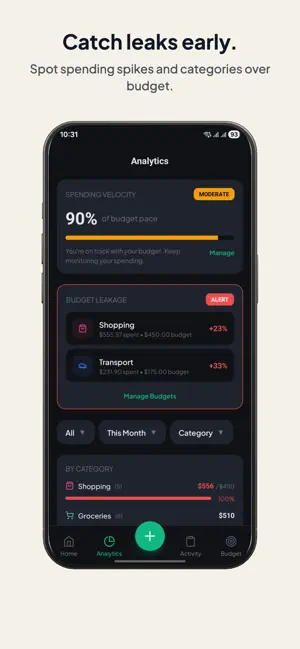
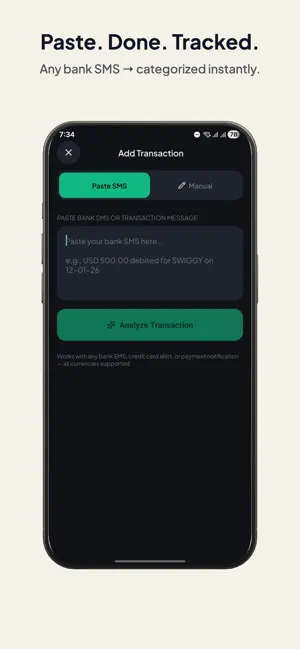
Ginti is an AI-powered expense tracker that makes logging transactions as fast as pasting a text message. No spreadsheets, no manual typing, no data entry. Copy a bank SMS, payment receipt, or credit card alert. Paste it into Ginti. AI extracts the amount, merchant, category, and currency — instantly. ================================ SMART PASTE ================================ - Paste any bank SMS, credit card alert, or payment notification - Works with Chase, Amex, Venmo, PayPal, Apple Pay, Google Pay, and hundreds more - AI-powered parsing extracts amount, merchant, and category automatically - 30+ currencies supported — USD, EUR, GBP, INR, and more - Spam, OTPs, and promotions are filtered out automatically ================================ SMART BUDGETS ================================ - Set a monthly budget and Ginti does the math for you - Live daily target updates with every transaction - See if you're ahead, on pace, or tightening up - Per-category budgets with over-allocation warnings - Automatic month rollover — no manual reset needed ================================ CLEAR INSIGHTS ================================ - Cumulative spending charts and category breakdowns - Month-over-month comparisons - Spending velocity tracked against your budget pace - Budget leakage alerts for overspent categories ================================ GENTLE REMINDERS ================================ - Start of Day — review yesterday's transactions - End of Day — catch up on today's spending before bed - Pick your own time for each reminder - Write your own message, or let Ginti rotate friendly defaults ================================ PRIVACY FIRST ================================ - Account numbers, card numbers, and phone numbers are masked before any AI processing - No access to your SMS, inbox, contacts, or clipboard history - Sign in with Apple — minimal data shared - Your data stays yours — delete your account anytime ================================ ALSO INCLUDED ================================ - Dark and light themes that match your system - Set up in under a minute ================================ HOW IT WORKS ================================ 1. Sign in with Apple or Google 2. Copy any bank SMS, alert, or receipt 3. Paste into Ginti — AI extracts the details 4. Review, approve, and track — all in one place ================================ GINTI PREMIUM ================================ Unlock full access to Ginti with a Premium subscription. Every new account gets a 21-day free trial of Ginti Premium — no payment, no credit card, and no subscription required to start. Enjoy full premium access during the trial. When the trial ends, you can choose a plan to continue. Available plans (auto-renewing) after the trial: - Weekly — $2.49 / week - Monthly — $6.99 / month - 3-Month — $17.99 / 3 months - Annual — $49.99 / year (best value) Payment will be charged to your Apple ID only if you choose to subscribe. Subscriptions automatically renew at the price shown at the time of purchase unless auto-renew is turned off at least 24 hours before the end of the current period. Your account will be charged for renewal within 24 hours prior to the end of the current period. You can manage or cancel your subscription at any time in Settings → Apple ID → Subscriptions on your device. ================================ LEGAL ================================ Privacy Policy: https://ginti.app/privacy Terms of Use (EULA): https://ginti.app/terms ================================ SUPPORT ================================ Email: [email protected] Support: https://ginti.app/support Stop tracking expenses manually. Let Ginti handle it.
What’s new
Version 1.0.1 · Updated May 28, 2026
Thanks for the incredible launch week! This update includes: • More reliable Smart Paste • Subscription and trial fixes • Improved transaction categorization • Stability and performance improvements Coming soon: German, Japanese, French, and Italian support. Enjoying Ginti? A quick rating really helps.
App privacy
The developer, Sri Sadguru Software Solutions LLP, reported these privacy practices to Apple.
Data Linked to You
The following data, which may be collected and linked to your identity, may be used for the following purposes:
- Identifiers: User ID, Device ID
- Usage Data: Product Interaction
- Purchases: Purchase History
- Financial Info: Other Financial Info
- Contact Info: Email Address, Name
- User Content: Emails or Text Messages, Other User Content
- Diagnostics: Crash Data, Performance Data, Other Diagnostic Data
Used for: Analytics, App Functionality
Alternatives to AI Expense Tracker - Ginti
Looking for apps like AI Expense Tracker - Ginti? Here are 6 similar apps on the App Store.
-
 开口记 - AI语音记账助手
-
 妙记账-Ai极速语音记账
-
 Stingy AI: Stop Overspending
-
 Factura Smart
-
 CalmLedger - AI Bookkeeping
-
 TradaVN
| App | Rating | Price | Last updated | Compare |
|---|---|---|---|---|
| AI Expense Tracker - Ginti | – | Free | May 28, 2026 | |
| 开口记 - AI语音记账助手 | – | Free | Feb 28, 2026 | Compare |
| 妙记账-Ai极速语音记账 | – | Free | Mar 23, 2026 | Compare |
| Stingy AI: Stop Overspending | – | Free | Oct 20, 2026 | Compare |
| Factura Smart | – | Free | Feb 27, 2026 | Compare |
| CalmLedger - AI Bookkeeping | – | Free | Aug 15, 2026 | Compare |
| TradaVN | – | Free | Oct 6, 2026 | Compare |