

Private Notes Daily.
向龙 卢 Productivity iPhoneiPadiPod touch
Private Notes Daily. is a free Productivity app for iPhone and iPad by 向龙 卢. Requires iOS 17.0. Updated September 6, 2026.
- Price
- Free
- on the App Store
- Size
- 3 MB
- Age 4+
- Updated
- Sep 6
- 2026 · v2.0
Screenshots

About Private Notes Daily.
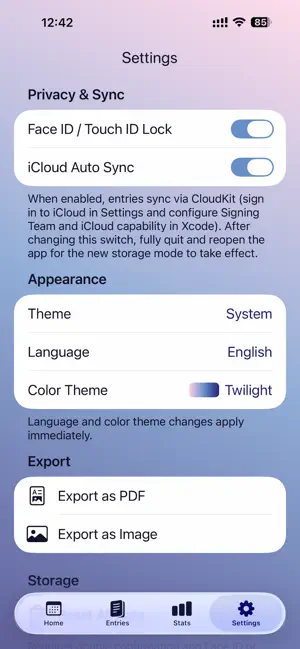
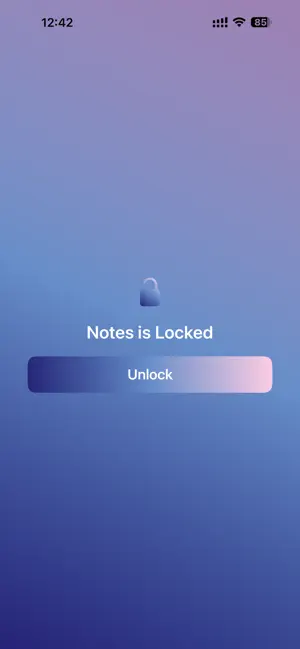
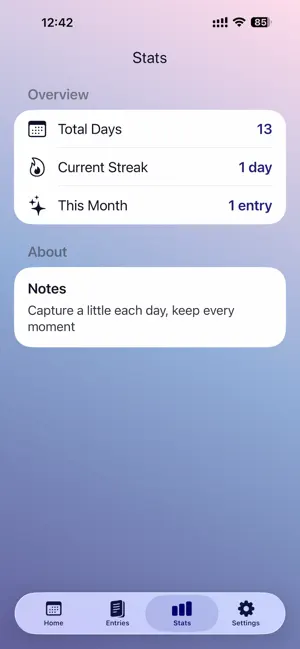
Notes (小记) is a minimal private journal that helps you capture each day in a few taps — text, mood, and a photo. No ads, no in-app purchases, and no sign-in required. 【Features】 • Daily entries: write by day with optional mood tags • Photo attachment: add one photo per entry • Calendar view: browse and jump to any day in a month grid • Writing stats: streaks, totals, and more at a glance • Export: save entries as PDF or image for backup and sharing • Face ID / Touch ID: optional app lock to protect your journal • iCloud sync: optional CloudKit sync across your devices (iCloud sign-in required) 【What’s new in 2.0】 • Four gradient themes: Twilight, Ocean, Forest, and Royal • Language options: System, Simplified Chinese, and English • Improved dark mode: better contrast for settings, toggles, and text • Data reset: double confirmation plus Face ID or device passcode before deleting all entries 【Design】 Notes is calm and distraction-free — no social features, no feeds, just your words. Soft gradients and rounded typography stay readable in both light and dark mode. 【Privacy】 • No account required; data is stored on your device by default • With iCloud sync enabled, data is stored in your iCloud account via Apple CloudKit • We do not collect, sell, or share your journal content 【Notes】 • iOS 17 or later is recommended for the best experience • Uninstalling the app may remove data stored only on this device. If iCloud sync is enabled, results may vary — export important entries regularly • Questions or feedback? Use in-app Support & Feedback
What’s new
Version 2.0 · Updated September 6, 2026
Notes 2.0 is a full refresh of the look and feel: • Four new gradient themes (Twilight, Ocean, Forest, Royal) — switch anytime in Settings • Language options: System, Simplified Chinese, and English • Dark mode improvements for settings, toggles, and text readability • “Reset All Data” replaces Clear Cache: double confirmation plus Face ID or passcode to securely delete all entries • Fixed stats display and other UI polish Thank you for using Notes. We’d love to hear from you via in-app feedback.
App privacy
The developer, 向龙 卢, reported these privacy practices to Apple.
Data Not Collected
The developer does not collect any data from this app.
Alternatives to Private Notes Daily.
Looking for apps like Private Notes Daily.? Here are 6 similar apps on the App Store. The highest rated is DayPilot: AI Tasks & Calendar (5.0/5), and all 6 are free to download.
-
 极简待办-任务打卡安排计划清单
-
 SnapScan: PDF Scanner & OCR
-
 麻将战绩管家-麻将账本,麻将记账本
-
 DayPilot: AI Tasks & Calendar
5.0
DayPilot: AI Tasks & Calendar
5.0
-
 心通达OA
1.0
心通达OA
1.0
-
 iPlan: Planner & Habit Tracker
| App | Rating | Price | Last updated | Compare |
|---|---|---|---|---|
| Private Notes Daily. | – | Free | September 6, 2026 | |
| 极简待办-任务打卡安排计划清单 | – | Free | Feb 2, 2026 | Compare |
| SnapScan: PDF Scanner & OCR | – | Free | Aug 26, 2026 | Compare |
| 麻将战绩管家-麻将账本,麻将记账本 | – | Free | Jun 2, 2026 | Compare |
| DayPilot: AI Tasks & Calendar | 5.0 / 5 (1) | Free | Oct 25, 2026 | Compare |
| 心通达OA | 1.0 / 5 (1) | Free | Oct 22, 2026 | Compare |
| iPlan: Planner & Habit Tracker | – | Free | Oct 15, 2026 | Compare |