

KiKO - AI Video Cut
GROWONE TECHNOLOGY PTE. LTD. Utilities iPhoneiPadiPod touch
KiKO - AI Video Cut is a free Utilities app for iPhone and iPad by GROWONE TECHNOLOGY PTE. LTD. Rated 4.5/5 from 2 ratings. Requires iOS 15.0.
- Rating
- 4.5
- 2 ratings
- Price
- Free
- on the App Store
- Size
- 96 MB
- Age 4+
- Updated
- Oct 10
- 2026 · v1.2.0
Screenshots

About KiKO - AI Video Cut
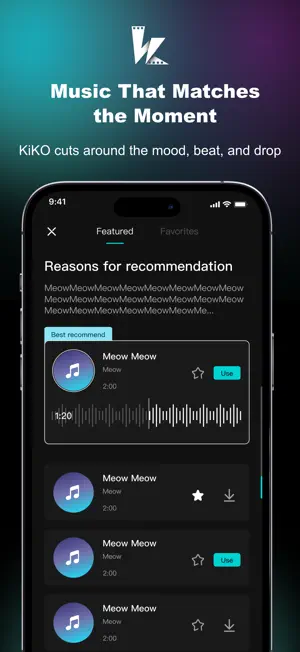
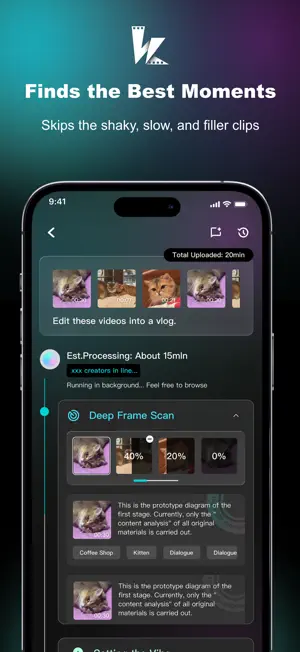
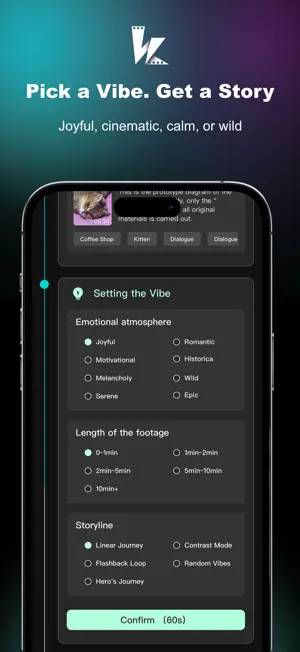
Experience a New Way of Video Creation with KiKO: Your AI Companion for Creative Storytelling. Video creation shouldn't be a complex struggle with a cluttered toolbox. Meet KiKO, an AI-powered companion-style video creation partner designed to simplify editing and help you express your unique creative vision. 1. From "Tool" to "Partner": A New Relationship In the past, video editing meant manually dragging timelines and hunting through endless libraries. KiKO redefines this through a "Companion-style Partnership." - Dialogue-Driven Creation: No more squinting at timelines. Use natural language to tell KiKO what you want, and it helps manage music selection, transitions, and storytelling structure. - Zero-Threshold Inspiration: You don’t need a perfect plan to start. Share your raw clips with KiKO, and it will provide creative suggestions and a high-quality initial draft instantly. 2. Style and Pacing: Focus on Quality and Aesthetics KiKO is designed to elevate the aesthetic quality of your content, moving beyond simple splicing to meaningful storytelling. - Smart Editing Logic: KiKO integrates professional editing techniques to automatically match the right music, seamless AI transitions, and emotional pacing for your specific content type. - Professional Effects: Access AI-enhanced components like cinematic scene transitions and dynamic picture-in-picture storytelling once reserved for professional editors. 3. An AI Partner That Grows With You KiKO is more than an app; it’s an assistant that adapts to your unique creative style. - Personalized Experience: As you interact, KiKO learns your editing preferences, making each project more intuitive and aligned with your personal taste. - Style Analysis: Inspired by a popular trend? KiKO can help analyze the rhythm and visual style of trending content to help you expand your creative skills. 4. Refine Your Content for Better Engagement - Engagement Insights: Before you share, let KiKO evaluate your video against current creative trends to provide helpful optimization tips and feedback. - Trend Recommendations: Get suggestions for popular strategies in your niche, helping you bridge the gap between raw footage and engaging content. KiKO is your second brain, your creative mentor, and your dedicated editor. Stop just editing. Start Creating. Download KiKO today!
What’s new
Version 1.2.0 · Updated October 10, 2026
feature optimization.
App privacy
The developer, GROWONE TECHNOLOGY PTE. LTD., reported these privacy practices to Apple.
Data Linked to You
The following data, which may be collected and linked to your identity, may be used for the following purposes:
- Identifiers: User ID
Used for: App Functionality
Data Not Linked to You
The following data, which may be collected but is not linked to your identity, may be used for the following purposes:
- User Content: Photos or Videos
Used for: App Functionality
Alternatives to KiKO - AI Video Cut
Looking for apps like KiKO - AI Video Cut? Here are 6 similar apps on the App Store. The highest rated is Dancy - AI Dance Video Maker (4.3/5), and all 6 are free to download.
-
 Invoice Estimate Generator
-
 GMOmni - AI Video
-
 RATEL NetTest
-
 Dancy - AI Dance Video Maker
4.3
Dancy - AI Dance Video Maker
4.3
-
 iotics For Home Assistant
4.2
iotics For Home Assistant
4.2
-
 Fabisense
| App | Rating | Price | Last updated | Compare |
|---|---|---|---|---|
| KiKO - AI Video Cut | 4.5 / 5 (2 ratings) | Free | October 10, 2026 | |
| Invoice Estimate Generator | – | Free | May 17, 2025 | Compare |
| GMOmni - AI Video | – | Free | Jun 5, 2026 | Compare |
| RATEL NetTest | – | Free | Feb 9, 2025 | Compare |
| Dancy - AI Dance Video Maker | 4.3 / 5 (6) | Free | Jul 10, 2024 | Compare |
| iotics For Home Assistant | 4.2 / 5 (5) | Free | May 28, 2026 | Compare |
| Fabisense | – | Free | May 20, 2026 | Compare |