

NookBook – ACNH Snap & Log
jihye han Utilities iPhoneiPadiPod touch
NookBook – ACNH Snap & Log is a free Utilities app for iPhone and iPad by jihye han. Requires iOS 18.2. Updated October 25, 2026.
- Price
- Free
- on the App Store
- Size
- 84 MB
- Age 4+
- Updated
- Oct 25
- 2026 · v26.43.2
Screenshots



About NookBook – ACNH Snap & Log
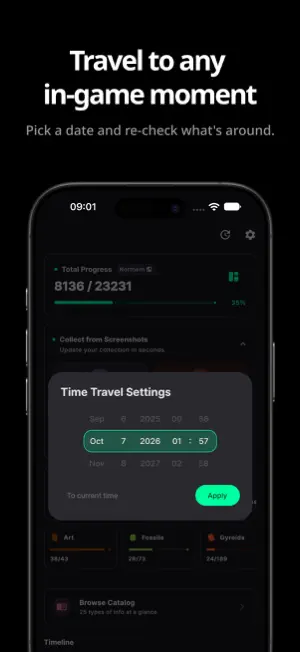
Snap a screenshot of your Animal Crossing: New Horizons gameplay, and NookBook turns it into a personal collection log. NookBook spots the items in your shot, and one tap adds them to your log. [Snap & Log — the core flow] • Capture: Take a screenshot of any list screen in the game. • Find: NookBook automatically picks out every item in the photo. • Check: One tap on the round button next to a match logs it as collected. • Collect All: Log everything it found in a single tap. • Progress: Your completion stats, remaining items, and availability info update instantly. [What you can collect from a screenshot] • Critter list screens - bugs, fish, sea creatures • Gyroid list screen • Reaction list screen [Your collection at a glance] • Combined progress for bugs, fish, and sea creatures at a glance • Uncollected items relevant to your current time and hemisphere • Remaining collection counts per category for bugs, fish, and sea creatures • Collection chips for fossils, art, and gyroids — track each at a glance • Recent activity timeline: look back on what you collected and when • Island villager status with upcoming birthdays [Reference data (bonus)] NookBook is not a handbook app. Familiar ACNH data is included as a supporting reference for your log. • Critter and item information • Real-vs-fake art guide • Location, event, and breeding tips [Useful tools] • Search, sort, filter • Hemisphere-aware availability • Time travel: jump to another date or time to see what's available then • Data backup: export your collection to a file and import it back • Light and dark themes [Why NookBook is different] Most ACNH companions only show you static data. NookBook turns your screenshots into the log itself. Disclaimer • Unofficial fan-made app • Not affiliated with Nintendo
What’s new
Version 26.43.2 · Updated October 25, 2026
NookBook has been updated to make your island life easier! - Photos can now be collected by photo frame type and all at once from the list. Photos collected earlier were moved to the first photo frame. - On tablets, the collection list and catalog now fit the wider screen. - Catalog ads now appear as cards in the list. - Fixed an issue where some insects showed the wrong rarity. - Fixed other bugs and improved performance.
App privacy
The developer, jihye han, reported these privacy practices to Apple.
Data Used to Track You
The following data may be used to track you across apps and websites owned by other companies:
- Location: Coarse Location
- Identifiers: Device ID
- Usage Data: Product Interaction, Advertising Data
Data Linked to You
The following data, which may be collected and linked to your identity, may be used for the following purposes:
- Location: Coarse Location
- Identifiers: Device ID
- Usage Data: Product Interaction, Advertising Data
- Diagnostics: Crash Data, Performance Data, Other Diagnostic Data
Used for: Third-Party Advertising, Analytics, App Functionality
Alternatives to NookBook – ACNH Snap & Log
Looking for apps like NookBook – ACNH Snap & Log? Here are 6 similar apps on the App Store. The highest rated is 단모음키보드 럭럭고 (5.0/5), and all 6 are free to download.


| App | Rating | Price | Last updated | Compare |
|---|---|---|---|---|
| NookBook – ACNH Snap & Log | – | Free | October 25, 2026 | |
| Yarn Math | – | Free | Oct 8, 2026 | Compare |
| GPAI Image | – | Free | May 15, 2026 | Compare |
| Emoji Picker - Pick Emojis | – | Free | Oct 9, 2026 | Compare |
| 단모음키보드 럭럭고 | 5.0 / 5 (1) | Free | Aug 14, 2026 | Compare |
| GW2 Garden Plots | 5.0 / 5 (2) | Free | Mar 5, 2026 | Compare |
| Survive Easy | – | Free | Jan 26, 2026 | Compare |