

ShardCast
Pritam Mukherjee Photo & Video iPhoneiPadiPod touchApple Watch
ShardCast is a free Photo & Video app for iPhone and iPad by Pritam Mukherjee. Requires iOS 26.0. Updated August 26, 2026.
- Price
- Free
- on the App Store
- Size
- 21 MB
- Age 4+
- Updated
- Aug 26
- 2026 · v1.6.8
Screenshots

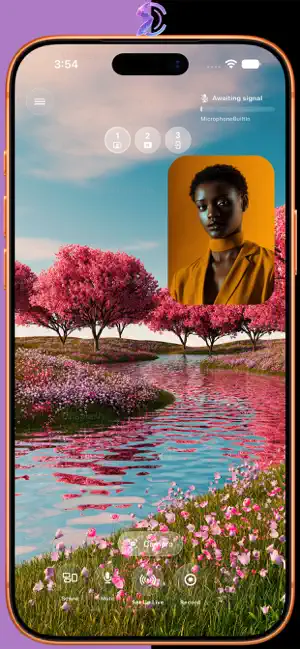


About ShardCast
Stream. Record. Screen share. Keep going when you leave the app. ShardCast turns your iPhone or iPad into a mobile live studio for creators who want a real production workflow without carrying a laptop everywhere. STREAM AND RECORD • Go live to Twitch or compatible RTMP destinations • Record locally without going live • Stream and record at the same time • Keep a separate high-quality local copy while broadcasting • Stream up to 2K and record camera video up to 4K on supported devices and setups • Save recordings to Photos, Files, or compatible external storage such as an SSD SINGLE CAMERA OR TRUE DUAL CAMERA • Use the front or rear camera • Switch between available rear lenses • Adjust front-camera zoom where supported • Use simultaneous front-and-rear cameras on supported devices • Choose front-main or rear-main Dual Camera layouts • Move and resize your Facecam / Picture in Picture directly on screen Dual Camera is available free with ShardCast-branded output. SCREEN SHARING WITH FACECAM • Share mobile gameplay, apps, walkthroughs, presentations, and other screen content • Keep your facecam visible while sharing • Record screen-based sessions locally • Stream your screen live with your camera included • Capture supported system audio and microphone audio Screen Sharing is available free with ShardCast-branded output. BUILT FOR REAL MOBILE MULTITASKING Check Maps. Open Safari. Use Files. In supported workflows, ShardCast can keep an active session going while you use another app, then let you return to your studio controls without rebuilding your setup. SCENES AND STREAM CHECK • Use Starting Soon, BRB, and Stream Ended scenes • Built-in scenes are available to everyone • Pin your most-used scenes for quick access • Prepare destination, quality, camera, audio, and scenes with Stream Check • Monitor essential stream status and health information • Add supported lightweight alert sources TWITCH AND CUSTOM RTMP • Connect your Twitch account • Read Twitch chat inside ShardCast • Send and reply to Twitch chat with ShardCast Pro • Create Twitch clips from supported controls • Stream manually to compatible Custom RTMP destinations • Record locally without connecting Twitch APPLE WATCH AND WIDGETS • Use ShardCast Deck controls from Apple Watch • Access live, recording, scene, clip, and creator actions from your wrist where available • Use ShardCast Home Screen widgets on iPhone and iPad • Jump quickly into Single Camera, Screen Sharing, Scenes, and Stream Check • View ready, recording, live, and live-plus-recording status at a glance SHARDCAST PRO Try ShardCast Pro free for 7 days if eligible. Pro includes: • Clean output without ShardCast branding on Dual Camera and Screen Sharing • Custom image and GIF artwork for stream scenes • Higher recording and streaming quality options where supported • 1440p and 4K recording options where supported • Up to 2K streaming where supported • 60 FPS options where supported • Higher bitrate headroom and Low Latency Mode • Twitch chat send and reply • Advanced overlay and alert-source controls MADE FOR CREATORS AWAY FROM THE DESK ShardCast is useful for mobile gameplay, IRL streaming, outdoor streams, talking-head videos, reactions, walkthroughs, event coverage, behind-the-scenes content, and screen sharing with facecam. Feature availability and performance depend on your device, storage, destination, account connection, selected quality settings, and network conditions. Test important sessions before relying on a new setup. Privacy Policy: https://diaclasticstudios.com/shardcast/privacy Terms of Use: https://diaclasticstudios.com/shardcast/eula
What’s new
Version 1.6.8 · Updated August 26, 2026
ShardCast 1.6.8 improves Screen Sharing quality, reliability, and flexibility. • Added 1440p Screen Sharing support on supported devices with ShardCast Pro. • Added Fit / Original and Fill 16:9 Screen Sharing options. • Improved Screen Sharing video, app audio, microphone, and facecam reliability. • Improved background streaming and quality selection. • Added privacy, security, and general reliability improvements.
App privacy
The developer, Pritam Mukherjee, reported these privacy practices to Apple.
Data Linked to You
The following data, which may be collected and linked to your identity, may be used for the following purposes:
- User Content: Photos or Videos, Audio Data, Other User Content
- Identifiers: User ID
Used for: App Functionality
Alternatives to ShardCast
Looking for apps like ShardCast? Here are 6 similar apps on the App Store. The highest rated is Taylormade Camera (5.0/5), and all 6 are free to download.
-
 StreamNow: Live Stream Studio
-
 ClickAndLive!
-
 LivestreamToolkit
-
 MoyStream Mobile
-
 TwinCam: Dual Video Recorder
-
 Taylormade Camera
5.0
| App | Rating | Price | Last updated | Compare |
|---|---|---|---|---|
| ShardCast | – | Free | August 26, 2026 | |
| StreamNow: Live Stream Studio | – | Free | Aug 20, 2026 | Compare |
| ClickAndLive! | – | Free | Oct 26, 2026 | Compare |
| LivestreamToolkit | – | Free | Jun 16, 2026 | Compare |
| MoyStream Mobile | – | Free | Mar 26, 2026 | Compare |
| TwinCam: Dual Video Recorder | – | Free | May 11, 2026 | Compare |
| Taylormade Camera | 5.0 / 5 (2) | Free | Oct 19, 2026 | Compare |
Compare ShardCast with the top alternatives: ratings, updates, ASO score and keyword gaps →