

Lucky Day · Chinese Almanac
献慧 陈 Utilities iPhoneiPadiPod touchApple Watch
Lucky Day · Chinese Almanac is a free Utilities app for iPhone and iPad by 献慧 陈. Rated 5.0/5 from 3 ratings. Requires iOS 17.0. Updated October 16, 2026.
- Rating
- 5.0
- 3 ratings
- Price
- Free
- on the App Store
- Size
- 12 MB
- Age 4+
- Updated
- Oct 16
- 2026 · v2.4
Screenshots

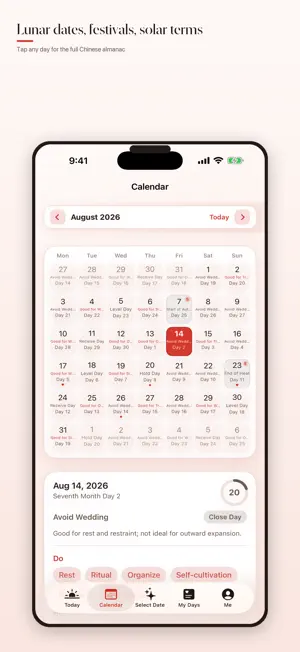


About Lucky Day · Chinese Almanac
Plan meaningful days with the traditional Chinese almanac. Explore lunar dates, festivals and solar terms, find reference dates for important plans, and remember lunar birthdays. TODAY & THE MONTH AHEAD See Gregorian and lunar dates, stems and branches, zodiac, suitable and avoid guidance, lucky hours and an explained daily score. Browse the month and open any date for full almanac details. FIND A DATE Search activities such as weddings, moving, business openings and travel. Read scored recommendations and their reasons. The basic date finder covers the next 30 days. YOUR IMPORTANT DAYS Save events, birthdays and anniversaries with reminders and lunar repeats. Optionally add events to the system calendar or export ICS and JSON files without private notes. QUICK ACCESS Home Screen and Lock Screen widgets, Live Activities, Apple Watch, iMessage, Siri and Shortcuts keep useful dates close. Your selected month, date and unsaved event details stay in place when the window size changes. LOCAL FIRST The almanac works offline, with no account or ads. Location, notifications and calendar access are optional. Sync using your own iCloud account. Light and dark appearances are included. LUCKY DAY PRO An optional one-time purchase, with no subscription, unlocks a one-year search range, advanced filters and year view, full hourly details and lucky-hour alerts, unlimited saved date favorites, a custom briefing time, themes, share-card styles and folklore tools. Event records, basic reminders and all widgets remain available without Pro. Almanac, BaZi, compatibility, dream and name content is traditional cultural entertainment reference only. It is not an official almanac, professional advice or a guarantee of real-world outcomes.
What’s new
Version 2.4 · Updated October 16, 2026
This app is independently developed and maintained by an indie developer. Feedback and bug reports are always welcome. For collaboration inquiries, please contact me by email. Enjoy the app. Email: [email protected] • Keep your selected month and date when the window changes size. • Preserve unsaved event details while changing layouts. • Refined sharing cards, support links and the purchase experience. • Fixed missing translations for several almanac activity labels.
App privacy
The developer, 献慧 陈, reported these privacy practices to Apple.
Data Not Collected
The developer does not collect any data from this app.
Alternatives to Lucky Day · Chinese Almanac
Looking for apps like Lucky Day · Chinese Almanac? Here are 6 similar apps on the App Store. The highest rated is MindFit - Your Brain Gym (5.0/5), and 3 of the 6 are free to download.
-
 iHabit: Habit Tracker & Goals
4.9
-
 MindFit - Your Brain Gym
5.0
-
 SpinCube: Cube Solver+Timer
4.2
-
 JianYi: AI Flashcards
5.0
-
 多能记-一目了然 记的多
-
 TimePulse
3.0
| App | Rating | Price | Last updated | Compare |
|---|---|---|---|---|
| Lucky Day · Chinese Almanac | 5.0 / 5 (3 ratings) | Free | October 16, 2026 | |
| iHabit: Habit Tracker & Goals | 4.9 / 5 (22) | 1.99 USD | Oct 1, 2026 | Compare |
| MindFit - Your Brain Gym | 5.0 / 5 (4) | 0.99 USD | Oct 18, 2026 | Compare |
| SpinCube: Cube Solver+Timer | 4.3 / 5 (8) | Free | Oct 9, 2026 | Compare |
| JianYi: AI Flashcards | 5.0 / 5 (3) | Free | Oct 15, 2026 | Compare |
| 多能记-一目了然 记的多 | – | Free | Aug 14, 2026 | Compare |
| TimePulse | 3.0 / 5 (1) | 0.99 USD | Sep 10, 2026 | Compare |