

Nemo Places
Guillermo Kardolus Travel iPhoneiPadiPod touchMac
Nemo Places is a free Travel app for iPhone and iPad by Guillermo Kardolus. Rated 5.0/5 from 3 ratings. Requires iOS 17.0. Updated October 13, 2026.
- Rating
- 5.0
- 3 ratings
- Price
- Free
- on the App Store
- Size
- 6 MB
- Age 4+
- Updated
- Oct 13
- 2026 · v1.5.2
Screenshots


About Nemo Places
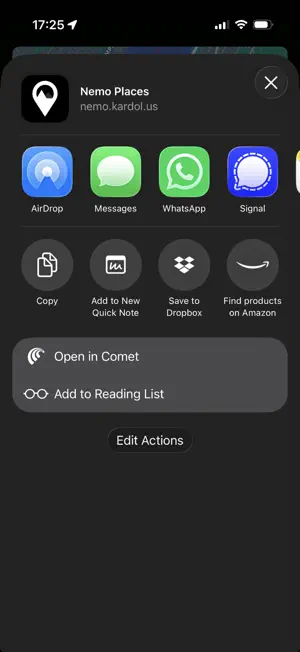
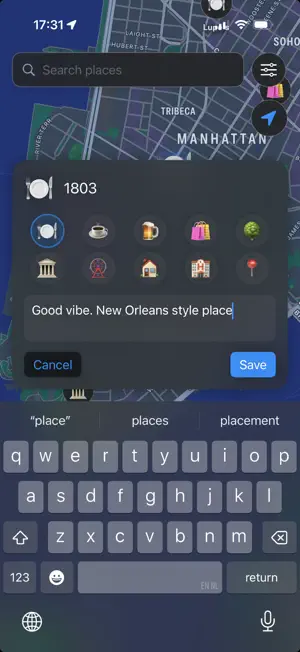
Save the places you love. Share a map that stays current. Build a personal map of favorite cafés, weekend plans and places worth coming back to. Share the places you choose with a link, or follow a friend's map right alongside your own. SHARE ONCE, KEEP IT CURRENT Choose "Share and keep updated" to create a link that follows your edits. Add a place, change a note or remove a spot, and anyone who opens the link sees the latest version. They can explore it without installing Nemo. You pick which places go out, and you can stop sharing anytime. FOLLOW A FRIEND'S MAP Keep a friend's shared map on yours. Their places appear next to your own, clearly marked, and refresh as they make changes. Get directions, or save your own copy of the ones you love. SAVE A PLACE IN SECONDS Long-press anywhere on the map to save a place. Add a name, notes and an emoji category: coffee, parks, bookstores, date spots, or whatever matters to you. FIND YOUR NEXT STOP The Visible places list shows how far each place is from you. Nothing saved in view? "Show nearest saved place" takes you to the closest one. Long-press a place in the list for Directions. On iPad in landscape and on the Mac, keep the list pinned as a sidebar that follows the map while you explore. PLANS THAT EXPIRE Give a place an expiration date for pop-ups, festivals or weekly markets. An orange clock badge marks it until it expires and hides on its own. PHOTOS FROM THIS PLACE Open a saved place to see photos you took nearby, from your own Photos library. Photos stay on your device and are never included in shared maps. SEND A COPY, TOO Send a snapshot link that anyone can explore or forward. Friends who use Nemo can save a copy of your places to their own map. IMPORT & EXPORT Bring in places from Google My Maps, GeoJSON, KML or KMZ files, and export yours anytime. ON iPHONE, iPAD AND MAC Works without an account. Optional sign-in syncs your places across your devices. No ads and no cross-app tracking. ACCESSIBILITY VoiceOver and Voice Control support. Respects Reduce Motion and Reduce Transparency.
What’s new
Version 1.5.2 · Updated October 13, 2026
Imported places keep their categories. A map's layers, Nemo's own exports and Google Takeout's saved places now land in the categories they came with, instead of all in Other. After an import, Review categories shows what ended up in Other and lets you re-file it: a whole layer in one tap, or one place at a time, with the emoji you want for Other.
App privacy
The developer, Guillermo Kardolus, reported these privacy practices to Apple.
Data Linked to You
The following data, which may be collected and linked to your identity, may be used for the following purposes:
- Location: Precise Location
- User Content: Other User Content
- Identifiers: User ID
- Usage Data: Product Interaction
- Contact Info: Email Address
Used for: Analytics, App Functionality
Data Not Linked to You
The following data, which may be collected but is not linked to your identity, may be used for the following purposes:
- Diagnostics: Crash Data
Used for: App Functionality
Alternatives to Nemo Places
Looking for apps like Nemo Places? Here are 6 similar apps on the App Store. The highest rated is My Traveler Map (5.0/5), and all 6 are free to download.
-
 My Traveler Map
5.0
My Traveler Map
5.0
-
 Open Maps: Create & Share
-
 OSM Maps
5.0
OSM Maps
5.0
-
 Scenic Map
4.7
Scenic Map
4.7
-
 GPS Map Navigation
3.0
GPS Map Navigation
3.0
-
 Live Street View - Maps
1.8
Live Street View - Maps
1.8
| App | Rating | Price | Last updated | Compare |
|---|---|---|---|---|
| Nemo Places | 5.0 / 5 (3 ratings) | Free | October 13, 2026 | |
| My Traveler Map | 5.0 / 5 (1) | Free | Jun 19, 2026 | Compare |
| Open Maps: Create & Share | – | Free | Jul 27, 2026 | Compare |
| OSM Maps | 5.0 / 5 (1) | Free | Jul 20, 2026 | Compare |
| Scenic Map | 4.7 / 5 (3) | Free | Jan 16, 2024 | Compare |
| GPS Map Navigation | 3.0 / 5 (10) | Free | Sep 12, 2026 | Compare |
| Live Street View - Maps | 1.8 / 5 (4) | Free | Aug 14, 2026 | Compare |
Compare Nemo Places with the top alternatives: ratings, updates, ASO score and keyword gaps →