

tregua - Dumb Phone Launcher
Michael Pulgar Productivity iPhoneiPadiPod touch
tregua - Dumb Phone Launcher is a free Productivity app for iPhone and iPad by Michael Pulgar. Requires iOS 17.0. Updated October 21, 2026.
- Price
- Free
- on the App Store
- Size
- 75 MB
- Age 4+
- Updated
- Oct 21
- 2026 · v2.1.2
Screenshots

About tregua - Dumb Phone Launcher
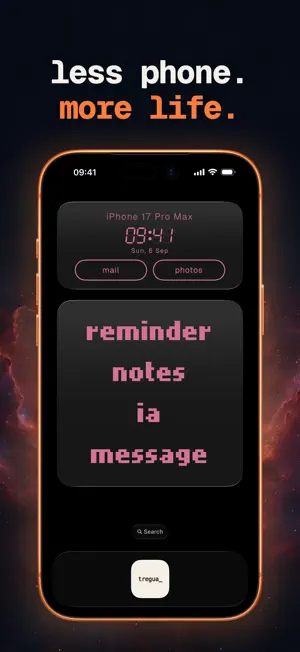
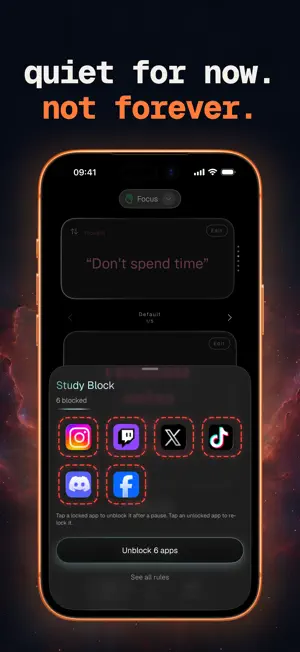
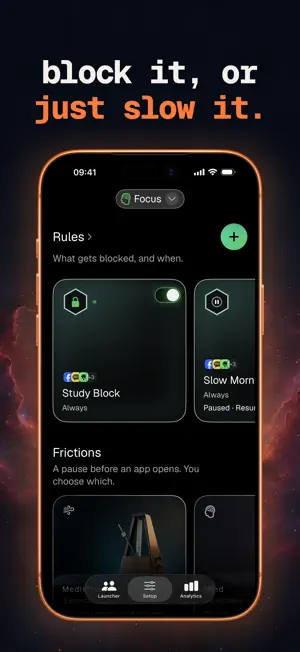
Your phone is designed to grab your attention. Tregua gives it back to you. Replace your colorful app grid with a calm, text-based launcher that makes every app opening an intentional choice. A CALMER HOME SCREEN Tregua replaces flashy app icons with simple text labels. No colors competing for your attention. No badge counts creating urgency. Just the names of your apps in a clean, monospaced list. This tiny change transforms your phone from a slot machine into a tool. PROFILES FOR EVERY PART OF YOUR DAY Create profiles to match your daily rhythm: - Work — Phone, Messages, Calendar, Maps, Notes. Only what you need to be productive. - Evening — Phone, Messages, Music, Podcasts. Wind down without distractions. - Sleep — Phone, Clock. Nothing else. Switch between profiles with a tap. Each profile shows only the apps you chose when you were thinking clearly. WIDGETS THAT REPLACE YOUR HOME SCREEN The launcher lives as a widget on your home screen. Medium and large sizes. Interactive buttons open apps directly from the widget — no need to open Tregua itself. Add a secondary widget for the time, your day, or a daily note. PAUSE THE APPS THAT PULL YOU IN Add an "Apps to Pause" list to any profile. When you open a paused app, Tregua gives you a moment to reflect first — a breathing exercise, a short delay, a type-a-phrase or quick math challenge, or a firm block. This is self-directed: you choose your own apps, for your own profile, using Apple's Screen Time API. It is not a parental control tool. SCHEDULES THAT ACTIVATE ON THEIR OWN Let a profile turn itself on by time of day, including overnight wind-down. Set it once when you are calm; it works on its own. MAKE IT YOURS (WITHOUT THE NOISE) Customize your launcher within calm, intentional boundaries: - Choose from a curated font catalog - Adjust size, spacing, and alignment - Pick from muted color presets or a calm background - Keep it monochromatic — no rainbow pickers, no busy wallpapers Every typeface, color, background and gradient is free. The look is never behind a paywall. FREE TO USE, WITH AN OPTIONAL PRO UPGRADE Tregua is free: one profile, app pausing with a schedule, the launcher and secondary widgets, and the whole calm catalog of fonts, colors, and backgrounds. Blocking apps and adding a pause are free, with at least one free option in every family of pause. Tregua Pro unlocks unlimited profiles, more schedules, daily time limits, up to 10 launcher views per profile, the Classic Phone widget, four Pro pause exercises — including Hard Block, the one mode with no way to open the app early — and optional private iCloud sync. Available as a monthly or yearly subscription (with a free trial) or a one-time Lifetime purchase. PRIVATE BY DESIGN - Everything runs on your device. No account needed. - Optional iCloud sync (Pro) uses your own iCloud account — your data never reaches our servers. - App icons and in-app App Store search use Apple's public app directory anonymously (no account, no profile). - The optional weather widget uses Apple WeatherKit. It shows the city you choose, or — if you allow it — your approximate location. Either way only that city is sent to Apple's weather service, never to us. Location is optional, approximate, read only when you tap, and never tracked in the background. - No ads, no tracking, no analytics. The only third-party library is RevenueCat, which handles purchases. We never sell your data. BUILT FOR iOS Tregua is a native SwiftUI app for iPhone. It supports Dynamic Type, VoiceOver throughout, and is available in English. Tregua is a general wellness tool for intentional phone use. It is not a medical device and does not diagnose, treat, cure, or prevent any condition. Terms of Use (EULA): https://www.apple.com/legal/internet-services/itunes/dev/stdeula/
What’s new
Version 2.1.2 · Updated October 21, 2026
In this update: • "Re-lock now" locks every app you unlocked at once, not just one. • The end of a session or a scheduled rule is now in sync: the countdown and the block end at the same second, and the notification that it ended arrives right after. • The upcoming-rule notice on the Lock Screen and in the Dynamic Island shows only rules that will really start, names their profile, wraps long names instead of cutting them, and updates when you rename a rule or a profile. • The rules of a profile that isn't active show again. • New profiles start Indigo, the Date and Word Clock widgets write dates in your language's order, and Analytics has new period buttons.
App privacy
The developer, Michael Pulgar, reported these privacy practices to Apple.
Data Not Linked to You
The following data, which may be collected but is not linked to your identity, may be used for the following purposes:
- Purchases: Purchase History
- Location: Coarse Location
- Identifiers: Device ID
Used for: Analytics, App Functionality
Alternatives to tregua - Dumb Phone Launcher
Looking for apps like tregua - Dumb Phone Launcher? Here are 6 similar apps on the App Store. The highest rated is Dumb Phone - Blanq (5.0/5), and all 6 are free to download.
-
 Blank Phone: Dumb Phone
-
 HabTrack: Habits & Discipline
-
 Minimal Space
-
 Vinyl Shelf
-
 Dumb Phone - Blanq
5.0
Dumb Phone - Blanq
5.0
-
 BeBetter: Habits & Motivation
| App | Rating | Price | Last updated | Compare |
|---|---|---|---|---|
| tregua - Dumb Phone Launcher | – | Free | October 21, 2026 | |
| Blank Phone: Dumb Phone | – | Free | Sep 5, 2026 | Compare |
| HabTrack: Habits & Discipline | – | Free | Sep 12, 2026 | Compare |
| Minimal Space | – | Free | Jan 19, 2026 | Compare |
| Vinyl Shelf | – | Free | Feb 6, 2026 | Compare |
| Dumb Phone - Blanq | 5.0 / 5 (1) | Free | Oct 15, 2026 | Compare |
| BeBetter: Habits & Motivation | – | Free | Jun 20, 2025 | Compare |