

Screen Time Control: NightLock
Georgios Avenidis Health & Fitness iPhoneiPadiPod touch
Screen Time Control: NightLock is a free Health & Fitness app for iPhone and iPad by Georgios Avenidis. Requires iOS 17.0. Updated August 8, 2026.
- Price
- Free
- on the App Store
- Size
- 7 MB
- Age 4+
- Updated
- Aug 8
- 2026 · v1.0.3
Screenshots


About Screen Time Control: NightLock
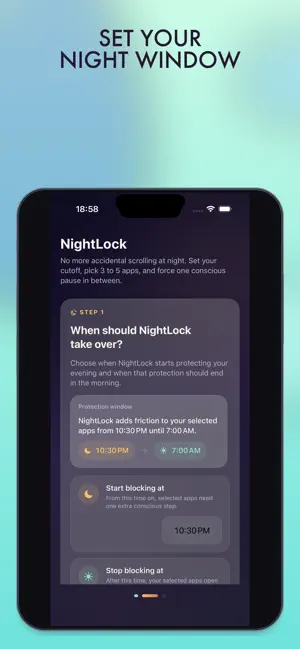
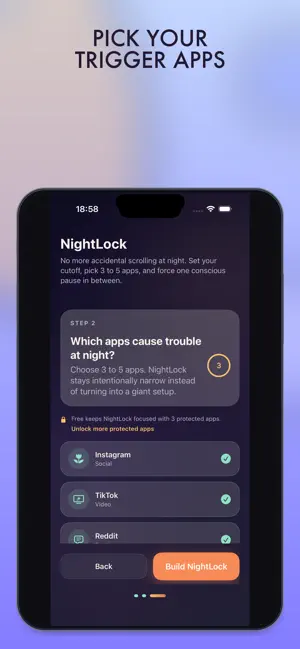
Take control of your screen time and block distracting apps when scrolling is most tempting. NightLock lets you choose apps and websites, set an automatic protection window, and add intentional friction before access. Use it to stop late-night doomscrolling without accounts, feeds, or a complicated productivity system. Features: - Block selected apps and websites during your protection window - Schedule automatic nightly screen-time control - Add a pause or two-step unlock before opening blocked apps - Allow brief temporary access when needed - Review your morning report Everything stays focused on one job: helping you stop scrolling and put your phone down. Terms of Use: https://georgevalandis.com/apps/nightlock/terms-and-conditions/
What’s new
Version 1.0.3 · Updated August 8, 2026
This update refreshes NightLock’s screen-time control and app-blocking presentation.
App privacy
The developer, Georgios Avenidis, reported these privacy practices to Apple.
Data Not Collected
The developer does not collect any data from this app.
Alternatives to Screen Time Control: NightLock
Looking for apps like Screen Time Control: NightLock? Here are 6 similar apps on the App Store.
-
 Calmod: ADHD Support
-
 Screen Time Control: Pushly
-
 BeatSleep: Wind Down to Sleep
-
 Glucosy
-
 WellVue: AI Health Agents
-
 Nourilo: Nutrition & Community
| App | Rating | Price | Last updated | Compare |
|---|---|---|---|---|
| Screen Time Control: NightLock | – | Free | August 8, 2026 | |
| Calmod: ADHD Support | – | Free | Sep 17, 2026 | Compare |
| Screen Time Control: Pushly | – | Free | Oct 28, 2026 | Compare |
| BeatSleep: Wind Down to Sleep | – | Free | Oct 15, 2026 | Compare |
| Glucosy | – | Free | Jun 6, 2026 | Compare |
| WellVue: AI Health Agents | – | Free | Oct 27, 2026 | Compare |
| Nourilo: Nutrition & Community | – | Free | Aug 15, 2026 | Compare |