

FlowDay: Daily Planner
Nguyen Xuan Hai Utilities iPhoneiPadiPod touch
FlowDay: Daily Planner is a free Utilities app for iPhone and iPad by Nguyen Xuan Hai. Requires iOS 16.0. Updated April 14, 2026.
- Price
- Free
- on the App Store
- Size
- 5 MB
- Age 4+
- Updated
- Apr 14
- 2026 · v1.0
Screenshots


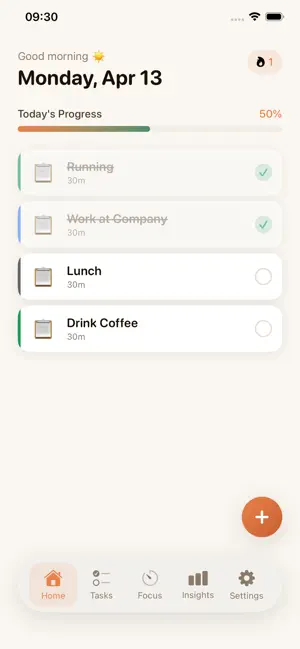

About FlowDay: Daily Planner
FlowDay turns an overwhelming to-do list into a calm, visual daily plan — designed for people whose brains work a little differently. No clutter. No noise. Just your day, laid out clearly. PLAN WITH VISUAL CLARITY See every task with its color-coded category, emoji, and exact duration at a glance. Work, Health, Learning, Social, Creative, Errands — each one has its own color so you always know what kind of day you're building. A gradient progress bar shows how much of your day you've already completed. Watching it fill up is surprisingly motivating. BUILD YOUR STREAK FlowDay tracks how many consecutive days you complete at least one task. The flame badge on your home screen grows with every productive day — no pressure, just a quiet nudge to keep going. DEEP FOCUS, ON DEMAND When it's time to concentrate, switch to the Focus Timer. Choose a session length from 5 to 60 minutes. A circular gradient ring counts down your time — and when it hits zero, a completion banner marks your win. The timer keeps running even when you switch apps, so you stay on track without babysitting the screen. UNDERSTAND YOUR PATTERNS The Insights screen shows what you actually do — not what you plan to do. A bar chart reveals your completion rate for each of the last 7 days. Your 30-day average, top category, and all-time completed tasks are computed from real activity. QUICK ADD, ANYTIME Capture a task before it slips away. Tap the + button to open a Quick Add sheet: type a title, pick a category, and it's saved in seconds. No form filling, no dropdowns, just the idea and the category. The full Task List screen lets you go deeper — set priority (High / Medium / Low), choose a duration, and search or filter by category. DESIGNED FOR REAL LIFE • Daily reminder notification at any time you choose • Warm color palette designed to reduce visual overwhelm • Full Dark Mode support • Works completely offline • No account required — your data stays on your device WHO IS FLOWDAY FOR? FlowDay is built for anyone who finds traditional to-do apps too complex, too cluttered, or too demanding. If you have ADHD, are neurodivergent, or simply prefer a calmer approach to planning — FlowDay is for you. FlowDay: Daily Planner is free to download and use.
App privacy
The developer, Nguyen Xuan Hai, reported these privacy practices to Apple.
Data Not Collected
The developer does not collect any data from this app.
Alternatives to FlowDay: Daily Planner
Looking for apps like FlowDay: Daily Planner? Here are 6 similar apps on the App Store. The highest rated is VeloClean: Photo Cleaner (5.0/5), and all 6 are free to download.
-
 TimeBlast: Custom Voice Alarm
-
 VeloClean: Photo Cleaner
5.0
-
 Incident Genie
2.0
-
 Plant Identifier: AI Vision
-
 ADHD Daily Planner - Daylic
-
 Juiced Up
5.0
| App | Rating | Price | Last updated | Compare |
|---|---|---|---|---|
| FlowDay: Daily Planner | – | Free | April 14, 2026 | |
| TimeBlast: Custom Voice Alarm | – | Free | Apr 26, 2026 | Compare |
| VeloClean: Photo Cleaner | 5.0 / 5 (1) | Free | Sep 14, 2026 | Compare |
| Incident Genie | 2.0 / 5 (2) | Free | Mar 28, 2026 | Compare |
| Plant Identifier: AI Vision | – | Free | Jun 4, 2026 | Compare |
| ADHD Daily Planner - Daylic | – | Free | May 30, 2026 | Compare |
| Juiced Up | 5.0 / 5 (1) | Free | Sep 24, 2026 | Compare |