

WidgText: Text & Quote Widgets
Aaron Price Utilities iPhoneiPadiPod touch
WidgText: Text & Quote Widgets is a free Utilities app for iPhone and iPad by Aaron Price. Rated 5.0/5 from 5 ratings. Requires iOS 17.0.
- Rating
- 5.0
- 5 ratings
- Price
- Free
- on the App Store
- Size
- 10 MB
- Age 4+
- Updated
- Oct 24
- 2026 · v2.6
Screenshots


About WidgText: Text & Quote Widgets
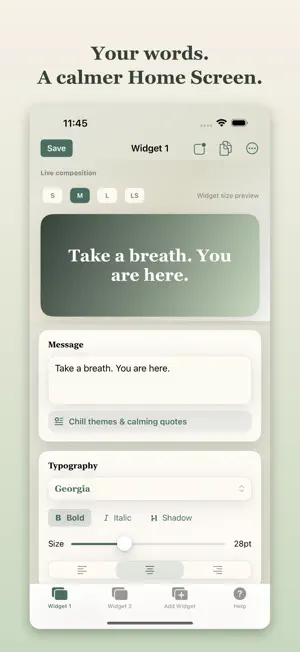
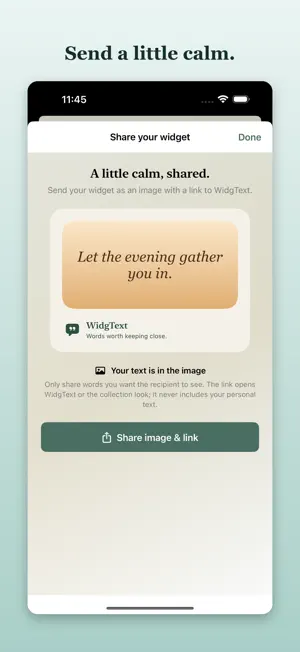
Made for iPhone Duo, and every iPhone. Open your iPhone Duo and give one calm thought two facing pages. Choose what your words look like in StandBy. WidgText brings daily affirmations, mindful quotes, and your own reminders to your Home Screen, Lock Screen, and StandBy. No streaks, guilt, or badges. MADE FOR IPHONE DUO • Book Spread with Pro: Create two widgets as facing pages, like an open book. Split a message across them or answer it with a gentle reflection, with a mirrored background on the right. Place the pair side by side on the two Home Screen pages of the open display. • Desk Mode: Choose a StandBy style. Minimal shows light words on black, free; Pro shows your full design as a card. • A sidebar workspace on the large open display, and familiar tabs when it's closed. Your edits carry over as you open and close it. • On any other iPhone, a Book Spread sits side by side and Desk Mode works in StandBy. LOOKS FOR THE SEASON • Explore seasonal collections of widget designs and mindful words. Earlier collections stay in the archive. • Start with free designs, choose an optional rewarded ad to keep a featured look, or unlock Pro collection designs. MORE PLACES FOR YOUR WORDS • Add a free one-line quote above the Lock Screen clock. Longer words may be shortened to fit. • Open Widget 1's editor with a free Control Center control on iOS 18 or later. MAKE IT YOURS • Write your own mantra, intention, reminder, or inside joke. • See your widget change as you edit colors, gradients, type, alignment, shadows, and borders. • Preview small, medium, and large Home Screen widgets and Lock Screen styles. iPad adds an Extra Large widget and a sidebar workspace. • Choose from 120 classic mindful messages, plus words in seasonal collections. • Keep one thought, or rotate a list: up to three quotes in Free, unlimited rotating quotes with Pro. • Receive an optional daily mindful notification at a time you choose. SHARE A LITTLE CALM • Export free Stories (1080×1920) or Pinterest (1000×1500) images with a quiet “made with WidgText” mark. Your words are visible in the image; its accompanying links exclude personal text. • Share your look as a design link. Words are excluded by default; include them only if you want anyone with the link to read them. • Recipients preview the look, choose whether to use any shared words, then Save. Pro styles require their own unlocks. New recipients install WidgText, then reopen the design link. FREE TO START. PRO IS ONE PURCHASE. Free includes one widget slot, eight classic themes, all 120 classic messages to choose from, daily thoughts, Desk Mode's minimal style, and free seasonal looks. The free version includes ads. Optional rewarded ads can permanently unlock a second slot and up to five more fonts. WidgText Pro adds Book Spreads, your full design in StandBy, a personal library of named looks saved on this device, Pro collection designs, up to 8 independent widget slots, all 34 fonts, three exclusive classic themes, advanced gradients and borders, grain texture, unlimited rotating quotes, full scheduling, eight alternate app icons, and no ads. One purchase. No subscription. No account is needed. Your widget text and saved looks stay on your device unless you share an image or choose to include words in a design link. Design links are not encrypted. Firebase Analytics measures app use; Google AdMob supports the free version. Your words. Your look. A calmer Home Screen.
Ratings & reviews
5.0
5 ratings
What’s new
Version 2.6 · Updated October 24, 2026
Made for iPhone Duo, with more room for your words. • Book Spread with Pro: Create two widgets as facing pages, splitting a message or adding a gentle reflection. Place the pair yourself on your Home Screen. • Desk Mode: Choose light words on black with free Minimal, or your full design as a card with Pro. • A sidebar workspace on the larger display of iPhone Duo, plus fixes for editor continuity and banner sizing when display space changes. • Free Stories and Pinterest image exports with a “made with WidgText” mark and an accompanying App Store link. • Share design links with words excluded by default. Preview before using a look; new recipients install the app, then reopen the link. Pro styles require their own unlocks. • Free one-line Lock Screen quotes above the clock and a Control Center shortcut to Widget 1's editor on iOS 18 or later.
App privacy
The developer, Aaron Price, reported these privacy practices to Apple.
Data Used to Track You
The following data may be used to track you across apps and websites owned by other companies:
- Diagnostics: Crash Data
Data Not Linked to You
The following data, which may be collected but is not linked to your identity, may be used for the following purposes:
- Identifiers: Device ID
- Usage Data: Advertising Data, Product Interaction, Other Usage Data
- Diagnostics: Crash Data, Performance Data, Other Diagnostic Data
Used for: Third-Party Advertising, Analytics, App Functionality
Alternatives to WidgText: Text & Quote Widgets
Looking for apps like WidgText: Text & Quote Widgets? Here are 6 similar apps on the App Store. The highest rated is Getwid: Widget Design Studio (5.0/5), and all 6 are free to download.
-
 Lock Screen Text
-
 Mood: Widgets
-
 Getwid: Widget Design Studio
5.0
Getwid: Widget Design Studio
5.0
-
 LockMotto - Lock Screen Quotes
5.0
LockMotto - Lock Screen Quotes
5.0
-
 Rotate: Schedule Widgets
4.9
Rotate: Schedule Widgets
4.9
-
 Practicia: Practice Log
| App | Rating | Price | Last updated | Compare |
|---|---|---|---|---|
| WidgText: Text & Quote Widgets | 5.0 / 5 (5 ratings) | Free | October 24, 2026 | |
| Lock Screen Text | – | Free | Sep 10, 2026 | Compare |
| Mood: Widgets | – | Free | Aug 5, 2026 | Compare |
| Getwid: Widget Design Studio | 5.0 / 5 (2) | Free | Sep 9, 2026 | Compare |
| LockMotto - Lock Screen Quotes | 5.0 / 5 (1) | Free | Sep 5, 2026 | Compare |
| Rotate: Schedule Widgets | 4.9 / 5 (24) | Free | Feb 22, 2024 | Compare |
| Practicia: Practice Log | – | Free | Jul 14, 2026 | Compare |