

Caldzy: Family Calendar Sync
Joshua Lipton Productivity iPhoneiPadiPod touch
Caldzy: Family Calendar Sync is a free Productivity app for iPhone and iPad by Joshua Lipton. Rated 5.0/5 from 5 ratings. Requires iOS 18.6.
- Rating
- 5.0
- 5 ratings
- Price
- Free
- on the App Store
- Size
- 36 MB
- Age 4+
- Updated
- Sep 27
- 2026 · v2026.9.20
Screenshots



About Caldzy: Family Calendar Sync
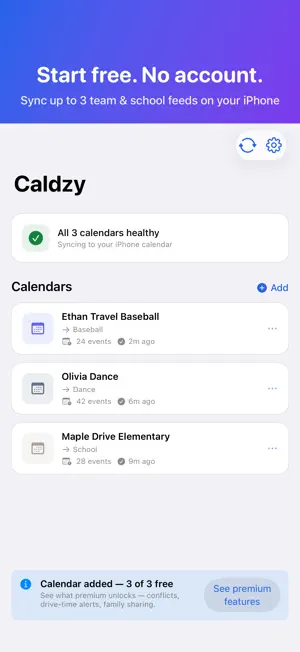
Your calendar. Your family's calendars. Your kids' sports and school feeds. All in one view that syncs straight into the Calendar app you already use — so nothing slips through the cracks. Start free, no account needed: add up to 3 team, school, or league feeds and Caldzy keeps them current in the Calendar app on your iPhone. Go Premium when you want conflict detection, drive times, family sharing, and unlimited feeds. FREE — NO SIGN-UP • Sync up to 3 calendar feeds (ICS / webcal) straight into your Calendar app, right on your device • One-tap team connect — link a GameChanger team in seconds and Caldzy finds its calendar for you; or add TeamSnap, SportsEngine, a league site, or any ICS/webcal link • Built-in calendar — day, week, and month views with smooth swipe navigation • Background refresh — feeds stay current through the day, even when the app is closed • Filtered views — toggle individual calendars on and off to focus on what matters • Private by default — no account, no password, and your feeds sync on your phone PREMIUM — 7-DAY FREE TRIAL • Unlimited feeds — every team, every kid, every season • Family sharing — invite family members and see each other's calendars without sharing passwords • Conflict detection — spot double-bookings across everyone's schedules before game day • Today view with drive times — traffic-aware "leave by" times for every event • Smart Arrival — event times adjust for real-world travel distance so you always leave on time • Event filters — hide the notices, categories, and keywords you don't want in your calendar • Cloud sync — Caldzy's servers keep every device current and can write to iCloud or Google Calendar HOW IT WORKS 1. Add a feed — connect a GameChanger team or paste any calendar link. 2. Pick the calendar on your iPhone it should land in. 3. Done. Caldzy refreshes it automatically, and events show up in the Calendar app on every device that calendar already syncs to. Premium adds Caldzy's cloud sync. Connect iCloud with an app-specific password — a secure, revocable password generated by Apple just for this app; your Apple ID password is never shared with Caldzy — or connect Google Calendar. "Caldzy has been a game changer for our family! With two boys in travel baseball and a daughter in dance, our schedule is nonstop… I was able to sync both GameChanger and TeamSnap into one calendar." — App Store review SUBSCRIPTION The free tier never expires. Premium is an optional subscription with a 7-day free trial, Monthly or Yearly. Subscriptions auto-renew at the price and period selected at purchase, and renew within 24 hours of the end of the current period unless canceled. You can manage or cancel your subscription at any time in your Apple ID account settings. Terms of Use (EULA): https://caldzy.com/terms Privacy Policy: https://caldzy.com/privacy iCloud and Apple ID are trademarks of Apple Inc., registered in the U.S. and other countries. GameChanger, TeamSnap, and SportsEngine are trademarks of their respective owners. Caldzy is not affiliated with or endorsed by Apple Inc. or any of these services.
Ratings & reviews
5.0
5 ratings
What’s new
Version 2026.9.20 · Updated September 27, 2026
Caldzy is now free to start — no account needed. • Free tier — add up to 3 team, school, or league feeds and Caldzy syncs them straight into the Calendar app on your iPhone. No sign-up, no password. • Connect GameChanger in seconds — sign in, pick your team, and Caldzy finds its calendar link for you. • Today view — traffic-aware "leave by" times and conflict warnings for the day ahead (Premium). • Event filters — hide the notices, categories, or keywords you don't want, with rules you can combine any way you like (Premium). • All-day events stay all-day — school closures and tournament days no longer land as midnight appointments. • School feeds that rebuild their calendar every day no longer flicker or disappear. • Reliability, privacy, and performance improvements throughout. Thanks for using Caldzy!
App privacy
The developer, Joshua Lipton, reported these privacy practices to Apple.
Data Linked to You
The following data, which may be collected and linked to your identity, may be used for the following purposes:
- Contact Info: Email Address
- Identifiers: User ID, Device ID
- Other Data: Other Data Types
Used for: App Functionality
Alternatives to Caldzy: Family Calendar Sync
Looking for apps like Caldzy: Family Calendar Sync? Here are 6 similar apps on the App Store. The highest rated is Nudge: AI To-Do Planner (5.0/5), and 5 of the 6 are free to download.
-
 PenCalendarPro
1.0
PenCalendarPro
1.0
-
 Nudge: AI To-Do Planner
5.0
Nudge: AI To-Do Planner
5.0
-
 Faivelo
-
 Add to Calendar: AI Events
5.0
Add to Calendar: AI Events
5.0
-
 Treehouse: Family Hub
5.0
Treehouse: Family Hub
5.0
-
 GCM Mail
| App | Rating | Price | Last updated | Compare |
|---|---|---|---|---|
| Caldzy: Family Calendar Sync | 5.0 / 5 (5 ratings) | Free | September 27, 2026 | |
| PenCalendarPro | 1.0 / 5 (1) | 19.99 USD | Jun 3, 2026 | Compare |
| Nudge: AI To-Do Planner | 5.0 / 5 (15) | Free | Jul 17, 2026 | Compare |
| Faivelo | – | Free | Oct 15, 2026 | Compare |
| Add to Calendar: AI Events | 5.0 / 5 (1) | Free | Jul 27, 2026 | Compare |
| Treehouse: Family Hub | 5.0 / 5 (5) | Free | Oct 15, 2026 | Compare |
| GCM Mail | – | Free | Nov 1, 2025 | Compare |