

Photo Organizer: Waypost
David O'Brien Photo & Video iPhoneiPadiPod touch
Photo Organizer: Waypost is a free Photo & Video app for iPhone and iPad by David O'Brien. Rated 5.0/5 from 4 ratings. Requires iOS 17.0.
- Rating
- 5.0
- 4 ratings
- Price
- Free
- on the App Store
- Size
- 157 MB
- Age 4+
- Updated
- Oct 19
- 2026 · v1.7.6
Screenshots



About Photo Organizer: Waypost
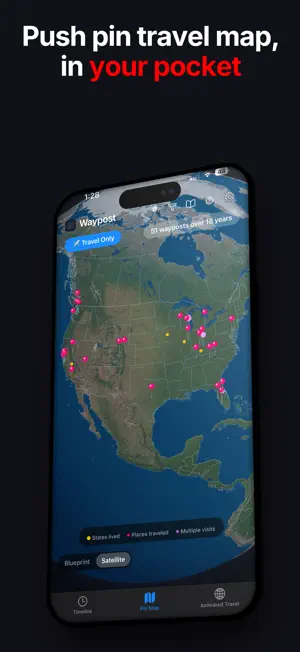
Turn your photos into organized events, a timeline and a map of your travels. Waypost works on your device, with backups and sync through iCloud. HOW IT STARTS Waypost groups your photos and videos into events: trips, weekends and special occasions. Rename, split and refine events without rearranging your original photos. New events appear as your library grows. Optionally connect your calendar to help name events; calendar information is processed on your device and never sent to Waypost. FIND YOUR MEMORIES BY TIME OR PLACE Timeline. Browse events chronologically with cover photos, search and year filters. Open an event to revisit its photos and videos. Pin Map. Explore your travels on a rotatable, zoomable globe. Blueprint is included free. Premium adds the atmospheric Satellite globe and the new Dotted view, plus Blueprint clouds, atmosphere glow, land fill and additional colors. Tap destinations to open your travel moments, with a trip picker for repeat visits. Animated Travel — Premium. Tour circles the globe and reveals your destinations. Journey follows your travels in order, going directly between trips or returning via home. Export Blueprint or Satellite animations as video, or share a Blueprint Tour as a browser link. Passport. Collect country stamps automatically as you travel. Premium opens the passport book so you can browse your stamps and revisit the photos behind them. ACROSS YOUR DEVICES Keep your events, names and edits in sync across iPhone and iPad through your own private iCloud. No Waypost account required. Photos are displayed from each device’s photo library. ON YOUR HOME SCREEN Rediscover memories with Event Showcase, continent maps and travel and photo statistics. Customize your widgets. BRING EVERYONE’S TRIP PHOTOS TOGETHER — PREMIUM Everyone came home with different photos. Choose what to share, export a .waypost file and send it through AirDrop, Messages, email or your preferred messaging app. Another Waypost user can import the photos into their library, with duplicate photos flagged during import. CREATE SOMETHING WORTH SHARING — PREMIUM Make a Classic Holiday Greeting card or Modern greeting video. Create a postcard or Captioned Snap, enjoy an event slideshow, or gather pictures into an Apple Photo Album for your favorite print service. FREE AND PREMIUM Free features include: • Timeline, search, filters and event browsing • Blueprint Pin Map • Automatic event detection and basic editing • Recurring events, duplicate photo review and photo statistics • Collecting Passport stamps • Private iCloud backups and device sync Premium adds: • Satellite and Dotted globe styles • Blueprint effects and premium globe and widget colors • Animated Travel and supported video and browser-link sharing • Passport book and event slideshows • Holiday Greetings and .waypost trip sharing • Captioned Snap, Postcards and Apple Photo Albums • Merge Events and Rename Many Eligible users can try Premium free for 14 days. No payment is collected for the trial, and it does not automatically renew or charge you when it ends. Continue with free features or choose monthly, annual or lifetime Premium access. Loyal members can also earn three months of Premium. PRIVATE BY DESIGN Waypost processes your photo library on your device. Your event data backs up and syncs through your own iCloud. RevenueCat helps verify purchase status. Waypost does not receive your photo or event library. There is no real-time location tracking: maps use location information already attached to your photos. You choose what to share and which app sends it. Browser animation links exclude photos, event names and dates. No ads or tracking. Anonymous usage stats (PostHog) and crash reports (Sentry) never include your photos, places, calendar or event names. Privacy Policy: https://thewaypost.app/privacy Terms of Use: https://www.apple.com/legal/internet-services/itunes/dev/stdeula/
What’s new
Version 1.7.6 · Updated October 19, 2026
Improved user experience and bug fixes
App privacy
The developer, David O'Brien, reported these privacy practices to Apple.
Data Linked to You
The following data, which may be collected and linked to your identity, may be used for the following purposes:
- Identifiers: Device ID, User ID
- Purchases: Purchase History
Used for: Analytics, App Functionality
Data Not Linked to You
The following data, which may be collected but is not linked to your identity, may be used for the following purposes:
- Usage Data: Product Interaction
- Diagnostics: Crash Data, Performance Data, Other Diagnostic Data
Used for: Analytics, App Functionality
Alternatives to Photo Organizer: Waypost
Looking for apps like Photo Organizer: Waypost? Here are 6 similar apps on the App Store. The highest rated is FlipPhotos:3D Flip Photos (5.0/5), and all 6 are free to download.
-
 Just Now Baby - Photo Album
-
 Culla: Photo Organizer
-
 Soroi: Shared Photo Albums
-
 Waypost - Humans Only
4.9
Waypost - Humans Only
4.9
-
 FlipPhotos:3D Flip Photos
5.0
FlipPhotos:3D Flip Photos
5.0
-
 AI Video Translator & Dubbing
4.2
AI Video Translator & Dubbing
4.2
| App | Rating | Price | Last updated | Compare |
|---|---|---|---|---|
| Photo Organizer: Waypost | 5.0 / 5 (4 ratings) | Free | October 19, 2026 | |
| Just Now Baby - Photo Album | – | Free | Mar 23, 2026 | Compare |
| Culla: Photo Organizer | – | Free | Jul 14, 2026 | Compare |
| Soroi: Shared Photo Albums | – | Free | Oct 9, 2026 | Compare |
| Waypost - Humans Only | 4.9 / 5 (40) | Free | Oct 22, 2026 | Compare |
| FlipPhotos:3D Flip Photos | 5.0 / 5 (3) | Free | Jul 17, 2026 | Compare |
| AI Video Translator & Dubbing | 4.2 / 5 (99) | Free | Feb 10, 2025 | Compare |