

talktrack teleprompter
Lucas Hurd Photo & Video iPhoneiPadiPod touch
talktrack teleprompter is a free Photo & Video app for iPhone and iPad by Lucas Hurd. Requires iOS 17.6. Updated April 29, 2026.
- Price
- Free
- on the App Store
- Size
- 3 MB
- Age 4+
- Updated
- Apr 29
- 2026 · v1.19
Screenshots


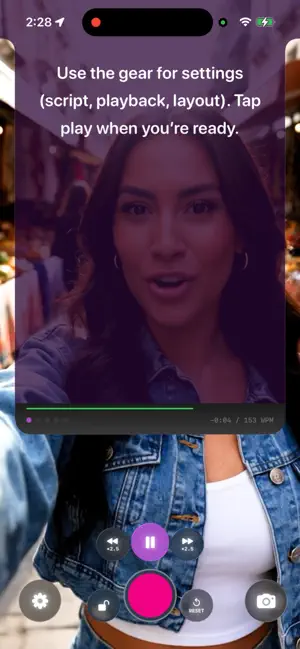

About talktrack teleprompter
talktrack is a teleprompter that actually respects you. No insane price tag. No monthly subscription bleeding your wallet. No bloated "video suite" with features you'll never touch. Just a sharp, focused teleprompter built for people who create things. Your script sits right under the camera lens in a floating panel, so you stay on message without breaking eye contact. Hit record. Read your words. Save to your camera roll. Done. Three ways to use your scripts: Timed scroll lets you set a speed and go. Simple. Voice-activated scroll listens to your voice and moves when you talk, pauses when you stop. Hands-free. Speech-tracked scroll (experimental / iOS 26+) actually follows along with your words in real time using on-device speech recognition. It knows where you are in the script and keeps pace with you, not the other way around. You can go off-script and come back, the teleprompter will pick up where you left off. You can also control talktrack with your voice. Say "talktrack start" and it rolls. Say "talktrack stop" and it holds. "Faster," "slower," "reset," "record." No tapping, no swiping, no interrupting your flow. No remote needed (but we support those too). Five script slots so you can prep multiple takes or segments without copy-pasting between apps. Import scripts from .txt, .docx, .pdf, or .rtf files. Toggle slots in and out of the prompter on the fly. Full manual camera controls. Exposure, white balance, ISO, shutter speed, focus, video quality. Front or back camera. Pinch to zoom. Tap to focus. Everything saves straight to your Photos library. Record in both portrait and landscape at the same time (rear camera only). Works with Bluetooth presentation remotes and keyboards for hands-free control from across the room. Enable mirroring for use with beam-splitter teleprompter rigs. Built with Liquid Glass on iOS 26. Looks gorgeous. Runs smooth. talktrack is a one-time price. Once. Forever. Every feature, every update. No accounts, no subscription, no tier gating, no "pro unlock" that holds your own words hostage. Try it free for 3 days before you decide. Made for creators, students, musicians, podcasters, teachers, preachers - literally anyone who has something to say and wants to say it well. This is a teleprompter for the rest of us.
What’s new
Version 1.19 · Updated April 29, 2026
What's New in 1.19 Fixed a rotation bug that affected some iPhone Pro models on iOS 26, where the camera preview or recording could appear rotated 90° from portrait. Cinematic mode is back with full controls — input is swapped automatically to a Cinematic-capable lens, and the simulated-aperture wheel works again. Picture-in-Picture is more flexible: on iPhone Pro you can now switch between W+UW, W+T, and UW+T lens pairs from the camera HUD without leaving PiP. PiP toggling is also smoother and no longer hangs or briefly collapses the bottom controls. Stereo audio + better recording quality: video recordings now use the built-in mic array's stereo pattern at 192 kbps AAC, 48 kHz — matching the iOS Camera app instead of the previous mono ~88 kbps default. This applies to both single-camera and PiP recordings. Voice commands work the first time you enable them. Previously you had to toggle Voice Commands off and back on (or relaunch) after granting Speech permission before the recognizer would start listening. Voice commands stay alive across audio route changes (camera flips, Bluetooth/headset connect/disconnect, Cinematic input swaps) — they no longer silently go deaf after a route change. Voice commands and Auto Listen no longer poison recorded audio with a noise floor; they now share the same .videoRecording audio mode the camera uses. More UI polish Extra love!
App privacy
The developer, Lucas Hurd, reported these privacy practices to Apple.
Data Not Collected
The developer does not collect any data from this app.
Alternatives to talktrack teleprompter
Looking for apps like talktrack teleprompter? Here are 6 similar apps on the App Store. The highest rated is Teleprompter for Video (4.9/5), and all 6 are free to download.
-
 Teleprompt Overlay
1.0
Teleprompt Overlay
1.0
-
 QCam: Pro Teleprompter Camera
4.7
QCam: Pro Teleprompter Camera
4.7
-
 Telepromter for Video
4.4
Telepromter for Video
4.4
-
 CueCam: AI Video Teleprompter
4.4
CueCam: AI Video Teleprompter
4.4
-
 Telepromptr
4.6
Telepromptr
4.6
-
 Teleprompter for Video
4.9
Teleprompter for Video
4.9
| App | Rating | Price | Last updated | Compare |
|---|---|---|---|---|
| talktrack teleprompter | – | Free | April 29, 2026 | |
| Teleprompt Overlay | 1.0 / 5 (1) | Free | Jul 7, 2026 | Compare |
| QCam: Pro Teleprompter Camera | 4.7 / 5 (22) | Free | Oct 19, 2026 | Compare |
| Telepromter for Video | 4.4 / 5 (132) | Free | Jul 22, 2026 | Compare |
| CueCam: AI Video Teleprompter | 4.4 / 5 (38) | Free | Oct 18, 2026 | Compare |
| Telepromptr | 4.6 / 5 (1,345) | Free | Dec 12, 2024 | Compare |
| Teleprompter for Video | 4.9 / 5 (15,111) | Free | Sep 29, 2026 | Compare |