

QR Smart – Scan & Generate QR
Bees Studio Productivity iPhoneiPadiPod touch
QR Smart – Scan & Generate QR is a free Productivity app for iPhone and iPad by Bees Studio. Requires iOS 17.0. Updated May 19, 2026.
- Price
- Free
- on the App Store
- Size
- 50 MB
- Age 4+
- Updated
- May 19
- 2026 · v1.0.1
Screenshots



About QR Smart – Scan & Generate QR
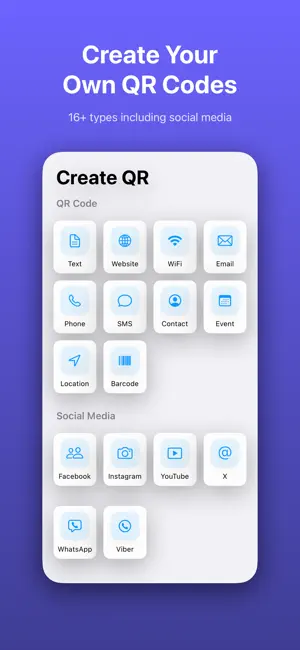
QRSmart is your all-in-one solution to scan QR codes, read barcodes, and generate custom QR codes in seconds. Designed for speed, simplicity, and privacy, it helps you handle everyday tasks effortlessly. Key Features Instant QR & Barcode Scanning Quickly scan all types of QR codes and barcodes using your camera or images from your photo library. Easy QR Code Generator Create QR codes for URLs, Wi-Fi, contacts, emails, SMS, events, and more in just a few taps. Batch Scanning Mode Scan multiple codes continuously without interruption, perfect for events, check-ins, or inventory. Smart History Management Automatically saves all scanned and generated codes. Easily search, organize, or mark favorites. Quick Sharing Share QR codes via social apps, email, or save them directly to your device. Privacy First Your privacy matters: All data is processed locally on your device. No personal data is collected or shared. Why Choose QRSmart? Fast, lightweight, and accurate Supports multiple formats (URL, Wi-Fi, SMS, vCard, etc.) Clean and user-friendly interface Suitable for both personal and professional use How to Use Open the app and allow camera access Choose to scan or create a QR code Get instant results Save or share as needed Download QRSmart today and enjoy a fast, simple, and secure QR experience.
What’s new
Version 1.0.1 · Updated May 19, 2026
Our teams have solved many crashed, fixed issues you've reported and made the app faster.
App privacy
The developer, Bees Studio, reported these privacy practices to Apple.
Data Used to Track You
The following data may be used to track you across apps and websites owned by other companies:
- Identifiers: Device ID
Data Linked to You
The following data, which may be collected and linked to your identity, may be used for the following purposes:
- Identifiers: Device ID
Used for: Third-Party Advertising
Data Not Linked to You
The following data, which may be collected but is not linked to your identity, may be used for the following purposes:
- Usage Data: Product Interaction, Advertising Data
- Diagnostics: Crash Data, Performance Data
- Identifiers: Device ID
Used for: Third-Party Advertising, Analytics
Alternatives to QR Smart – Scan & Generate QR
Looking for apps like QR Smart – Scan & Generate QR? Here are 6 similar apps on the App Store. The highest rated is Ping: Never Forget Again (5.0/5), and all 6 are free to download.
-
 Ping: Never Forget Again
5.0
Ping: Never Forget Again
5.0
-
 Majordomo: AI agents for all
5.0
Majordomo: AI agents for all
5.0
-
 Task Calendar - Todo & Planner
-
 Khmer Lunar Calendar +
1.0
Khmer Lunar Calendar +
1.0
-
 MISA OneAI: AI for Family
1.0
MISA OneAI: AI for Family
1.0
-
 Business Card Digital Scanner
4.4
Business Card Digital Scanner
4.4
| App | Rating | Price | Last updated | Compare |
|---|---|---|---|---|
| QR Smart – Scan & Generate QR | – | Free | May 19, 2026 | |
| Ping: Never Forget Again | 5.0 / 5 (4) | Free | Oct 19, 2026 | Compare |
| Majordomo: AI agents for all | 5.0 / 5 (4) | Free | Mar 16, 2026 | Compare |
| Task Calendar - Todo & Planner | – | Free | Oct 28, 2026 | Compare |
| Khmer Lunar Calendar + | 1.0 / 5 (1) | Free | Sep 17, 2026 | Compare |
| MISA OneAI: AI for Family | 1.0 / 5 (2) | Free | Oct 16, 2026 | Compare |
| Business Card Digital Scanner | 4.4 / 5 (41) | Free | Oct 24, 2026 | Compare |