

Sudoku Scan and Solve
Olive & Co Games iPhoneiPadiPod touch
Sudoku Scan and Solve is a free Games app for iPhone and iPad by Olive & Co. Requires iOS 15.1. Updated September 3, 2026.
- Price
- Free
- on the App Store
- Size
- 89 MB
- Age 4+
- Updated
- Sep 3
- 2026 · v1.0.5
Screenshots


About Sudoku Scan and Solve
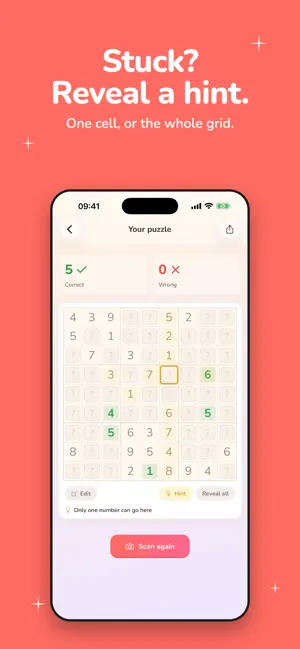
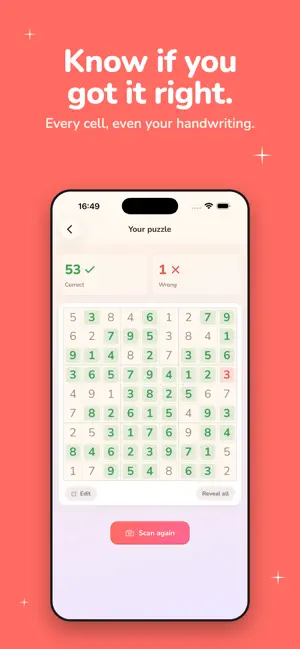
Know if you got every cell right. Even your handwriting. Even mid-puzzle. Snap a sudoku from any newspaper, puzzle book, or screenshot. Your pencil answers turn green when right, red when wrong. No answer key, no eraser, no retyping digits. Works on the plane, on the train, anywhere. WHY IT'S DIFFERENT - Know if you got it right. Most scanners only see printed digits. This one checks your handwritten answers too. - Never get stuck. Reveal one cell, or the whole grid, in a tap. - 100% on-device. No internet, no account, no server. Photos and grids never leave your iPhone. - Two-second scans. Point, tap, done. No spinner. - Works on real paper. Folded newsprint, puzzle-book curl, dim cafe light. The grid detector handles it. - Camera or library or keyboard. Scan live, pick a screenshot, or type the puzzle in by hand. HOW IT WORKS Printed clues stay neutral. Correct answers glow green. Wrong answers flag red. Tap any empty cell to reveal one number, or solve the whole grid at once. MADE FOR - Solvers double-checking the last cell before claiming victory. - Parents and teachers verifying kids' work without the answer key. - Puzzle-book readers who want a safety net for pencil and paper. - Travelers solving puzzles offline on planes and trains. PREMIUM Unlocks unlimited scans and removes ads. Subscriptions auto-renew through Apple and can be managed any time from Settings > Apple ID > Subscriptions. PRIVACY Recognition and solving run locally on your iPhone. Puzzles are never uploaded. Anonymous diagnostics and ad identifiers cover crash reporting and ad delivery, both governed by your iOS settings. Privacy: https://www.oliveandco.dev/privacy/sudoku-scan-and-solve Terms: https://www.oliveandco.dev/terms/sudoku-scan-and-solve Support: [email protected]
What’s new
Version 1.0.5 · Updated September 3, 2026
This updates comes with big performance improvements: - Faster app start: the app opens much quicker - Faster scanning: Sudoku puzzles are detected and solved in less time
App privacy
The developer, Olive & Co, reported these privacy practices to Apple.
Data Linked to You
The following data, which may be collected and linked to your identity, may be used for the following purposes:
- Location: Coarse Location
- Identifiers: Device ID, User ID
- Usage Data: Product Interaction, Advertising Data
- Purchases: Purchase History
Used for: Third-Party Advertising, Analytics, App Functionality
Data Not Linked to You
The following data, which may be collected but is not linked to your identity, may be used for the following purposes:
- Diagnostics: Crash Data, Performance Data
Used for: Analytics, App Functionality
Alternatives to Sudoku Scan and Solve
Looking for apps like Sudoku Scan and Solve? Here are 6 similar apps on the App Store. The highest rated is Puzzlesight - Sudoku AI (5.0/5), and 5 of the 6 are free to download.
-
 Squoku
-
 Puzzlesight - Sudoku AI
5.0
Puzzlesight - Sudoku AI
5.0
-
 Sudoku Atlas: 4x4 to 25x25
5.0
Sudoku Atlas: 4x4 to 25x25
5.0
-
 Sudoku Solver - Smart Tools
5.0
Sudoku Solver - Smart Tools
5.0
-
 Sudoku Camera Solver
-
 Catdoku
| App | Rating | Price | Last updated | Compare |
|---|---|---|---|---|
| Sudoku Scan and Solve | – | Free | September 3, 2026 | |
| Squoku | – | Free | Oct 19, 2026 | Compare |
| Puzzlesight - Sudoku AI | 5.0 / 5 (1) | Free | Sep 3, 2026 | Compare |
| Sudoku Atlas: 4x4 to 25x25 | 5.0 / 5 (1) | Free | Sep 8, 2026 | Compare |
| Sudoku Solver - Smart Tools | 5.0 / 5 (1) | Free | Jan 21, 2025 | Compare |
| Sudoku Camera Solver | – | Free | Dec 1, 2025 | Compare |
| Catdoku | – | 1.99 USD | Jan 5, 2026 | Compare |