

Clearcut - Photo Editor
勇 王 Photo & Video iPhoneiPadiPod touch
Clearcut - Photo Editor is a free Photo & Video app for iPhone and iPad by 勇 王. Rated 5.0/5 from 1 ratings. Requires iOS 17.0. Updated April 17, 2026.
- Rating
- 5.0
- 1 ratings
- Price
- Free
- on the App Store
- Size
- 282 MB
- Age 4+
- Updated
- Apr 17
- 2026 · v1.0.1
Screenshots
About Clearcut - Photo Editor
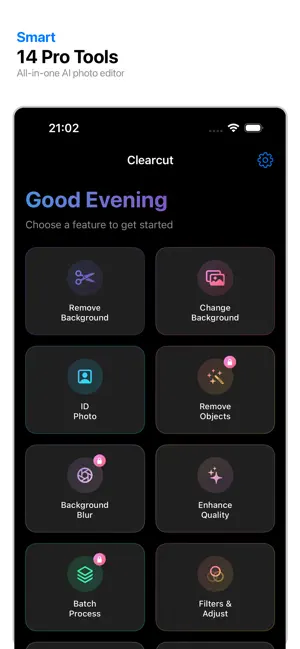
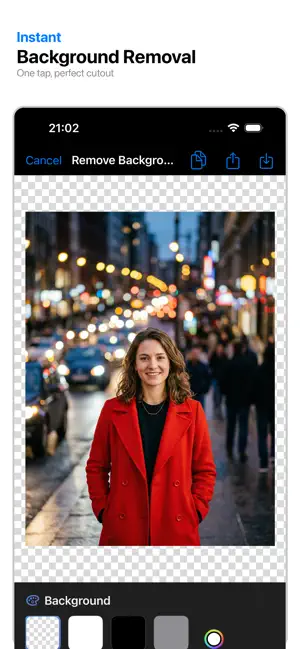
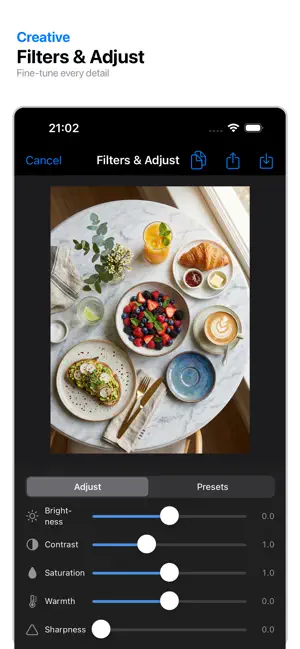
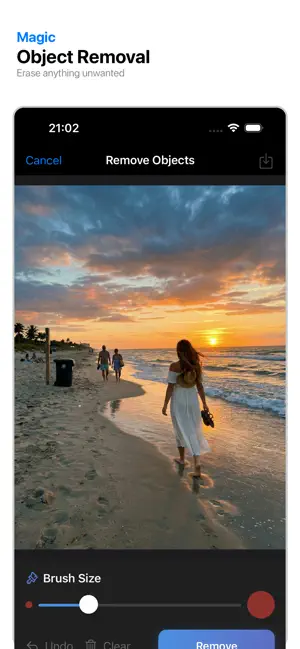
Clearcut is the ultimate photo editing tool powered by 100% on-device AI. Remove backgrounds, enhance image quality, and create stunning visuals in seconds - all without uploading your photos to the cloud. KEY FEATURES ◆ One-Tap Background Removal Instantly remove backgrounds from any photo with professional-quality edge detection. Perfect for product photos, portraits, and more. ◆ Smart Background Replacement Choose from solid colors, beautiful gradient templates, or your own custom images. Create the perfect backdrop for any occasion. ◆ ID Photo Maker Create passport and ID photos with standard background colors (white, blue, red). Save time and money on professional photo services. ◆ Object Removal (Pro) Erase unwanted objects, people, or blemishes from your photos. Our AI intelligently fills in the removed areas. ◆ Background Blur (Pro) Add professional depth-of-field effects to make your subject stand out. ◆ Image Enhancement Upscale your photos up to 4x with AI super-resolution. Perfect for printing or sharing high-quality images. ◆ Batch Processing (Pro) Process up to 10 images at once. Ideal for e-commerce sellers and content creators. ◆ Manual Refinement Tools Fine-tune your edits with eraser, brush, and feathering tools for pixel-perfect results. WHY CLEARCUT AI? • 100% On-Device Processing - Your photos never leave your device • Lightning Fast - Most edits complete in under 2 seconds • No Watermarks - Export clean, professional images • High Resolution - Preserve original image quality • Privacy First - No cloud uploads, no data collection SUBSCRIPTION OPTIONS Clearcut Pro unlocks all premium features: • Weekly subscription with 3-day free trial • Monthly subscription for best value Payment will be charged to your Apple ID account at confirmation of purchase. Subscription automatically renews unless canceled at least 24 hours before the end of the current period. You can manage and cancel your subscriptions by going to your App Store account settings after purchase. Terms of Service: https://slowbuild.dev/clearcut-ai/terms Privacy Policy: https://slowbuild.dev/clearcut-ai/privacy Download Clearcut today and transform your photos with the power of AI!
What’s new
Version 1.0.1 · Updated April 17, 2026
Welcome to Clearcut — your smart background removal tool! • One-tap background removal with AI precision • Smart background replacement with templates • ID photo maker with standard colors • Object removal for unwanted elements • Background blur for portrait mode effects • Image enhancement up to 4x • Batch processing for multiple images • Manual refinement tools (eraser, brush, feather) We'd love to hear your feedback. Enjoy!
App privacy
The developer, 勇 王, reported these privacy practices to Apple.
Data Linked to You
The following data, which may be collected and linked to your identity, may be used for the following purposes:
- Identifiers: Device ID
Used for: Analytics
Data Not Linked to You
The following data, which may be collected but is not linked to your identity, may be used for the following purposes:
- Usage Data: Product Interaction
Used for: Analytics
Alternatives to Clearcut - Photo Editor
Looking for apps like Clearcut - Photo Editor? Here are 6 similar apps on the App Store.
-
 PhotoRepair: Erase & Retouch
-
 LumiStudio: AI Photo Editor
-
 Offline Product Photo Studio
-
 Recolor: Restore Old Photos
-
 7 Wonder Ai Art Generator
-
 Vanish: Auto Background Eraser
| App | Rating | Price | Last updated | Compare |
|---|---|---|---|---|
| Clearcut - Photo Editor | 5.0 / 5 (1 rating) | Free | April 17, 2026 | |
| PhotoRepair: Erase & Retouch | – | Free | Jul 7, 2026 | Compare |
| LumiStudio: AI Photo Editor | – | Free | Jul 16, 2026 | Compare |
| Offline Product Photo Studio | – | Free | Jun 18, 2026 | Compare |
| Recolor: Restore Old Photos | – | Free | Aug 17, 2026 | Compare |
| 7 Wonder Ai Art Generator | – | Free | Jul 23, 2026 | Compare |
| Vanish: Auto Background Eraser | – | Free | Jul 25, 2026 | Compare |