

BurnCoach
Byoungho Kim Health & Fitness iPhoneiPadiPod touchApple Watch
BurnCoach is a free Health & Fitness app for iPhone and iPad by Byoungho Kim. Requires iOS 17.0. Updated October 10, 2026.
- Price
- Free
- on the App Store
- Size
- 4 MB
- Age 4+
- Updated
- Oct 10
- 2026 · v1.0.2
Screenshots


About BurnCoach
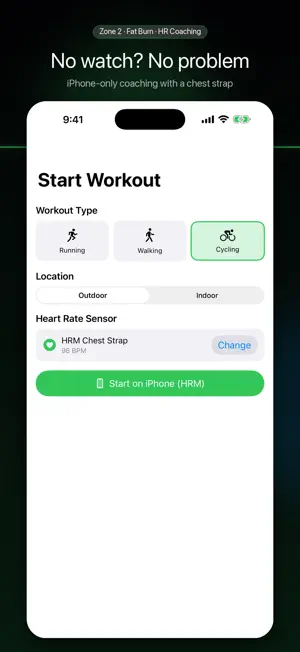
Real-time heart rate coaching for the most efficient fat-burning intensity: Zone 2. Your Apple Watch keeps you in the sweet spot — not too fast, not too slow — every second of your workout. Diet results come from intensity, not just time. ■ Why BurnCoach is different • Built for Zone 2 — Not just a heart rate display. BurnCoach tells you exactly how to adjust, every moment. • Voice + haptic coaching — Don't even look at your wrist. Cues drop into your music like Apple Maps navigation. • Auto phases — Warm-up, main, and cool-down transition automatically based on time and intensity. • Live glow ring — The ring color changes the instant you cross zones, glanceable on your wrist. ■ Core features • Real-time heart rate + zone detection (Rest, Warm-up, Fat Burn, Cardio, Peak, Max) • Automatic Zone-time and Fat Burn duration tracking • Post-workout report — zone distribution, average/max BPM, calories, GPS route (outdoor) • Two-way HealthKit sync — pulls in workouts from other apps and writes back yours • Live Activity / Dynamic Island — see your zone from the lock screen • Pace coaching — voice cues to slow down or speed up • Bluetooth heart rate monitors — pair a chest strap and train with iPhone only, no watch needed • Start from iPhone — remotely launch the watch workout, or start right on iPhone with your HRM ■ Why Zone 2 matters Zone 2 (60–70% of max heart rate) is where your body uses fat as the primary fuel. • Faster (Zone 3+): you burn more carbs, less fat efficiency. • Slower (Zone 1): not enough caloric demand to matter. If your goal is weight loss, time-in-Zone-2 is the most honest metric. ■ With or without a watch • Standalone Apple Watch — runs entirely on your watch; leave your iPhone at home. History syncs when reconnected. • No watch? — pair a Bluetooth heart rate monitor (chest strap) and get the same real-time zone coaching on iPhone alone. • Smart audio routing — coaching speaks through your earphones when connected, or your watch speaker when not. ■ Privacy first All workout data stays on your device. No external servers. HealthKit access is fully controlled by you. ■ Requirements • iPhone: iOS 17 or later • Apple Watch: watchOS 10 or later (optional — Series 4 and newer recommended) • Bluetooth heart rate monitor: standard heart rate profile devices (optional — for training without a watch) Make every 30 minutes count.
What’s new
Version 1.0.2 · Updated October 10, 2026
1.0.2 — Better pause • Pause and resume a Watch workout right from your iPhone when you started it there. • Fixed elapsed and fat-burn time freezing on iPhone after pausing and resuming on the Watch. • Distance covered while paused is no longer added to your workout. • Elapsed time in the Lock Screen Live Activity now excludes paused time. • Voice coaching now pauses too when you pause an iPhone-only workout with a heart rate strap. • Workout start dates and times in the detailed report now follow your language format.
App privacy
The developer, Byoungho Kim, reported these privacy practices to Apple.
Data Not Collected
The developer does not collect any data from this app.
Alternatives to BurnCoach
Looking for apps like BurnCoach? Here are 6 similar apps on the App Store. The highest rated is Wristle: Buzz Alerts (5.0/5), and all 6 are free to download.
-
 Mode Training
-
 Zone2 — Heart Rate Zones
-
 Wristle: Buzz Alerts
5.0
Wristle: Buzz Alerts
5.0
-
 Nova Sport: fitness tracker
-
 BPM: Heart Rate Monitor
-
 뉴마핏 파트너스
| App | Rating | Price | Last updated | Compare |
|---|---|---|---|---|
| BurnCoach | – | Free | October 10, 2026 | |
| Mode Training | – | Free | Oct 14, 2026 | Compare |
| Zone2 — Heart Rate Zones | – | Free | Jun 2, 2026 | Compare |
| Wristle: Buzz Alerts | 5.0 / 5 (1) | Free | Oct 14, 2026 | Compare |
| Nova Sport: fitness tracker | – | Free | Aug 19, 2026 | Compare |
| BPM: Heart Rate Monitor | – | Free | Oct 9, 2026 | Compare |
| 뉴마핏 파트너스 | – | Free | May 8, 2026 | Compare |
Compare BurnCoach with the top alternatives: ratings, updates, ASO score and keyword gaps →