

Body Editor: Shape It Your Way
Trang Vu Thuy Photo & Video iPhoneiPadiPod touch
Body Editor: Shape It Your Way is a free Photo & Video app for iPhone and iPad by Trang Vu Thuy. Rated 2.0/5 from 4 ratings. Requires iOS 17.0.
- Rating
- 2.0
- 4 ratings
- Price
- Free
- on the App Store
- Size
- 52 MB
- Age 4+
- Updated
- Jun 4
- 2026 · v1.1
Screenshots
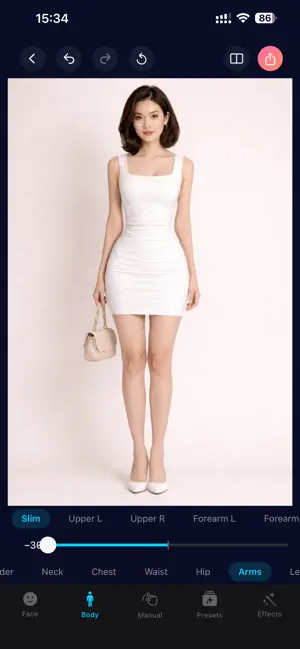
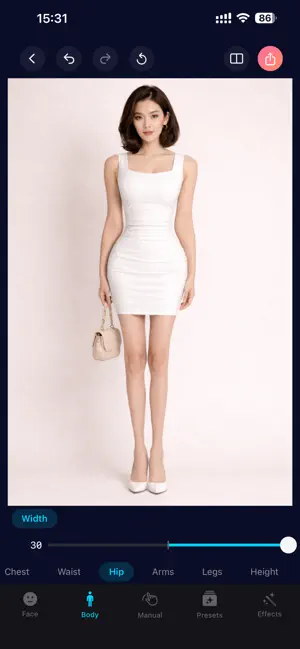


About Body Editor: Shape It Your Way
Body Editor — Shape It Your Way Reshape your body and face in photos with professional-grade tools, all running 100% on your device. 90+ ADJUSTMENTS ACROSS 5 TABS FACE (39 tools) Slim, width, temples, cheekbones, jawline, V-chin, chin height, forehead, crown, upper stretch — sculpt every face shape. Eyes: enlarge, height, distance, openness, width, tilt, iris size, tail/inner/outer lift, lower lid. Nose: reshape, width, tip height, wing width, bridge, length. Lips: full reshape, height, width, upper/lower thickness, smile curve. Eyebrows: thickness, length, lift, arch, tilt, distance. BODY (23 tools) Shoulder width and lift, neck width and length, chest size and lift, waist slim, hip width, arms (slim, left/right upper arm, left/right forearm), legs (slim, length, straighten, left/right thigh, left/right calf), and full-body height stretch (upper-only or full body). PRESETS (5 archetypes) Hourglass, Natural, Pear, Triangle, Inverted Triangle — apply a complete body silhouette in one tap, blend strength with a single slider. MANUAL (3 freeform tools) • Surface — drag a circle anywhere, bulge or pinch radially with smooth falloff. • Slim — pull a rectangular region around any body area, squeeze or expand horizontally with 5 draggable handles. • Refine — drag your finger directly on the photo to push pixels along the stroke path, like a liquify brush. Brush size slider + finger-following indicator circle. EFFECTS (21 adjustments + 8 filter presets) • Color: brightness, contrast, saturation • Light: exposure, warmth, highlights, shadows • Art: vignette, sharpen, bloom, grain, blur, tilt-shift • Filters: Noir, Chrome, Fade, Instant, Vintage, Warm, Cool, Dramatic — preview thumbnails generated from your photo. POLISHED EXPERIENCE • Real-time GPU rendering — every slider drag shows instant preview powered by Metal compute shaders. • Single-pass warp pipeline — all face, body, preset, and manual edits blend together for a clean final image. • Before/After comparison — full-screen split view with draggable divider. • Undo / Redo / Reset — full session history for every tool, including manual brush strokes. • Pinch-to-zoom + drag-to-pan on the photo preview. • Export as JPEG (with quality slider) or PNG. • Optional watermark setting. • 15 languages supported. • Dark mode interface. YOUR PRIVACY Every photo edit happens 100% on your device. No image is ever uploaded to any server. The app works completely offline. Privacy policy: https://trangvuthuy.netlify.app/policy Term of use: https://trangvuthuy.netlify.app/terms
What’s new
Version 1.1 · Updated June 4, 2026
v1.1 — Manual Tab, 2.5× Faster, and More NEW: MANUAL TAB A whole new way to fine-tune any photo with three freeform tools: • Surface — drag a circle anywhere on the photo and bulge or pinch radially with a single slider. Great for adjusting localized curves. • Slim — drop a rectangular region around any body area and squeeze or expand horizontally. Five draggable handles let you shape the region precisely. • Refine — drag your finger directly on the photo to push pixels along the stroke path. A brush-size slider and a circle indicator that follows your finger make it easy to control. Undo any stroke instantly. NEW: SMARTER FILTER PICKER Filter thumbnails now generate from YOUR photo, so you can see exactly how each filter will look before tapping. Eight filter presets included: Noir, Chrome, Fade, Instant, Vintage, Warm, Cool, Dramatic. FASTER: 2.5× QUICKER PHOTO LOADING Opening a photo and preparing it for editing is now around 2.5× faster on supported devices. Slider drags feel snappier across face and body tools. IMPROVED: BEFORE / AFTER COMPARISON The Before / After split view now accurately reflects your latest edits — including manual brushwork and filters — so you can see the real difference. IMPROVED: EXPORT DIALOG The export sheet now gives your photo a much larger preview, with the format picker, quality slider, and export button grouped neatly at the bottom. FIXES • Watermark setting from Settings now correctly applies to exported photos. • Various stability and consistency improvements across the editor. Thanks for using Body Editor — keep the feedback coming!
App privacy
The developer, Trang Vu Thuy, reported these privacy practices to Apple.
Data Not Collected
The developer does not collect any data from this app.
Alternatives to Body Editor: Shape It Your Way
Looking for apps like Body Editor: Shape It Your Way? Here are 6 similar apps on the App Store. The highest rated is Bodylook-AI Body & Face Editor (5.0/5), and all 6 are free to download.
-
 Body Tune - Face & Body Editor
4.4
Body Tune - Face & Body Editor
4.4
-
 Bodylook-AI Body & Face Editor
5.0
Bodylook-AI Body & Face Editor
5.0
-
 FitShape : Body & Curve Editor
4.4
FitShape : Body & Curve Editor
4.4
-
 AI Body Shape Video Editor
4.4
AI Body Shape Video Editor
4.4
-
 Body Sculpt: Tune Body & Face
4.4
Body Sculpt: Tune Body & Face
4.4
-
 Photo Body Editor
4.4
Photo Body Editor
4.4
| App | Rating | Price | Last updated | Compare |
|---|---|---|---|---|
| Body Editor: Shape It Your Way | 2.0 / 5 (4 ratings) | Free | June 4, 2026 | |
| Body Tune - Face & Body Editor | 4.4 / 5 (14) | Free | Mar 30, 2026 | Compare |
| Bodylook-AI Body & Face Editor | 5.0 / 5 (1) | Free | Mar 11, 2026 | Compare |
| FitShape : Body & Curve Editor | 4.4 / 5 (16) | Free | Nov 3, 2025 | Compare |
| AI Body Shape Video Editor | 4.4 / 5 (69) | Free | Sep 22, 2026 | Compare |
| Body Sculpt: Tune Body & Face | 4.4 / 5 (23) | Free | Sep 29, 2026 | Compare |
| Photo Body Editor | 4.4 / 5 (39) | Free | Aug 4, 2026 | Compare |