

CopyPaste AI - Formal & Email
Shuto Nishiyama Productivity iPhoneiPadiPod touch
CopyPaste AI - Formal & Email is a free Productivity app for iPhone and iPad by Shuto Nishiyama. Requires iOS 26.2. Updated September 21, 2026.
- Price
- Free
- on the App Store
- Size
- 6 MB
- Age 4+
- Updated
- Sep 21
- 2026 · v1.0.5
Screenshots

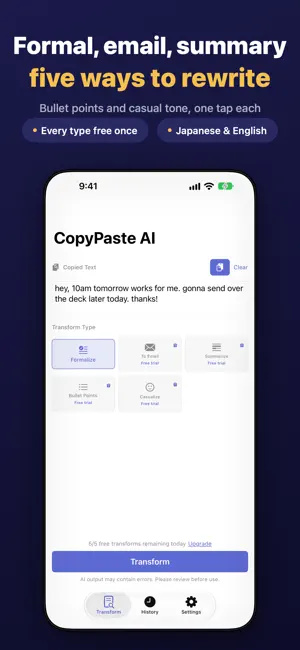


About CopyPaste AI - Formal & Email
CopyPaste AI rewrites your copied text with one tap. No prompts. No typing. Just copy, open, tap, and paste. Works on iPhone and iPad. COPY, OPEN, TAP Copy text in any app. Open CopyPaste AI — your text appears automatically. Tap a transform button. That's it. No typing, no prompt writing, no complexity. FIVE TRANSFORMATIONS - Formalize Turn casual messages into polished, professional text. Perfect for business communication and client emails. - To Email Convert bullet points or rough memos into full business emails with subject line, greeting, body, and closing. Requests, thank-yous, apologies, status updates — every situation covered. - Summarize Condense long articles, meeting notes, or documents into clear, concise summaries. - Bullet Points Organize paragraphs into structured bullet points. Ideal for meeting minutes and reports. - Casualize Soften formal text into friendly, conversational language for social media and personal messages. AUTO-COPY TO CLIPBOARD When transformation completes, the result is automatically copied to your clipboard. Just return to your original app and paste. Go from copy to paste in under 10 seconds. WORKS WITH EVERY APP Share Extension support. Use CopyPaste AI from Mail, Messages, Slack, Notes, Safari — any app with text. FULLY OFFLINE & PRIVATE Powered by Apple Intelligence on-device AI (iOS 26 Foundation Models). Your text never leaves your device. It even works in airplane mode. Safe for confidential business documents, sensitive work communications, and personal messages. PERFECT FOR - Professionals writing emails and reports - Job seekers polishing resumes and cover letters - Students preparing essays and assignments - Non-native English speakers improving business writing - Japanese learners practicing keigo and business Japanese - Anyone who wants clearer, better writing in seconds PRICING Formalize is free — up to 5 transformations per day. To Email, Summarize, Bullet Points, and Casualize each come with one free trial run, so you can see the actual output before you decide. Pro unlocks all five transformations with unlimited usage, unlimited history, and no ads, for a one-time purchase. No subscription. No recurring fees. Pay once, use forever. REQUIREMENTS - iOS 26 or iPadOS 26 or later - Apple Intelligence-compatible device (iPhone 15 Pro or newer, or an iPad with M1 or newer) - Apple Intelligence must be enabled in Settings PRIVACY CopyPaste AI does not collect or transmit your text data. All transformations happen on-device. Clipboard access only occurs when you explicitly tap within the app. The free version displays ads through Google AdMob, which may use anonymous identifiers for ad delivery. Purchasing Pro removes all ads. See our privacy policy for full details. SUPPORT Questions or feedback? Contact us from the Settings screen.
What’s new
Version 1.0.5 · Updated September 21, 2026
- To Email now produces a complete email with a subject line, greeting, body and closing - Every transform type now includes one free trial run, so you can see the output before upgrading - Failed transforms are retried automatically, and error messages are clearer - All five transform types now fit on the home screen without scrolling - Added review and share options to Settings
App privacy
The developer, Shuto Nishiyama, reported these privacy practices to Apple.
Data Used to Track You
The following data may be used to track you across apps and websites owned by other companies:
- Location: Coarse Location
- Identifiers: Device ID
- Usage Data: Product Interaction, Advertising Data
- Diagnostics: Crash Data, Performance Data, Other Diagnostic Data
Data Linked to You
The following data, which may be collected and linked to your identity, may be used for the following purposes:
- Location: Coarse Location
- Identifiers: Device ID
- Usage Data: Product Interaction, Advertising Data
- Diagnostics: Crash Data, Performance Data, Other Diagnostic Data
Used for: Third-Party Advertising
Alternatives to CopyPaste AI - Formal & Email
Looking for apps like CopyPaste AI - Formal & Email? Here are 6 similar apps on the App Store.
-
 CopyBlocks
-
 Hatch AI
-
 Omakase Message | AI Reply
-
 Snapkit - AI Camera Builder
-
 Email Draft: AI Writer
-
 Splunk Calculator
| App | Rating | Price | Last updated | Compare |
|---|---|---|---|---|
| CopyPaste AI - Formal & Email | – | Free | September 21, 2026 | |
| CopyBlocks | – | Free | Jul 30, 2026 | Compare |
| Hatch AI | – | Free | Aug 1, 2026 | Compare |
| Omakase Message | AI Reply | – | Free | Aug 27, 2026 | Compare |
| Snapkit - AI Camera Builder | – | Free | May 28, 2026 | Compare |
| Email Draft: AI Writer | – | Free | Oct 2, 2026 | Compare |
| Splunk Calculator | – | Free | May 11, 2026 | Compare |