

GIORNO Diary
Chihiro Omata Productivity iPhoneiPadiPod touchApple Watch
GIORNO Diary is a free Productivity app for iPhone and iPad by Chihiro Omata. Requires iOS 17.0. Updated September 30, 2026.
- Price
- Free
- on the App Store
- Size
- 30 MB
- Age 4+
- Updated
- Sep 30
- 2026 · v3.0.1
Screenshots


About GIORNO Diary
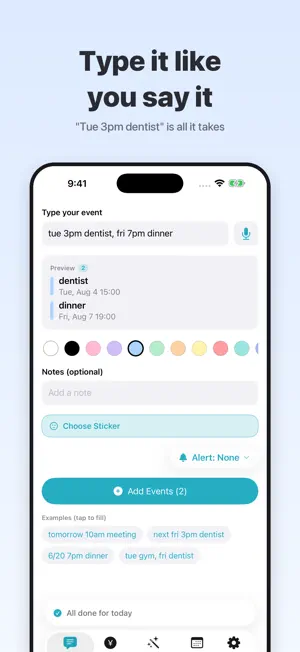
What is GIORNO? Simple, yet it does it all — a beautifully organized planner for your events, shifts, and class schedule. [Great for] • Managing work or part-time shifts (see your payday at a glance) • School timetables, assignments, and exam prep • Following your favorite artists (concerts, merch, birthday countdowns) • Keeping a diary with photos • To-dos and building daily habits • Budgeting with the expense tracker [Main features] • Attach events, notes, photos, and stickers to your calendar • Countdown alerts: "N days to go" until the dates that matter • Class schedule tab (breaks and up to 7 periods) • To-do list with due dates and reminders • Habit tracker to visualize your streaks • Insights that chart your events and habits • Expense tracker with monthly budgets • Create your own photo stickers (with automatic background removal) • Customize freely with theme colors and background images • Weather and temperature right on your calendar • Home Screen and Lock Screen widgets • Repeating and multi-day events • Sync across devices with iCloud, and connect with Apple Calendar Terms of Use (EULA): https://www.apple.com/legal/internet-services/itunes/dev/stdeula/
What’s new
Version 3.0.1 · Updated September 30, 2026
GIORNO 3.0.1 - Stickers and input, leveled up! ■ Sticker Effects - Give My Stickers a die-cut white outline or a shiny sparkle effect when you create them - Redesigned sticker browser: scroll through every category at a glance and tap once to apply - It also remembers your last category, so you pick up right where you left off - Long-press any event to add or change its sticker ■ Batch Add - Add a whole week of plans at once: date, title, time and sticker in one table. Set notifications for all rows together ■ Anniversary Countdown - Past dates now celebrate milestones like "3 mo anniversary" and "1 yr anniversary" - Tap a repeating event to see how many days until the next one ■ Faster to find and add - Search from the calendar: find events by title or memo and jump straight to the day - Tap an event in iPhone search (Spotlight) and GIORNO now opens that day directly - Quick Entry can now be your default way to add events ■ Currency and languages - The budget and your shift pay estimate now show in your country's currency (pick a currency in the monthly budget screen) - Shift pattern names, to-do due alerts, the first-run guide, overseas holiday names, Apple Watch complications, widgets and Siri replies are now translated ■ Fixes - Fixed all-day events visually merging when two or more share a day - Fixed holidays appearing twice after changing the app language - Fixed multi-day all-day events turning into timed events when syncing with Apple Calendar - Fixed event names being cut off in Batch Add in some languages
App privacy
The developer, Chihiro Omata, reported these privacy practices to Apple.
Data Used to Track You
The following data may be used to track you across apps and websites owned by other companies:
- Identifiers: Device ID
- Usage Data: Product Interaction, Advertising Data
Data Not Linked to You
The following data, which may be collected but is not linked to your identity, may be used for the following purposes:
- Identifiers: Device ID
- Usage Data: Product Interaction, Advertising Data
- Location: Coarse Location
- Diagnostics: Crash Data, Performance Data
Used for: Third-Party Advertising, App Functionality
Alternatives to GIORNO Diary
Looking for apps like GIORNO Diary? Here are 6 similar apps on the App Store.
-
 マルミエ
マルミエ
-
 Nafty ナースのシフト管理
-
 TaskFlow - タスク&タイムライン
-
 Playlyst: Tasks, Focus, Habits
-
 シェアカレンダーSC - シンプル予定共有
-
 カレンダーニャ
| App | Rating | Price | Last updated | Compare |
|---|---|---|---|---|
| GIORNO Diary | – | Free | September 30, 2026 | |
| マルミエ | – | Free | Sep 2, 2026 | Compare |
| Nafty ナースのシフト管理 | – | Free | Sep 16, 2026 | Compare |
| TaskFlow - タスク&タイムライン | – | Free | Sep 26, 2026 | Compare |
| Playlyst: Tasks, Focus, Habits | – | Free | Jul 19, 2026 | Compare |
| シェアカレンダーSC - シンプル予定共有 | – | Free | Oct 9, 2026 | Compare |
| カレンダーニャ | – | Free | Jun 18, 2026 | Compare |
Compare GIORNO Diary with the top alternatives: ratings, updates, ASO score and keyword gaps →