

Cube Magic X
Infinite Quantum Tech Limited Utilities iPhoneiPadiPod touch
Cube Magic X is a free Utilities app for iPhone and iPad by Infinite Quantum Tech Limited. Requires iOS 13.0. Updated October 8, 2026.
- Price
- Free
- on the App Store
- Size
- 216 MB
- Age 4+
- Updated
- Oct 8
- 2026 · v1.0.22
Screenshots



About Cube Magic X
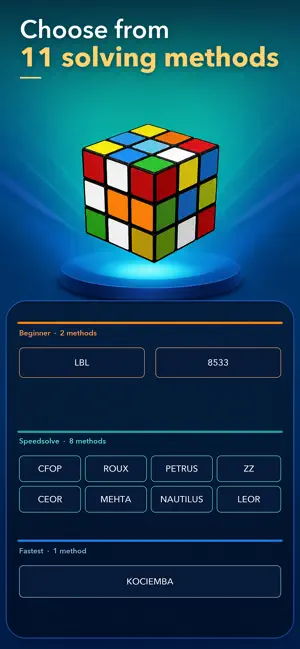
Turn a scrambled 3x3 cube into a clear solution you can follow. Cube Magic X combines camera-guided cube scanning, 11 solving methods, and an interactive 3D move player in one focused app. Capture two views of your cube, review the detected colors, and start solving step by step. SCAN WITH CONFIDENCE • Capture two guided views of your physical 3x3 cube. • Review recognized colors before generating a solution. • Correct individual stickers manually whenever needed. • Save cube states to your on-device history and reopen them later. CHOOSE FROM 11 SOLVING METHODS Start with beginner-friendly LBL or 8533. Explore speedcubing systems including CFOP, Roux, Petrus, ZZ, CEOR, Mehta, Nautilus, and LEOR. When you want a direct, efficient route, choose the Kociemba two-phase method. FOLLOW EVERY MOVE IN INTERACTIVE 3D See the cube state change as you work through the solution. Rotate the view, move between phases, jump to a specific step, or use automatic playback to follow the algorithm at your own pace. PRACTICE WITHOUT A PHYSICAL CUBE Open the virtual 3x3 cube whenever you want to practice. Scramble it, turn individual layers, undo moves, reset the cube, and track your time and move count. CREATE CLASSIC CUBE PATTERNS Build Checkerboard, Six Spots, Cube in a Cube, and Superflip with guided 3D moves. You can also enter your own cube algorithm and preview it step by step. MADE FOR EVERY STAGE • Beginners learning their first complete solve • Experienced cubers comparing algorithms and methods • Speedcubers exploring CFOP, Roux, ZZ, and other systems • Puzzle fans who want a camera scanner and visual 3D guide • Anyone who wants to practice with a virtual cube Cube Magic X supports English, Simplified Chinese, Spanish, French, German, Japanese, Korean, Portuguese, and Russian. Core features are available without membership. Some advanced speedsolving methods require an optional Cube Magic X membership. Availability and pricing are shown in the app before purchase. Terms of Use (EULA): https://www.apple.com/legal/internet-services/itunes/dev/stdeula/ Privacy Policy: https://infinitquantum.com/policy/cubemagic/privacy-policy-en.html
What’s new
Version 1.0.22 · Updated October 8, 2026
Improved scanning performance for faster, smoother, and more reliable cube recognition.
App privacy
The developer, Infinite Quantum Tech Limited, reported these privacy practices to Apple.
Data Linked to You
The following data, which may be collected and linked to your identity, may be used for the following purposes:
- Identifiers: Device ID, User ID
- Usage Data: Product Interaction
- User Content: Photos or Videos
Used for: Analytics, App Functionality
Data Not Linked to You
The following data, which may be collected but is not linked to your identity, may be used for the following purposes:
- Location: Coarse Location
- Purchases: Purchase History
- Diagnostics: Crash Data, Other Diagnostic Data
Used for: Analytics, App Functionality
Alternatives to Cube Magic X
Looking for apps like Cube Magic X? Here are 6 similar apps on the App Store. The highest rated is CubeSolver AI:Scan & Solve (5.0/5), and 5 of the 6 are free to download.
-
 CubeSolver AI:Scan & Solve
5.0
CubeSolver AI:Scan & Solve
5.0
-
 Solve My Cube – Scan & Guide
-
 Cubing Insight - Cube Timer
5.0
Cubing Insight - Cube Timer
5.0
-
 Cube Solver | Solve My Cube
-
 Magic Cube: Rubik Solver
-
 Cube Solver AI
| App | Rating | Price | Last updated | Compare |
|---|---|---|---|---|
| Cube Magic X | – | Free | October 8, 2026 | |
| CubeSolver AI:Scan & Solve | 5.0 / 5 (1) | Free | Jun 23, 2026 | Compare |
| Solve My Cube – Scan & Guide | – | 7.99 USD | Aug 28, 2026 | Compare |
| Cubing Insight - Cube Timer | 5.0 / 5 (2) | Free | Aug 23, 2026 | Compare |
| Cube Solver | Solve My Cube | – | Free | Sep 29, 2026 | Compare |
| Magic Cube: Rubik Solver | – | Free | Jul 15, 2026 | Compare |
| Cube Solver AI | – | Free | Sep 5, 2026 | Compare |
Compare Cube Magic X with the top alternatives: ratings, updates, ASO score and keyword gaps →