

Happy Prospector: Offline Maps
Blueprint Industries Pty Ltd Navigation iPhoneiPadiPod touch
Happy Prospector: Offline Maps is a free Navigation app for iPhone and iPad by Blueprint Industries Pty Ltd. Requires iOS 15.6. Updated August 17, 2026.
- Price
- Free
- on the App Store
- Size
- 67 MB
- Age 4+
- Updated
- Aug 17
- 2026 · v2.6.81
Screenshots

About Happy Prospector: Offline Maps
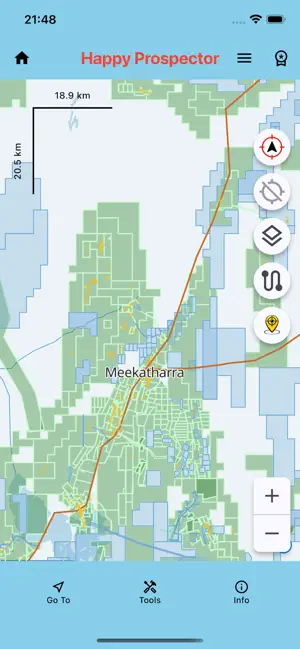
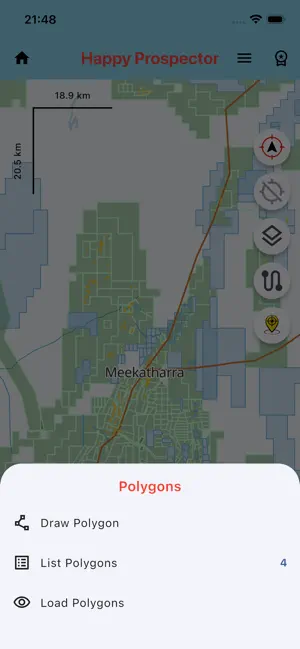
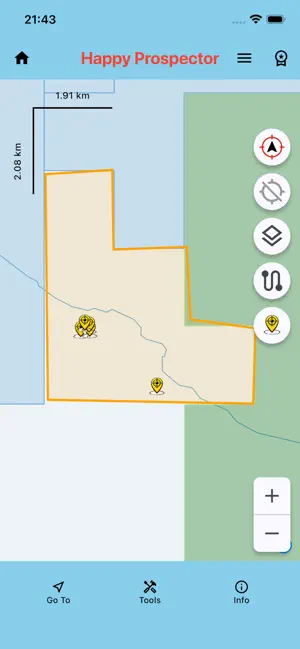
The Happy Prospector is an offline mapping app specifically built for prospectors in Western Australia. Designed for remote areas, the app lets you download maps and data before you go, then use essential mapping, GPS, tenement, find, track and reporting tools without mobile coverage or WiFi. Use The Happy Prospector to explore WA prospecting data, browse directly to GPS coordinates, save classified field markers, record tracks, draw polygons, measure distances and create reports from your saved information. Key Features • Offline map use after downloads • Standard WA base map • High Resolution Maps • Live and Pending WA Mining Tenements • Mindex Gold locations • Bedrock Geology • Surface and Structures layers • Browse directly to entered GPS coordinates • Optional marker placement at a browsed GPS point • Save Finds and field markers with notes • Marker styles for finds, vehicles, camps and field features • Premium Gate, Windmill, Dam, Dig Hole, Chained, Dryblowing, Pushed Area, Drill Hole, Costean and Mine markers • Colour options for Find markers • Depth and weight recording for applicable finds • Go To navigation to saved Finds • GPS track recording • Track distance recording and live distance display • Saved track distances shown in track lists • Import Tracks from CSV/ZIP files • Measure Distance tool • Draw Polygons on the map • Save, list, show/hide and delete Polygons • 40E Report generation • Finds Report generation • Select a saved polygon or Live tenement as the report area • Filter reports by date, exact area and marker type • Report measured Finds or include all field markers • Automatic tenement ID, lease and holder details where available • Editable permit, lease, mineral, recovery and cost information • Remembered prospector and permit-holder names • Tools Settings menu • GPS button mode settings • Orientation lock settings • Tap-map or centre-crosshair Measure mode Free Version The Free Version provides a practical way to get started. Included in Free: • Standard base map • High Resolution Maps up to zoom level 16 • Live WA Mining Tenements display • Mindex Gold locations • Unlimited saved Finds, with the newest three available for selection • Default, Car and Camp marker styles • Browse to GPS Point • Go To navigation to selectable Finds • Save and reload the latest Tracks • Track distance recording • Draw Polygons from the Tools menu Lite Version Lite adds the main prospecting and tenement tools. Included in Lite: • Everything in Free • Full High Resolution Map zoom range • Live and Pending WA Mining Tenements • Tenement identify, query and detail results • Tenement highlighting on the map • Yellow Find marker style • Full saved Find selection • Full saved Track loading • Track pause and follow controls Premium Version Premium includes the complete Happy Prospector toolkit. Included in Premium: • Everything in Lite • Gate, Windmill and Dam marker styles • Dig Hole, Chained, Dryblowing, Pushed Area, Drill Hole, Costean and Mine marker styles • Additional Find marker colours • Drop Marker Pin • Optional marker placement after browsing to a GPS point • Measure Distance tool • Saved Polygon management • List, show/hide and delete saved Polygons • 40E Report generation • Finds Report generation • Saved-polygon and Live-tenement report areas • Measured-Finds or All-Markers report selection • Track import from CSV/ZIP files • Find import/export • Track export • Bedrock Geology • Surface layer • Structures layer • Tools Settings • GPS button mode settings • Orientation lock settings • Measure mode settings The Happy Prospector is designed to be simple, practical and reliable in the field. Download your maps and data before heading out, then use the app offline wherever your next Western Australian prospecting trip takes you. Terms of Use (EULA): https://www.apple.com/legal/internet-services/itunes/dev/stdeula/
What’s new
Version 2.6.81 · Updated August 17, 2026
What’s New in Version 2.6.81 In addition to recently added features—like the live track-distance recording, saved track distances, CSV/ZIP track importing, the Measure Distance tool, polygon drawing and management, and configurable GPS, orientation and measuring controls—this version adds several major improvements for navigation, field markers and reporting. Browse map directly to a GPS point A new Browse to GPS Point option is available from the Go To menu. Enter valid latitude and longitude coordinates and the map will move directly to that exact position at a useful close-up zoom. The entry screen validates coordinates, remembers the last successful point and includes a Clear option for quickly entering another location. After arriving, Premium users can optionally place a marker at the exact browsed position using the normal marker editor. More field-marker choices Finds and field locations can now be classified with a much wider range of map symbols. The compact marker selector keeps commonly used choices immediately available while organising specialist markers into Gate and More groups. New Premium marker styles include: • Windmill • Dam • Dig Hole • Chained area • Dryblowing area • Pushed area • Drill Hole • Costean • Mine Gate, Windmill and Dam are grouped together, while the additional field and mining markers are available under More. Marker classifications are saved with each location and displayed using their matching map icons. Depth and weight fields remain available only for applicable Default and Find markers, keeping utility-marker entry simple. Improved 40E and Finds Reports Reports can now use either a saved polygon or a selected Live tenement as the exact reporting area. For Live tenements, long press the tenement on the map, review the highlighted boundary and confirm the selection. The report uses the actual tenement boundary, including boundary holes, rather than a simple polygon area. You can also choose whether to report: • Finds with recorded depth or size/weight • All saved marker types Report improvements include: • Date-range and exact-area filtering • Automatic tenement and lease information where available • Automatic first-listed tenement-holder details • Editable permit, lease, mineral, recovery and cost fields • Remembered prospector and permit-holder names • Marker classifications included in report records • Clear handling of measurements that were not recorded Better support for compact screens and larger text GPS coordinate entry, Find lists and action buttons have been refined for smaller iPhones and Android devices. Buttons and labels remain on a single row at larger accessibility text settings, while layouts also scale appropriately for iPads and Android tablets. This update continues making The Happy Prospector a more practical offline field companion for navigating directly to locations, recording meaningful site information and producing clearer reports from your saved prospecting data.
App privacy
The developer, Blueprint Industries Pty Ltd, reported these privacy practices to Apple.
Data Not Collected
The developer does not collect any data from this app.
Alternatives to Happy Prospector: Offline Maps
Looking for apps like Happy Prospector: Offline Maps? Here are 6 similar apps on the App Store. The highest rated is Australian Geology Travel Maps (5.0/5), and 5 of the 6 are free to download.


| App | Rating | Price | Last updated | Compare |
|---|---|---|---|---|
| Happy Prospector: Offline Maps | – | Free | August 17, 2026 | |
| Dig Here | – | Free | Oct 7, 2026 | Compare |
| Patchly | – | Free | Oct 18, 2026 | Compare |
| Australian Geology Travel Maps | 5.0 / 5 (1) | Free | Jun 21, 2026 | Compare |
| Auswide Adventures | – | Free | Aug 26, 2026 | Compare |
| Gold Maps | – | 39.99 USD | Feb 23, 2025 | Compare |
| Detector Maps | 4.7 / 5 (264) | Free | Oct 12, 2026 | Compare |