

AutoLedger: Expense Tracker
Mochuan Software (Tianjin) Co., Ltd. Finance iPhoneiPadiPod touchMacApple Watch
AutoLedger: Expense Tracker is a free Finance app for iPhone and iPad by Mochuan Software (Tianjin) Co., Ltd. Rated 5.0/5 from 1 ratings. Requires iOS 17.0.
- Rating
- 5.0
- 1 ratings
- Price
- Free
- on the App Store
- Size
- 38 MB
- Age 4+
- Updated
- Sep 23
- 2026 · v1.7.0
Screenshots



About AutoLedger: Expense Tracker
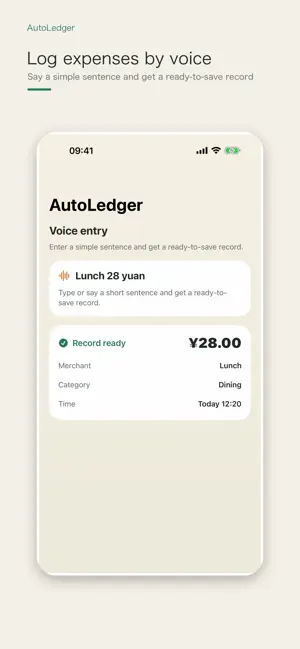
AutoLedger - Quick Ledger Turn screenshots, receipts, voice notes, and hotel folios into your personal ledger. AutoLedger is a local-first personal ledger app that helps reduce repetitive entry and makes everyday spending easier to record. Start from information you already have: payment screenshots, receipt photos, voice notes, Shortcuts, and hotel folios. Live OCR quickly recognizes amounts, merchants, and times from receipts and bills. Every result enters a confirmation flow before it is saved, so you can review and edit it first. AutoLedger never creates a transaction without your confirmation, keeping you in control of your records. Quick Capture Record with screenshots, receipt photos, voice, text, Shortcuts, the Share Extension, and quick entry on Apple Watch. Multiple ledgers, custom categories, spending trends, monthly reports, import and export, and iCloud sync help you maintain a useful spending history over time. Hotel Expense Archive Travel and business stays often contain more detail than ordinary expenses. A hotel folio may include stay dates, nights, room charges, taxes, service fees, dining, and other charges. AutoLedger organizes hotel folio PDFs and saves stay details and expenses as structured hotel records for reviewing trips and managing business spending. Apple Ecosystem Use AutoLedger on iPhone, iPad, Mac, and Apple Watch. Capture quickly on your phone, organize on a larger screen, and keep your ledger up to date. AutoLedger Pro Pro adds time-saving automation, including hotel folio organization, a dedicated folio inbox, batch candidate processing, advanced search, subscription anomaly alerts, month-end document organization, and advanced rule automation. Core bookkeeping remains available for the long term. Pro is designed to reduce repetitive work, not restrict access to your ledger data.
What’s new
Version 1.7.0 · Updated September 23, 2026
This update makes everyday expense review smoother and month-end organization clearer. • Improved ledger browsing, search and inbox switching, with less repeated loading. • Review import candidates, uncategorized entries and sync conflicts from one pending-items center. Preview and batch-dismiss or defer eligible items. • Track monthly reviews with a checklist, completion status and the option to reopen a month. • Improved hotel weather summaries. Configure DeepSeek to generate and edit a short stay note when you choose. • Improved currency and regional formatting, with clearer iCloud sync status. • A consistent app icon across Apple platforms and a fix for duplicate Pro page headings. Some advanced automation features require AutoLedger Pro.
App privacy
The developer, Mochuan Software (Tianjin) Co., Ltd., reported these privacy practices to Apple.
Data Not Linked to You
The following data, which may be collected but is not linked to your identity, may be used for the following purposes:
- Usage Data: Product Interaction
- Diagnostics: Crash Data, Performance Data
Used for: Analytics
Alternatives to AutoLedger: Expense Tracker
Looking for apps like AutoLedger: Expense Tracker? Here are 6 similar apps on the App Store. The highest rated is 存粮-定期存单大额存单存款管理与资产记录 (1.0/5), and all 6 are free to download.
-
 TruckExpense Pro
-
 Expense Minion
-
 存粮-定期存单大额存单存款管理与资产记录
1.0
-
 Laicai 来财: Portfolio & Budget
-
 Atlas Quant
-
 圆圆记账-一句话记账&预算管理&消费复盘
| App | Rating | Price | Last updated | Compare |
|---|---|---|---|---|
| AutoLedger: Expense Tracker | 5.0 / 5 (1 rating) | Free | September 23, 2026 | |
| TruckExpense Pro | – | Free | Aug 22, 2026 | Compare |
| Expense Minion | – | Free | Oct 22, 2026 | Compare |
| 存粮-定期存单大额存单存款管理与资产记录 | 1.0 / 5 (1) | Free | Oct 21, 2026 | Compare |
| Laicai 来财: Portfolio & Budget | – | Free | Oct 21, 2026 | Compare |
| Atlas Quant | – | Free | Sep 25, 2026 | Compare |
| 圆圆记账-一句话记账&预算管理&消费复盘 | – | Free | Aug 6, 2026 | Compare |