

SubLens: Subscription Tracker
慧慧 高 Finance iPhoneiPadiPod touch
SubLens: Subscription Tracker is a free Finance app for iPhone and iPad by 慧慧 高. Requires iOS 17.0. Updated October 13, 2026.
- Price
- Free
- on the App Store
- Size
- 4 MB
- Age 4+
- Updated
- Oct 13
- 2026 · v1.2
Screenshots
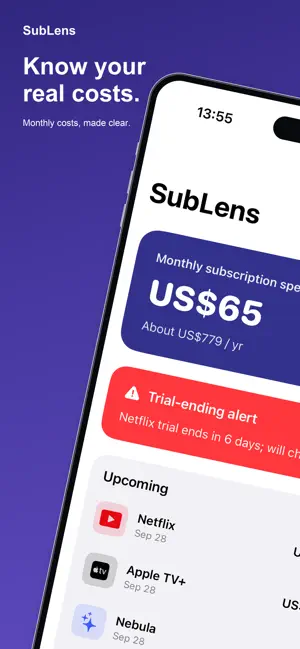


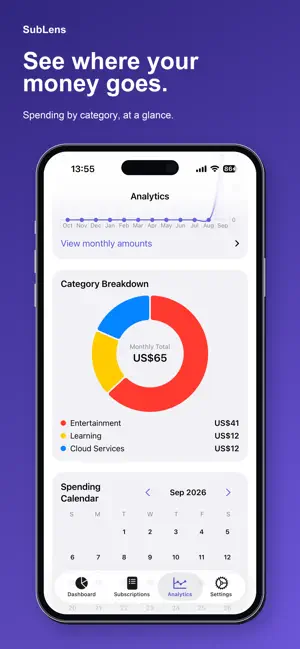
About SubLens: Subscription Tracker
SubLens keeps your recurring bills in one place. See your monthly subscription total, upcoming charges and trial dates without connecting a bank account. FREE TRACKING • Track up to 8 subscriptions using service templates or manual entries. • See monthly and yearly totals, upcoming bills and category summaries. • Choose bill reminders and track trial end dates. Notifications are optional. • Record payments in 11 currencies. Cross-currency totals use fixed local exchange rates and are estimates, not live quotes. • Keep your records on your device. No account or cloud sync is required. SUBLENS PRO Pro adds unlimited entries, custom categories, spending charts, a billing calendar, a monthly budget overview and CSV export. Choose an annual subscription or Lifetime, a one-time purchase with no automatic renewal. Prices and any eligible trial are shown in the app before purchase. Annual subscriptions renew automatically unless cancelled at least 24 hours before the current period ends. Payment is charged to your Apple ID. Manage or cancel in your Apple ID subscription settings. Restore purchases from the Pro page. SubLens records the bills you enter; it does not cancel services or process your bill payments. Deleting the app without a device backup can remove your records. Privacy Policy: https://app-legal-pages.vercel.app/sublens/privacy Terms of Service: https://app-legal-pages.vercel.app/sublens/terms Support: [email protected]
What’s new
Version 1.2 · Updated October 13, 2026
• Compare active subscriptions by average monthly cost and share of your spending. Tap an entry to edit its details. • Added INR, NZD, MYR and MXN for subscription amounts and your default currency. Cross-currency totals remain estimates based on fixed exchange rates. • Added Cash as a default payment method, without duplicating existing Cash entries. • Fixed Custom billing cycles: set intervals in days, weeks, months or years, including every 15 months. Plus/minus controls and a clear button make editing easier. Your interval is used for renewal dates, spending estimates, the bill calendar and CSV exports. • Fixed payment-method names switching languages when opened for editing. Chinese service presets now have English and Chinese names and can be found using either language.
App privacy
The developer, 慧慧 高, reported these privacy practices to Apple.
Data Not Collected
The developer does not collect any data from this app.
Alternatives to SubLens: Subscription Tracker
Looking for apps like SubLens: Subscription Tracker? Here are 6 similar apps on the App Store. The highest rated is Lumori Bill Tracker & Reminder (5.0/5), and 5 of the 6 are free to download.
-
 Yudao: Cute Budget & Money Log
4.5
Yudao: Cute Budget & Money Log
4.5
-
 BeanFlow: Expense Tracker
4.0
BeanFlow: Expense Tracker
4.0
-
 Lumori Bill Tracker & Reminder
5.0
Lumori Bill Tracker & Reminder
5.0
-
 Reminder: Subscription Tracker
5.0
Reminder: Subscription Tracker
5.0
-
 Cashbook-Daily expense tracker
1.0
Cashbook-Daily expense tracker
1.0
-
 MoneyLexa — Expense Tracker
4.7
MoneyLexa — Expense Tracker
4.7
| App | Rating | Price | Last updated | Compare |
|---|---|---|---|---|
| SubLens: Subscription Tracker | – | Free | October 13, 2026 | |
| Yudao: Cute Budget & Money Log | 4.5 / 5 (2) | Free | Oct 19, 2026 | Compare |
| BeanFlow: Expense Tracker | 4.0 / 5 (2) | Free | Sep 25, 2026 | Compare |
| Lumori Bill Tracker & Reminder | 5.0 / 5 (3) | Free | Oct 14, 2026 | Compare |
| Reminder: Subscription Tracker | 5.0 / 5 (2) | Free | Sep 29, 2026 | Compare |
| Cashbook-Daily expense tracker | 1.0 / 5 (1) | 1.99 USD | Oct 23, 2026 | Compare |
| MoneyLexa — Expense Tracker | 4.7 / 5 (3) | Free | Oct 23, 2026 | Compare |