

Flashcards in Widgets: Mnemo
Max Lottermoser Education iPhoneiPadiPod touchMac
Flashcards in Widgets: Mnemo is a free Education app for iPhone and iPad by Max Lottermoser. Requires iOS 26.0. Updated October 21, 2026.
- Price
- Free
- on the App Store
- Size
- 227 MB
- Age 4+
- Updated
- Oct 21
- 2026 · v5.8
Screenshots



About Flashcards in Widgets: Mnemo
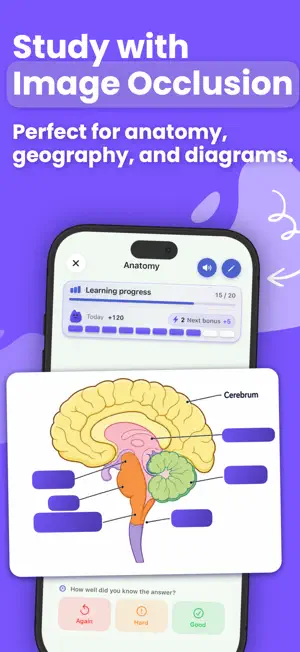
Create your own flashcards and review them directly in a widget. Mnemo brings together multiple choice, cloze cards and image occlusion for vocabulary, medical diagrams, formulas and the subjects you want to remember. YOUR MATERIAL, YOUR STUDY ROUTINE Write your own questions and answers or import structured cards with CSV or JSON. Organize your material into decks and use classic, multiple-choice, cloze or image-occlusion cards. Mnemo is a tool for your own learning content, rather than a complete exam question bank or medical atlas. REVIEW FROM A WIDGET Flip cards, answer multiple-choice questions and record your recall without opening the app. Passive widgets rotate questions and answers. Use Home Screen widgets to keep your material close between study sessions. MAKE RICH LEARNING CARDS Combine formatted text, images and LaTeX formulas. Use code highlighting for technical material and text-to-speech for vocabulary and pronunciation. BUILD A LASTING HABIT Spaced repetition in Mnemo Pro schedules your reviews. Heatmaps, streaks and a study companion help you see your progress and keep practising. PRIVATE, EVEN OFFLINE Study without an internet connection. Your library syncs through your personal iCloud. No account, advertising or subscription is required. Try the core features with the starter experience. Mnemo Pro unlocks unlimited decks and cards with a one-time purchase. Developed by a psychologist for students and lifelong learners.
What’s new
Version 5.8 · Updated October 21, 2026
This update makes creating cloze cards much smoother, introduces flexible study views, and takes full advantage of wider screens: • Easier Cloze Editing: Create multiple blanks in a row without bouncing between your text and controls—access them directly via the fixed toolbar or the selection menu. • Flexible Formatting: Turn cloze formatting on or off seamlessly as you type, or easily remove blanks from selected text. • Keep Track of Your Blanks: Higher-contrast highlights make blanks effortless to read. The new list below the editor displays every gap in reading order; tapping × removes a blank while preserving your text. • More Room, Clearer Views: On iPhone Duo and iPad in landscape, Mnemo makes better use of wide screens—content sits side by side instead of just stacking vertically. • Study Without the Companion: Tap the sliders icon at the top (“Learning display”) and select “Compact” or “Hidden” to tuck away the companion and focus purely on your cards. Your study progress continues to be fully tracked. Mnemo keeps improving: If you have feedback, questions, or ideas, reach out to us directly through the app anytime!
App privacy
The developer, Max Lottermoser, reported these privacy practices to Apple.
Data Not Collected
The developer does not collect any data from this app.
Alternatives to Flashcards in Widgets: Mnemo
Looking for apps like Flashcards in Widgets: Mnemo? Here are 6 similar apps on the App Store. The highest rated is Flashcards: Learn Anything (5.0/5), and all 6 are free to download.
-
 Flashcards: Learn Anything
5.0
Flashcards: Learn Anything
5.0
-
 NurseAI
-
 Revizy - Flashcard & Study
-
 Dosage Calc Nursing Practice
-
 WoofNote: Quiz Notes
-
 CRPE Concours QCM 2026
1.0
CRPE Concours QCM 2026
1.0
| App | Rating | Price | Last updated | Compare |
|---|---|---|---|---|
| Flashcards in Widgets: Mnemo | – | Free | October 21, 2026 | |
| Flashcards: Learn Anything | 5.0 / 5 (2) | Free | Oct 21, 2026 | Compare |
| NurseAI | – | Free | Oct 13, 2026 | Compare |
| Revizy - Flashcard & Study | – | Free | Sep 28, 2026 | Compare |
| Dosage Calc Nursing Practice | – | Free | Sep 30, 2026 | Compare |
| WoofNote: Quiz Notes | – | Free | Jul 7, 2026 | Compare |
| CRPE Concours QCM 2026 | 1.0 / 5 (1) | Free | Jun 18, 2026 | Compare |