

Lockbox: Password Manager
Evgeni Abadzhiev Utilities iPhoneiPadiPod touch
Lockbox: Password Manager is a free Utilities app for iPhone and iPad by Evgeni Abadzhiev. Requires iOS 15.1. Updated September 13, 2026.
- Price
- Free
- on the App Store
- Size
- 41 MB
- Age 4+
- Updated
- Sep 13
- 2026 · v2.1.5
Screenshots

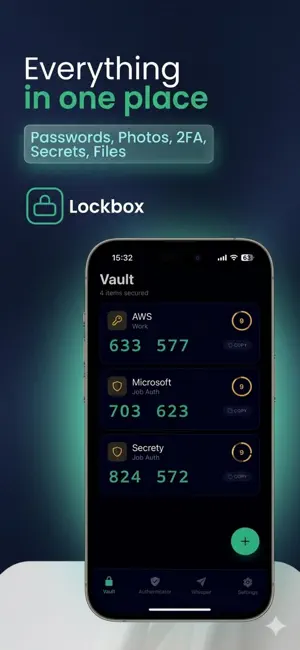

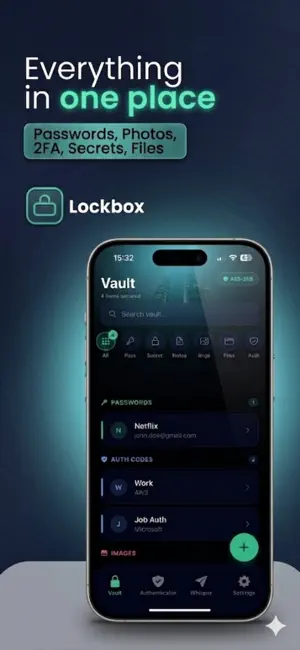
About Lockbox: Password Manager
Lockbox is a password manager and private vault that keeps everything encrypted on your device. Passwords, private photos, 2FA codes, secrets, notes, and files; all protected by AES-256 encryption. No cloud. No subscription. No one can see your data, not even us. SIX PRODUCTS IN ONE APP • Password Manager — Generate, store, and autofill strong passwords. Health reports flag weak and reused credentials. • Private Photo Vault — A gallery no one else can access. Import 500+ photos at once. Encrypted on your device. • 2FA Authenticator — Built-in TOTP codes with live countdown. Replaces Google Authenticator. Scan QR codes to set up. • Secure Notes — Encrypted notes for anything sensitive. • File Vault — Store documents, PDFs, and files up to 100MB. All encrypted. • Whisper — Share passwords and files securely. Self-destructing links with optional PIN protection. No account needed for the recipient. SECURITY YOU CAN TRUST • AES-256-GCM encryption (bank-grade) • PBKDF2-SHA256 with 600,000 iterations • Zero-knowledge architecture — we never see your data • Biometric unlock (Face ID / fingerprint) • Screenshot and screen recording blocked • Clipboard auto-clears after 10 seconds • Auto-lock when you leave the app • Dead Man's Switch — auto-wipe after inactivity SWITCH FROM ANY PASSWORD MANAGER Import your passwords from 1Password, Bitwarden, LastPass, Google, Apple Keychain, or Dashlane in 30 seconds. ONE PRICE. YOURS FOREVER. 3 items free. $7.99 once for unlimited. No subscription. No renewal. No ads. No telemetry. Privacy policy: https://lockboxnow.app/privacy
What’s new
Version 2.1.5 · Updated September 13, 2026
We generated your sync key and showed it to you once. Write it down and keep it somewhere safe: you'll need it to add another device, and we don't keep a copy. Changing your master password now covers photos and files too, not just passwords. Restoring a backup made by an earlier version no longer requires the password you used to save it. Restoring or importing reports returns exactly what came in, and no longer counts items it did not save. Saving a long note waits until the whole note has loaded, so you can't accidentally trim anything. Deleting an item is verified before it is applied on your other devices, and sync repairs itself if the cloud copy goes missing. Keys are held more tightly on your device and cleared more thoroughly when you lock.
App privacy
The developer, Evgeni Abadzhiev, reported these privacy practices to Apple.
Data Not Collected
The developer does not collect any data from this app.
Alternatives to Lockbox: Password Manager
Looking for apps like Lockbox: Password Manager? Here are 6 similar apps on the App Store. The highest rated is Time Vault: Memory Capsule (5.0/5), and all 6 are free to download.
-
 One-Time Passwords
-
 Time Vault: Memory Capsule
5.0
Time Vault: Memory Capsule
5.0
-
 Private Password Locker App
-
 Obsidian Vault: Private Secure
-
 iPass - Password Manager
4.4
iPass - Password Manager
4.4
-
 UGINE
UGINE
| App | Rating | Price | Last updated | Compare |
|---|---|---|---|---|
| Lockbox: Password Manager | – | Free | September 13, 2026 | |
| One-Time Passwords | – | Free | Mar 19, 2026 | Compare |
| Time Vault: Memory Capsule | 5.0 / 5 (1) | Free | Sep 24, 2026 | Compare |
| Private Password Locker App | – | Free | Apr 19, 2026 | Compare |
| Obsidian Vault: Private Secure | – | Free | Jun 8, 2026 | Compare |
| iPass - Password Manager | 4.4 / 5 (67) | Free | Aug 11, 2025 | Compare |
| UGINE | – | Free | Aug 27, 2025 | Compare |