

GPS Map Camera ٞ
MahiPal Singh Navigation iPhoneiPadiPod touch
GPS Map Camera ٞ is a free Navigation app for iPhone and iPad by MahiPal Singh. Rated 5.0/5 from 2 ratings. Requires iOS 17.0. Updated October 2, 2026.
- Rating
- 5.0
- 2 ratings
- Price
- Free
- on the App Store
- Size
- 31 MB
- Age 4+
- Updated
- Oct 2
- 2026 · v1.14
Screenshots


About GPS Map Camera ٞ
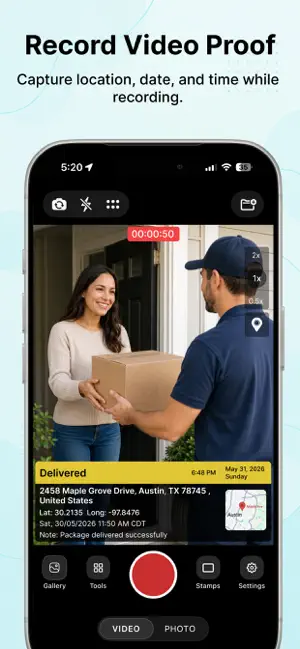
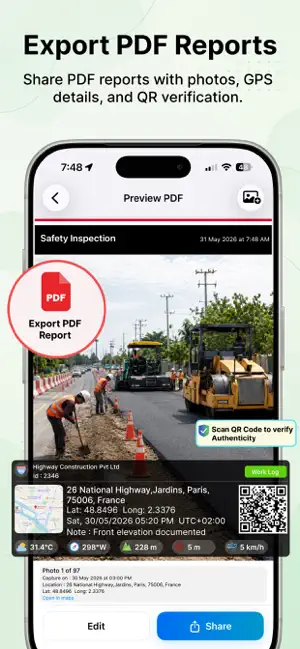
Turn everyday photos into location-aware memories with accurate location, map, timestamp and latitude/longitude saved along with each capture. Enhance your photos and videos by saving them with detailed location and time information. You can also capture multiple Geo-Tagged photos in a single session and app automatically organize them into seperate project with location-based details. App is designed for all type of users and can be used for site visits, inspections, travel logs, field work, progress tracking and other GPS-based documentation needs. Key Features: • GPS Camera: Capture photos and videos with live GPS location, timestamp, map, lat, long and other details like compass, altitude, accuracy, magnetic field etc. • Projects Management : Organize photos and videos manually or automatically (via project button on Home Screen ) into structured projects and create detailed PDF reports instantly. • Create Reports : Easily create detailed PDF reports from multiple photos capture by app and easily share them in one click . • Revisit Exact Locations : Navigate back to exact locations where photos were taken. App Guide the exact lat/long or place where you take photo previously and then you can take another photo from there. You can compare them later or refresh your memories. • Verify Photos Offline: Verify report and photos authenticity as all photos and reports are capture by our app embedded with secret unique verification code. By scanning embedded QR code or by selection single photo you can check its authenticity even offline . • Compare Captures : Compare two different photos with time and distance differences . App offers a Slider and Side-by-Side view to compare. • Photo on Map : View captured photos visually on interactive map also sort them with date and search them by name. • Multiple Languages: App Support 6 languages and built for global usability. App focuses on organized GPS photo and videos and also on photos authencity instead of simple stamped photos, helping you manage your captures, track locations over time and maintain verifiable records when needed. Download Now !!! Your Ultimate Geotagging Tool !!! Auto-renewable Subscription: • GeoSathi offers Three auto-renewable subscription options: – Yearly plan at $49.99/year – Yearly plan with discount at $19.99/year – Weekly plan at $2.99/week with a 3-day free trial • Subscribing gives you unlimited access to all GeoSathi premium features live unlimited report creation, exports, revisit and report verification . • Payment will be charged to your Apple ID account at confirmation of purchase. • Subscription automatically renews unless auto-renew is turned off at least 24 hours before the end of the current period. • Your account will be charged for renewal within 24 hours prior to the end of the current period, and the renewal cost will be displayed. • Subscriptions may be managed by the user, and auto-renewal can be turned off by going to the user’s Account Settings after purchase. • Any unused portion of a free trial period, if offered, will be forfeited when the user purchases a subscription to that publication, where applicable. • Current subscription may not be canceled during an active subscription period. • You have also cancel your subscription anytime through your Apple ID account settings then go to subscriptions and also at following web address : https://support.apple.com/en-in/billing Terms and Conditions : https://www.geosathi.com/termsconditions Privacy Policy : https://www.geosathi.com/privacypolicy
What’s new
Version 1.14 · Updated October 2, 2026
Bug Fixes.
App privacy
The developer, MahiPal Singh, reported these privacy practices to Apple.
Data Used to Track You
The following data may be used to track you across apps and websites owned by other companies:
- Identifiers: Device ID
Data Linked to You
The following data, which may be collected and linked to your identity, may be used for the following purposes:
- Identifiers: User ID, Device ID
- Usage Data: Product Interaction
- Purchases: Purchase History
Used for: Analytics, App Functionality
Data Not Linked to You
The following data, which may be collected but is not linked to your identity, may be used for the following purposes:
- Diagnostics: Crash Data
Used for: Analytics
Alternatives to GPS Map Camera ٞ
Looking for apps like GPS Map Camera ٞ? Here are 6 similar apps on the App Store. The highest rated is GPS Camera - GPS Map Camera (5.0/5), and all 6 are free to download.
-
 GPS Map Camera · Geo Timestamp
-
 GPS Camera - GPS Map Camera
5.0
GPS Camera - GPS Map Camera
5.0
-
 Geotag Photos: GPS Map Camera
-
 Speed Camera - Radar, map
2.0
Speed Camera - Radar, map
2.0
-
 GPS Camera - Geotag Photo Map
4.5
GPS Camera - Geotag Photo Map
4.5
-
 GrEL
5.0
GrEL
5.0
| App | Rating | Price | Last updated | Compare |
|---|---|---|---|---|
| GPS Map Camera ٞ | 5.0 / 5 (2 ratings) | Free | October 2, 2026 | |
| GPS Map Camera · Geo Timestamp | – | Free | Oct 7, 2026 | Compare |
| GPS Camera - GPS Map Camera | 5.0 / 5 (1) | Free | Apr 29, 2026 | Compare |
| Geotag Photos: GPS Map Camera | – | Free | Jul 13, 2026 | Compare |
| Speed Camera - Radar, map | 2.0 / 5 (3) | Free | Oct 15, 2026 | Compare |
| GPS Camera - Geotag Photo Map | 4.5 / 5 (93) | Free | Aug 8, 2026 | Compare |
| GrEL | 5.0 / 5 (2) | Free | May 13, 2026 | Compare |
Compare GPS Map Camera ٞ with the top alternatives: ratings, updates, ASO score and keyword gaps →