

Docera - Scan to PDF
Ibrahim Abu dbay Business iPhoneiPadiPod touch
Docera - Scan to PDF is a free Business app for iPhone and iPad by Ibrahim Abu dbay. Requires iOS 15.0. Updated September 13, 2026.
- Price
- Free
- on the App Store
- Size
- 12 MB
- Age 4+
- Updated
- Sep 13
- 2026 · v1.0.3
Screenshots



About Docera - Scan to PDF
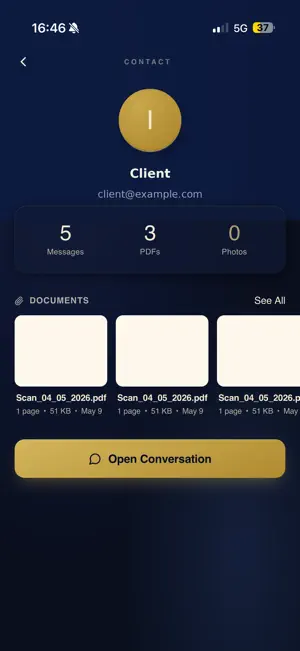
Docera is the document scanner built for professionals who live in their inbox. Scan any document with your camera, get a clean, crop-corrected PDF, and send it straight from your Gmail — without leaving the app. Organize everything by client so the right paperwork is always one tap away. SCAN - Fast camera scanning with automatic edge detection and crop - Clean, professional PDFs — no watermarks - Edit, re-crop, and rename before you send GMAIL, BUILT IN - Connect your Gmail and send documents directly from Docera - Browse and reply to client threads inside the app - Find every attachment a client has ever sent, grouped by contact ORGANIZE - Sort documents into folders and client profiles - Automatic detection of your important contacts - Search across all your documents instantly DOCERA PRO Start with a 7-day free trial. Pro unlocks unlimited scans, in-app Gmail sending, client organization, and more. Cancel anytime. Docera is ideal for lawyers, accountants, and anyone who handles client paperwork on the go. Privacy: Docera connects to your Gmail only to show and send the messages and attachments you choose. Your documents stay yours. Terms of Use (EULA): https://www.apple.com/legal/internet-services/itunes/dev/stdeula/ Privacy Policy: https://docera-production.up.railway.app/privacy
What’s new
Version 1.0.3 · Updated September 13, 2026
Fixed saving files shared from other apps and improved performance for large document libraries.
App privacy
The developer, Ibrahim Abu dbay, reported these privacy practices to Apple.
Data Linked to You
The following data, which may be collected and linked to your identity, may be used for the following purposes:
- Contact Info: Email Address, Name, Phone Number
- User Content: Other User Content
Used for: App Functionality
Data Not Linked to You
The following data, which may be collected but is not linked to your identity, may be used for the following purposes:
- Purchases: Purchase History
- Identifiers: User ID
Used for: App Functionality
Alternatives to Docera - Scan to PDF
Looking for apps like Docera - Scan to PDF? Here are 6 similar apps on the App Store. The highest rated is Daycrafter (5.0/5), and all 6 are free to download.
-
 Daycrafter
5.0
-
 CREATOR Cognitive OS
5.0
-
 RallyUp Events
-
 Sign PDF Documents - TapSign
-
 LivePeek - Stocks, Crypto & FX
-
 myPlaceNYC
| App | Rating | Price | Last updated | Compare |
|---|---|---|---|---|
| Docera - Scan to PDF | – | Free | September 13, 2026 | |
| Daycrafter | 5.0 / 5 (1) | Free | Jul 25, 2026 | Compare |
| CREATOR Cognitive OS | 5.0 / 5 (2) | Free | Aug 16, 2026 | Compare |
| RallyUp Events | – | Free | Oct 30, 2026 | Compare |
| Sign PDF Documents - TapSign | – | Free | Sep 24, 2026 | Compare |
| LivePeek - Stocks, Crypto & FX | – | Free | Sep 22, 2026 | Compare |
| myPlaceNYC | – | Free | Aug 10, 2026 | Compare |