

FileFlow: Transfer & Convert
Sandy Radadiya Utilities iPhoneiPadiPod touch
FileFlow: Transfer & Convert is a free Utilities app for iPhone and iPad by Sandy Radadiya. Requires iOS 15.6. Updated July 11, 2026.
- Price
- Free
- on the App Store
- Size
- 76 MB
- Age 4+
- Updated
- Jul 11
- 2026 · v1.1
Screenshots


About FileFlow: Transfer & Convert
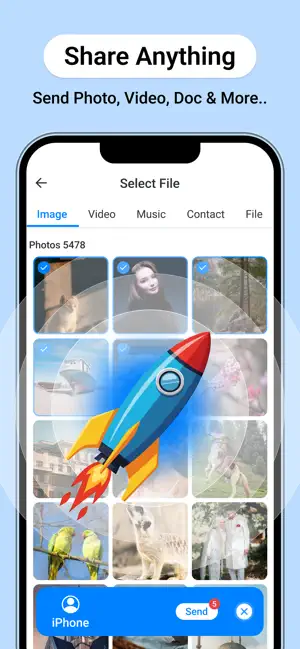
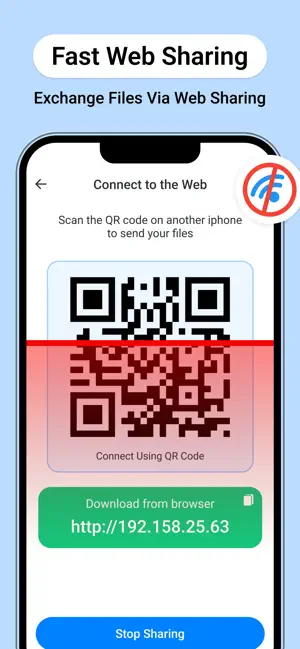
FileFlow: Transfer and Convert is the all-in-one utility designed for high-speed data movement and instant file transformation. Move your photos, videos, and documents without cables, size limits, or slow upload speeds. WHY USERS CHOOSE FILEFLOW: • Ultra-Fast Transfers: Use local WiFi or Hotspot to move heavy 4K videos and large photo libraries at speeds far beyond standard Bluetooth. • Universal Web Sharing: Transfer files from your iPhone to any PC, Mac, or Tablet instantly. Simply scan the QR code displayed in the app to start downloading on the receiving device via a web browser. • Professional Converter: Transform your images into JPEG, HEIC, PNG, BMP, or TIFF format in seconds. • Camera to PDF: Turn your physical documents or gallery photos into high-quality PDFs with the built-in creator. • Precise Quality Selection: Take control of your storage. Choose to send files in Original quality, High Quality, or Compressed to save space. CORE FEATURES: • Cross-Platform Support: Seamlessly connect iPhone to Windows, Linux, or other mobile devices via web browser. • Nearby Discovery: Quickly find and connect to devices around you for instant, secure sharing. • Offline Sharing: Use the Hotspot Transfer mode to move data even when no internet connection is available. • Modern Design: A clean, intuitive interface designed for maximum efficiency and speed. • Transfer History: Keep a detailed log of your sent and received items for easy access. Stop struggling with email attachments and slow cloud uploads. Join the FileFlow community and move your data at the speed of thought. Privacy Policy : https://iosapp2025.blogspot.com/2026/04/privacy-policy-for-fileflow-transfer.html Terms of Condition : https://sites.google.com/view/fileflow-terms/home
What’s new
Version 1.1 · Updated July 11, 2026
• Improved transfer speed and reliability. • Better user experience across the app. • Fixed minor issues and improved stability.
App privacy
The developer, Sandy Radadiya, reported these privacy practices to Apple.
Data Not Linked to You
The following data, which may be collected but is not linked to your identity, may be used for the following purposes:
- Diagnostics: Crash Data, Performance Data
- Contact Info: Name, Phone Number
- User Content: Photos or Videos, Audio Data
Used for: Analytics, App Functionality
Alternatives to FileFlow: Transfer & Convert
Looking for apps like FileFlow: Transfer & Convert? Here are 6 similar apps on the App Store. The highest rated is ToolBox Pro - All in One (4.4/5), and all 6 are free to download.
-
 Vocis: Voice Recorder & Scribe
-
 Block Ads: Adblocker VPN
3.3
-
 Caption Generator AI
4.0
-
 ToolBox Pro - All in One
4.4
-
 AIToolly-Discover Top AI Tools
-
 IP Info - What's my IP Address
1.0
| App | Rating | Price | Last updated | Compare |
|---|---|---|---|---|
| FileFlow: Transfer & Convert | – | Free | July 11, 2026 | |
| Vocis: Voice Recorder & Scribe | – | Free | Apr 14, 2026 | Compare |
| Block Ads: Adblocker VPN | 3.3 / 5 (3) | Free | Sep 30, 2026 | Compare |
| Caption Generator AI | 4.0 / 5 (1) | Free | Jul 20, 2026 | Compare |
| ToolBox Pro - All in One | 4.4 / 5 (5) | Free | Oct 23, 2026 | Compare |
| AIToolly-Discover Top AI Tools | – | Free | Aug 4, 2026 | Compare |
| IP Info - What's my IP Address | 1.0 / 5 (1) | Free | Mar 23, 2026 | Compare |