

QuickTally Pro
HA QISHEN Utilities iPhoneiPadiPod touch
QuickTally Pro is a free Utilities app for iPhone and iPad by HA QISHEN. Requires iOS 13.0. Updated April 16, 2026.
- Price
- Free
- on the App Store
- Size
- 35 MB
- Age 4+
- Updated
- Apr 16
- 2026 · v1.2.2
Screenshots


About QuickTally Pro
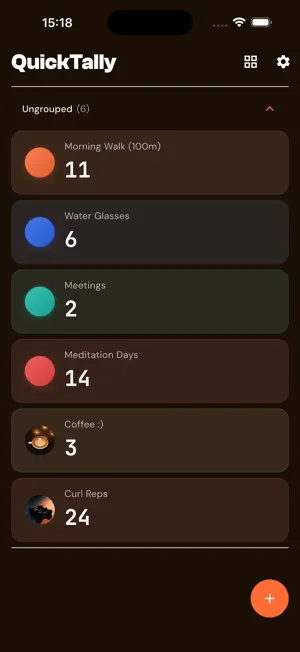
The simplest, fastest, most beautiful counter app you'll ever use. QuickTally manages multiple counters, tracks daily history, and exports your data. No intrusive ads. Perfect for: - Warehouse & inventory staff - Fitness enthusiasts tracking reps and sets - Bird watchers logging species - Event organizers counting attendees - Habit trackers monitoring daily goals Why QuickTally? Most counter apps interrupt your flow with full-screen ads mid-count. QuickTally never does. The counting screen is always ad-free. Modern design, instant response. Key Features: • Multiple Counters — Up to 50 counters, each with custom name and color • Custom Colors — Pick any color from the full color wheel • Large, Clear Numbers — Big display you can read at a glance • Fast +/- Buttons — Tap for single counts, hold to accelerate • Custom Shortcut Buttons — Set any value like +3 or -20 • Drag to Delete — Long-press and drag to the bottom to remove a counter • Swipe to Edit — Swipe a counter card to quickly edit its details • Grid & List Views — Switch between layouts, drag to reorder in both • Groups — Organize into groups like "Work", "Gym" • Haptic Feedback — Feel each count without looking • 30-Day History Chart — Daily changes per counter • Daily Summary — Start value, end value, net change per day Premium (Ad-Free Subscription): • Remove all ads • CSV Export for Excel, Numbers, Google Sheets • Unlimited History (free: 30 days, premium: forever) • Custom Background Images — Add a personal photo to any counter Fully Offline — No account, no cloud. Your data stays on your device. Supports English, Japanese, Chinese, Korean, German, Spanish, French, and Portuguese.
What’s new
Version 1.2.2 · Updated April 16, 2026
- Improved screen reader support for history charts and lists - Enhanced accessibility for empty states - Minor UI consistency improvements
App privacy
The developer, HA QISHEN, reported these privacy practices to Apple.
Data Used to Track You
The following data may be used to track you across apps and websites owned by other companies:
- Identifiers: Device ID
- Usage Data: Advertising Data
Data Not Linked to You
The following data, which may be collected but is not linked to your identity, may be used for the following purposes:
- Identifiers: Device ID
- Usage Data: Advertising Data, Product Interaction
- Diagnostics: Crash Data
Used for: Third-Party Advertising, Analytics, App Functionality
Alternatives to QuickTally Pro
Looking for apps like QuickTally Pro? Here are 6 similar apps on the App Store. The highest rated is KeepCount: Tally Counter (5.0/5), and all 6 are free to download.
-
 Daily Tally Counter
-
 Multiple Counters - CountBoard
-
 onySmart
-
 KeepCount: Tally Counter
5.0
KeepCount: Tally Counter
5.0
-
 Video Speed for Safari
5.0
Video Speed for Safari
5.0
-
 Counter Widget - Tally Counter
4.7
Counter Widget - Tally Counter
4.7
| App | Rating | Price | Last updated | Compare |
|---|---|---|---|---|
| QuickTally Pro | – | Free | April 16, 2026 | |
| Daily Tally Counter | – | Free | Sep 19, 2026 | Compare |
| Multiple Counters - CountBoard | – | Free | Sep 8, 2026 | Compare |
| onySmart | – | Free | Apr 22, 2025 | Compare |
| KeepCount: Tally Counter | 5.0 / 5 (1) | Free | Oct 12, 2026 | Compare |
| Video Speed for Safari | 5.0 / 5 (2) | Free | May 12, 2026 | Compare |
| Counter Widget - Tally Counter | 4.7 / 5 (33) | Free | Oct 21, 2025 | Compare |
Compare QuickTally Pro with the top alternatives: ratings, updates, ASO score and keyword gaps →