

Let's Make Art Companion
MICHAEL WILLIAM CRAY Education iPhoneiPadiPod touch
Let's Make Art Companion is a free Education app for iPhone and iPad by MICHAEL WILLIAM CRAY. Rated 4.6/5 from 11 ratings. Requires iOS 18.0.
- Rating
- 4.6
- 11 ratings
- Price
- Free
- on the App Store
- Size
- 7 MB
- Age 4+
- Updated
- Oct 22
- 2026 · v1.1.92
Screenshots

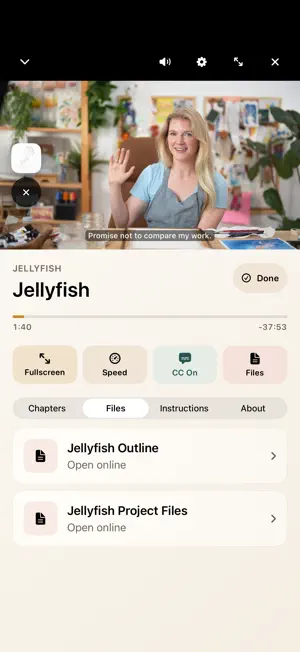


About Let's Make Art Companion
Make a little time for art, wherever you are. Watch your Let's Make Art classes on your phone or tablet. Sign in to find the classes in your account, or try our free Jellyfish class without signing in. PAINT AT YOUR OWN PACE Pause, replay a favorite technique, or adjust the video speed as you follow along. Use chapters to find your place and captions when available. Lefty mode mirrors the demonstration for left-handed painters. KEEP YOUR REFERENCES CLOSE Open available instructions and project files before you begin. Zoom and rotate reference pages, or pin a reference while you watch and adjust its size as you paint. TAKE YOUR CLASSES WITH YOU Download classes and their available project files to enjoy offline, whether you're traveling or creating somewhere with unreliable Wi-Fi. PICK UP WHERE YOU LEFT OFF Continue watching across devices signed in to the same account. Favorite classes and individual course videos, then find your course selections in Watch Next. Your favorites stay in sync with the website. Mark finished projects as you go. WATCH YOUR WAY Watch on a compatible TV with AirPlay. Picture-in-picture keeps your tutorial playing while you use another app. Looking for more inspiration? Explore free watercolor and guest-teacher tutorials from the app; these open in your browser. The app is free to use with your Let's Make Art account. Classes already in your account appear in your library. Need a hand? Reach us at [email protected].
Ratings & reviews
4.6
11 ratings
What’s new
Version 1.1.92 · Updated October 22, 2026
• A paused lesson now stays paused after a phone call, Siri or a timer. • iPad: the course grid no longer freezes when VoiceOver or other accessibility features are on, and opening a search result lands on the matching video. • The resume prompt now fits on every screen size, so both choices are always visible. • Pinned reference images: the small player offers the sizes that fit, with a hint to expand the player for a bigger reference. • Course artwork appears right away while you filter.
App privacy
The developer, MICHAEL WILLIAM CRAY, reported these privacy practices to Apple.
Data Linked to You
The following data, which may be collected and linked to your identity, may be used for the following purposes:
- Location: Coarse Location
- Identifiers: Device ID, User ID
- Diagnostics: Crash Data, Performance Data
- Contact Info: Email Address
- Usage Data: Product Interaction
Used for: Analytics, App Functionality
Alternatives to Let's Make Art Companion
Looking for apps like Let's Make Art Companion? Here are 6 similar apps on the App Store. The highest rated is Milan Art (4.9/5), and all 6 are free to download.
-
 Etchr
4.8
-
 Colored Pencil Picker
4.7
-
 Painta - Learn How to Draw Art
4.5
-
 Milan Art
4.9
-
 Craftsy
1.9
-
 Skillshare: Creativity Classes
4.8
| App | Rating | Price | Last updated | Compare |
|---|---|---|---|---|
| Let's Make Art Companion | 4.6 / 5 (11 ratings) | Free | October 22, 2026 | |
| Etchr | 4.8 / 5 (44) | Free | Sep 9, 2026 | Compare |
| Colored Pencil Picker | 4.7 / 5 (688) | Free | Sep 19, 2026 | Compare |
| Painta - Learn How to Draw Art | 4.5 / 5 (152) | Free | Oct 6, 2026 | Compare |
| Milan Art | 4.9 / 5 (1,071) | Free | Oct 23, 2026 | Compare |
| Craftsy | 1.9 / 5 (281) | Free | Jun 24, 2026 | Compare |
| Skillshare: Creativity Classes | 4.8 / 5 (25,457) | Free | Sep 22, 2026 | Compare |