

LogFleetIQ
Leandro Francisco Business iPhoneiPadiPod touch
LogFleetIQ is a free Business app for iPhone and iPad by Leandro Francisco. Requires iOS 15.0. Updated November 1, 2026.
- Price
- Free
- on the App Store
- Size
- 68 MB
- Age 4+
- Updated
- Nov 1
- 2026 · v2.12.0
Screenshots
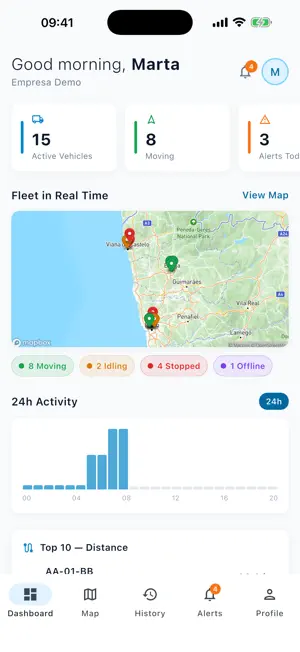


About LogFleetIQ
LogFleetIQ is the app for fleet managers at companies that use the LogFleetIQ platform. On your phone, it shows where the company's vehicles are, each day's route and the fleet's alerts, and lets you send messages to drivers. The platform is closed and intended for businesses: accounts are created by the customer company's administrator. There is no public sign-up, no ads and no in-app purchases. DASHBOARD Active vehicles, alerts and kilometres for the day; vehicles moving, idling, stopped and offline; the day's top 10 by distance; the fleet's fuel efficiency; the most recent alerts. LIVE MAP The company's vehicles on the map, in real time, with registration number, direction of travel and status colour (moving, idling, stopped). Tap a vehicle to see the address, driver, speed and time of its last position, or to follow it on the map. Street or satellite view and address search across the whole Iberian Peninsula. The vehicle list is organised by the company's operations, with search and a filter by status; that is where you choose the vehicles to show on the map. Vehicles with no positions for more than 24 hours do not appear on the map: they remain in the list and in the "Offline" counter. ROUTE HISTORY Choose a vehicle and a day to see the route on the map, with start, end and stops, and the summary: distance, top speed, duration and number of stops. ALERTS For today, the last 7 days or the last 30 days: speeding, harsh braking and acceleration, cornering, idling, fuel, geofences and GPS tracker not communicating. Filter by type, severity and status, mark as read or resolved and open the map at the alert's vehicle. It also shows the alerts for drivers' routes, AdBlue and fuel efficiency. NOTIFICATIONS For the alerts the platform sends and for drivers' replies to your messages. You only need to allow them once. MESSAGES TO DRIVERS Write a message, attach a PDF if you need to and send it to all drivers, by operation or only to the ones you choose. See, driver by driver, whether it is yet to be delivered, delivered or read, and when. Reply with text, a photo or a PDF. Drivers read, reply and start conversations in the LogFleetIQ Driver app. DRIVERS Ranking by driving score (day, week or month), fuel efficiency for the fleet and for each driver, and a searchable list of drivers. MAINTENANCE Records by vehicle, including the requests made by drivers. Create a record with type, description, date, odometer reading, garage and cost, and update its status. COMPLIANCE Fleet documents (periodic inspection, insurance, driving licence and others) with their expiry date. See the ones that are about to expire or have expired, open them and upload new files in PDF, JPG or PNG. VEHICLE MANAGEMENT Link or swap the GPS tracker, assign the driver, record odometer readings and consult the checklists that drivers complete when they take over the vehicle. GOOD TO KNOW • You need an active LogFleetIQ account, created by your company's administrator. You sign in with your email address and password; accounts with two-step verification also ask for the code. • Positions come from the GPS trackers installed in the company's vehicles, not from the phone. • The interface is in Portuguese, Spanish and English, and the app needs an internet connection. • What each person sees depends on the role assigned by the administrator: the view-only role has only the live map, and vehicle management is for management roles only. PRIVACY The phone's location is only requested if you tap the button for your own position on the live map, with the app open: it is used to centre the map, is handled by the maps component (Mapbox) and is not sent to LogFleetIQ's servers. The connection to the platform is encrypted. The app uses two external services: Firebase, for notifications and crash reports, and Mapbox, for maps and addresses.
What’s new
Version 2.12.0 · Updated November 1, 2026
Version 2.12.0 • Maintenance: 'Invoice' badges with the total and 'No invoice' in the list of completed requests. • Changing a vehicle's driver: the driver keeps only the new vehicle and the app says which one is now without a driver; if the change is refused, it says why. • Android: notifications show the app icon instead of a white square. Version 2.11.0 • Workshop visits: group requests for the same vehicle, book, check in, hand back and complete with done or not done per request and the work carried out. • Workshop invoice by camera or PDF, with lines (parts, labour, other) and automatic reading. • Compliance: the documents of the drivers' registration now appear in the list. • Amounts in the company's currency. Version 2.10.0 • Vehicle checklist: in Map › vehicle › Manage › Assignments, the checklist details show the driver's signature and the time they signed. Checklists made before version 1.19 of LogFleetIQ Driver show "No signature". Version 2.9.0 • "I forgot my password" on the sign-in screen: get an email with a link to choose a new one. • Sign in with a recovery code instead of the authenticator app code. • Before asking for notifications, the app explains what they are for. • Messages, Maintenance, Scoring, Drivers and Compliance also under Profile; more consistent screens. • Stability improvements. Version 2.7.2 • Live map: vehicles no longer flicker. The icons are loaded once and only the vehicle that changed position moves. • Android: the live map and the route history map are shown again. Version 2.4.0 • Messages: drivers can now start conversations with the managers. They appear in Messages with the driver's name, text and photos, and any manager can reply. • Replies with a photo or a PDF; photos and PDFs from drivers open in the app. • Vehicle: odometer readings are shown 20 at a time, with "See more" for older ones. • Compliance: a document without a file shows "No file" instead of a button that failed; the expiry date appears in the list and documents sent from the app keep their title and dates. • Live map: speeding alerts load faster. • Security: updated the component that keeps your session on the phone. You stay signed in after updating the app. Version 2.3.0 • Messages: search by title or sender, filters by category, unread replies and dates; each row shows who sent the message and to whom. • Lighter live map: it no longer requests every alert. Version 2.2.0 • Route history: each stop is shown as a single marker, with its duration and address, instead of a cloud of points; distance no longer counts the GPS drift of a parked vehicle. • Messages: send by operation, and an unread-replies counter on the Dashboard. • Notifications: they arrive again after updating the app, with no need to sign in again, and are also shown while the app is open. • Sign-in: clear messages when access is refused. • Address search across the whole Iberian Peninsula.
App privacy
The developer, Leandro Francisco, reported these privacy practices to Apple.
Data Linked to You
The following data, which may be collected and linked to your identity, may be used for the following purposes:
- Identifiers: User ID, Device ID
- Other Data: Other Data Types
- Contact Info: Email Address
- User Content: Emails or Text Messages, Photos or Videos, Other User Content
Used for: Analytics, App Functionality
Data Not Linked to You
The following data, which may be collected but is not linked to your identity, may be used for the following purposes:
- Location: Precise Location, Coarse Location
- Usage Data: Product Interaction, Other Usage Data
- Diagnostics: Performance Data, Other Diagnostic Data, Crash Data
- Search History: Search History
Used for: Analytics, App Functionality
Alternatives to LogFleetIQ
Looking for apps like LogFleetIQ? Here are 6 similar apps on the App Store. The highest rated is Santander Empresas Portugal (4.8/5), and all 6 are free to download.


| App | Rating | Price | Last updated | Compare |
|---|---|---|---|---|
| LogFleetIQ | – | Free | November 1, 2026 | |
| GFoundry | – | Free | Nov 26, 2024 | Compare |
| Bizdocs | – | Free | Jul 27, 2026 | Compare |
| TOConline OCC | 2.0 / 5 (1) | Free | Dec 5, 2023 | Compare |
| mPOS | – | Free | Jun 1, 2026 | Compare |
| BPI - Empresas | – | Free | Nov 2, 2026 | Compare |
| Santander Empresas Portugal | 4.8 / 5 (63) | Free | Oct 12, 2026 | Compare |
Compare LogFleetIQ with the top alternatives: ratings, updates, ASO score and keyword gaps →