

Web to PDF – Save Pages
Georgii Dolganov Utilities iPhoneiPadiPod touchMac
Web to PDF – Save Pages is a free Utilities app for iPhone and iPad by Georgii Dolganov. Requires iOS 15.6. Updated October 15, 2026.
- Price
- Free
- on the App Store
- Size
- 11 MB
- Age 17+
- Updated
- Oct 15
- 2026 · v2.2
Screenshots
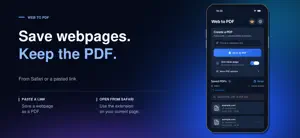

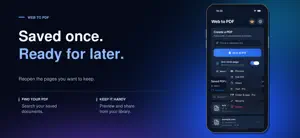
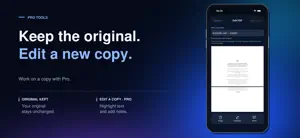
About Web to PDF – Save Pages
Save webpages as PDFs from Safari or a pasted link. Find them in your library, read them offline, and share a copy when needed. BASIC SAVING IS FREE • Save a webpage from Safari or paste a link in the app • Use Clean page to reduce banners, popups, and sticky overlays where possible • Preview PDFs, search by title or source URL, rename, and share • No daily or monthly export quota; technical size and page limits apply ONE-TIME PRO UPGRADE • Article Mode focuses on the main readable content when detected • Choose A4 or Letter, portrait or landscape, and adjust margins • Merge saved PDFs, change page order, or remove pages • Highlight selectable text and add page notes • Save edits as a new copy; originals stay unchanged Some sites restrict capture or rely on dynamic content that may not render completely. OCR is not included. Highlights require selectable text in the PDF. PDF files are stored in the app. Optional Firebase Analytics is off until you enable Help improve the app in Settings. When enabled, it records app-usage and Pro purchase events, not page URLs, PDF content, filenames, or notes. You can turn it off at any time.
What’s new
Version 2.2 · Updated October 15, 2026
- "Clean Page" no longer deletes blocks simply because they are pinned to the page, which could affect product galleries. - For long feeds, a 50-page PDF limit, a Stop loading and save button, and warnings about incomplete capture have been added. - A warning has been added about the longer saving time for pages with a large number of images. - A system request for an evaluation after a successful export has been added, no more than once every 30 days, and a reminder toggle in the settings.
App privacy
The developer, Georgii Dolganov, reported these privacy practices to Apple.
Data Linked to You
The following data, which may be collected and linked to your identity, may be used for the following purposes:
- Purchases: Purchase History
- Location: Coarse Location
- Identifiers: Device ID
- Usage Data: Product Interaction
Used for: Analytics
Data Not Linked to You
The following data, which may be collected but is not linked to your identity, may be used for the following purposes:
- Diagnostics: Other Diagnostic Data
Used for: Analytics
Alternatives to Web to PDF – Save Pages
Looking for apps like Web to PDF – Save Pages? Here are 6 similar apps on the App Store. The highest rated is SnapPDF - Convert Web to PDF (5.0/5), and all 6 are free to download.
-
 SnapPDF - Convert Web to PDF
5.0
SnapPDF - Convert Web to PDF
5.0
-
 WebPDF
5.0
WebPDF
5.0
-
 Webpage to PDF Converter Pro
3.0
Webpage to PDF Converter Pro
3.0
-
 Web To PDF : Scanner & Reader
4.3
Web To PDF : Scanner & Reader
4.3
-
 SanpSave - webPage Screenshot
1.0
SanpSave - webPage Screenshot
1.0
-
 PDF Convert - web to pdf
4.0
PDF Convert - web to pdf
4.0
| App | Rating | Price | Last updated | Compare |
|---|---|---|---|---|
| Web to PDF – Save Pages | – | Free | October 15, 2026 | |
| SnapPDF - Convert Web to PDF | 5.0 / 5 (1) | Free | Jun 3, 2026 | Compare |
| WebPDF | 5.0 / 5 (4) | Free | Aug 1, 2026 | Compare |
| Webpage to PDF Converter Pro | 3.0 / 5 (2) | Free | May 7, 2025 | Compare |
| Web To PDF : Scanner & Reader | 4.3 / 5 (10) | Free | Jul 31, 2026 | Compare |
| SanpSave - webPage Screenshot | 1.0 / 5 (1) | Free | Jun 4, 2026 | Compare |
| PDF Convert - web to pdf | 4.0 / 5 (8) | Free | Apr 17, 2026 | Compare |